World’s 1st Just-in-Time Cloud DR (VMware Cloud)... Everything Techies Need to Know....
No, the title of this post isn't a clickbait.
Organizations spend hundreds of thousands of dollars per year to keep Disaster Recovery (DR) datacenters operational while they wait for disaster to strike so they can realize that huge upfront and ongoing investment, but at the same time crossing fingers and hoping that the tragedy never happens. In many ways, DR datacenters are like insurance with huge upfront premiums.
Cloud DR where you only pay when needed has been an unfulfilled promise by all sorts of vendors, especially for those running applications on the VMware ecosystem.
There are just too many datacenter components that need to be in place before any IT organization could even start considering Cloud DR; things like networks, resource pools, folders, datastores, IP addresses, VM, replication, etc. Further, if the Cloud does not support VMware those VMs would need to be converted into a new disk format. And yes, it's unbelievable that some vendors actually offer such VM conversions, and I'm not even going to get into how cumbersome these conversions really are.
However, even if VM and infrastructure conversions are successful and you have been able to successfully failover your entire datacenter, then you will need to start worrying about the failback process. How do you replicate all the changes back and how to do so in a way that your organization is not charged exorbitant egress costs for a full private datacenter re-seeding.

Honestly, there are just so many things that could go wrong in this process that most IT organizations would not even dare to start thinking about the cloud as a way to eliminate DR costs.
How wonderful would be if VMware workloads could reliably use the VMware Cloud on AWS for DR? Datrium is announcing today a groundbreaking new service and another piece of the Automatrix platform.
DRaaS, or DR-as-a-Service.
At a high-level DRaaS if a complete DR solution offered as a subscription that leverages the VMware Cloud and native Datrium cloud-based backups to deliver a fully-orchestrated low cost, low RPO and lower RTO disaster recovery for the VMware ecosystem. Ok, there’s a lot to unpack here.
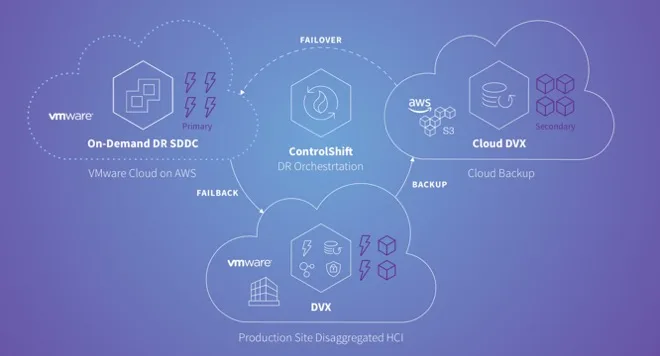
First things first... follow the numbers as things will start to make sense.
1) Datrium DVX on-premise provides high-performance storage with built-in backup. Individual and granular native VM snapshots can be kept on the system for many years. The universal dedupe and compression make the whole solution very cost-effective.
2) All backups are replicated to Cloud DVX, an as-a-service backup vault on AWS. Cloud DVX uses S3 as a repository of backups stored in a native compressed and deduplicated form. On-premises DVX systems send native forever- incremental backups to Cloud DVX. Global Deduplication ensures that data is transferred only when needed. The built-in Datrium VPN ensures there are no transfer charges during backup.
3) ControlShift is a DR orchestration service that executes DR plans and provisions and monitors SDDCs in VMware Cloud on AWS. DR plans and states are stored in a highly-available Plan database replicated across multiple availability zones. Built-in self-healing ensures that, in the event of public cloud unavailability, all affected Datrium services automatically migrate to a healthy availability zone without any data loss.
All Datrium services are deployed as AMIs into a Datrium-created VPC and Subnet. VPC endpoints used to access all other external services required by ControlShift and Cloud DVX are created automatically. All components are monitored and restarted for high availability and resilience. All required state is replicated to ensure resilience.
There's a lot of things happening under the covers, but you as a VMware administrator only need to know and understand vCenter as all cloud constructs are completely abstracted for you.
4) VMware Cloud SDDC provides a vSphere-based execution environment for a cloud DR target. An SDDC can be provisioned on-demand via ControlShift. A provisioned SDDC incurs hourly charges. Upon DR test completion, the SDDC can be decommissioned via the ControlShift UI. ControlShift performs automated network configurations for both AWS and VMware Cloud to make S3 backups from Cloud DVX available for spin-up in SDDC. The SDDC is managed via the familiar vCenter interface.
5) Efficiently failback with minimal AWS egress charges by transferring only changed and globally deduplicated data. Similar to failover, failback is fully automated. Data changes that occur while executing in the VMware Cloud are captured and stored as a Cloud DVX snapshot in S3.
6) ControlShift also orchestrates the transfer back to the on-premises data center, which includes just the data that changed. Cloud egress charges are minimized by delta transfers, which only occur when deltas are not already present in the on-premises data center.
Modes
The example above is the Just-in-Time deployment mode, but DRaaS also supports Ahead-of-Time Deployment and Pilot-Light with Cloud Burst deployment.
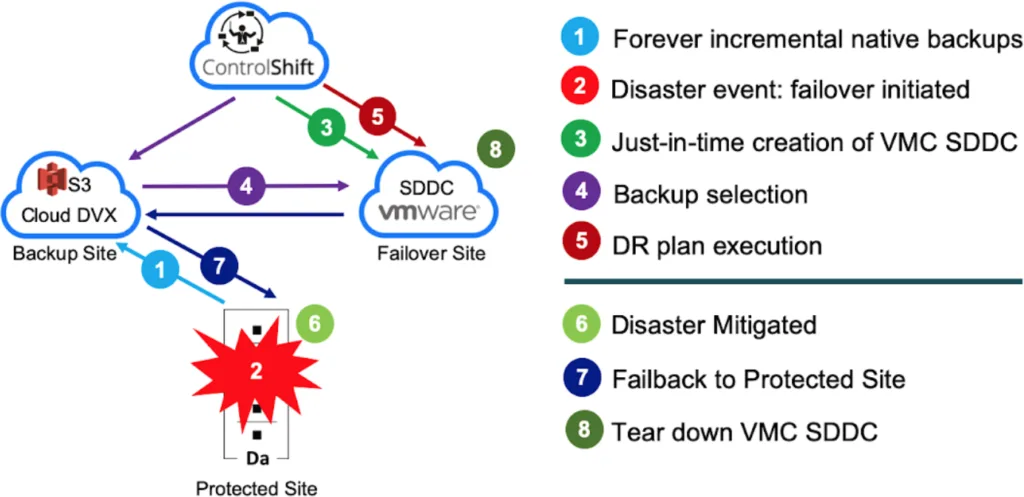
Just-in-Time deployment - This mode eliminates any infrastructure upfront CAPEX costs and drastically cutting OPEX costs. You will only pay VMware Cloud when in a disaster event. However, when DR is triggered, you may need to wait for an SDDC creation, and that may take approximately 90 minutes. After using the changes are synchronized back, and the SSDC is torn down.
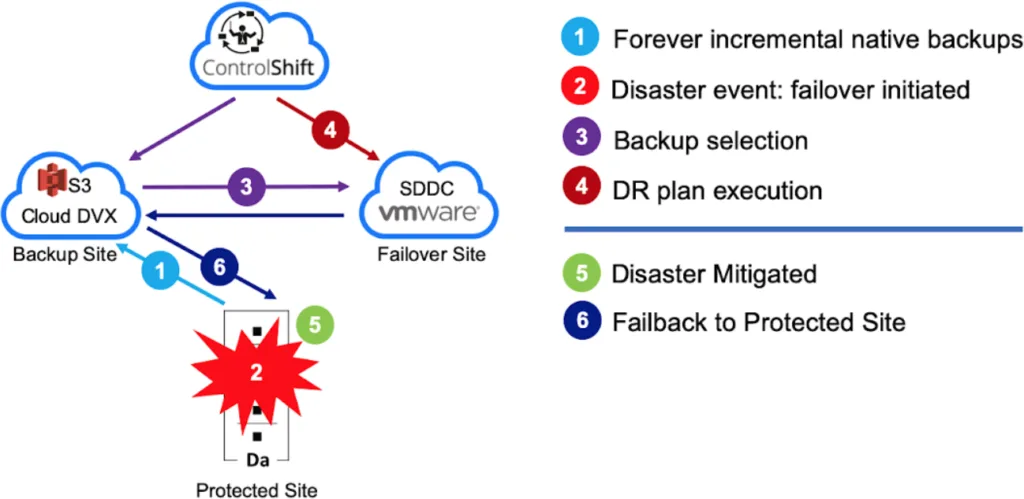
Ahead-of-Time Deployment - This mode is the most similar to a hot DR site, where the SDDC is created upfront and is readily available to use with a very low RTO. In this mode, you will keep paying for all the hosts available in the SDDC until the DR event happens.
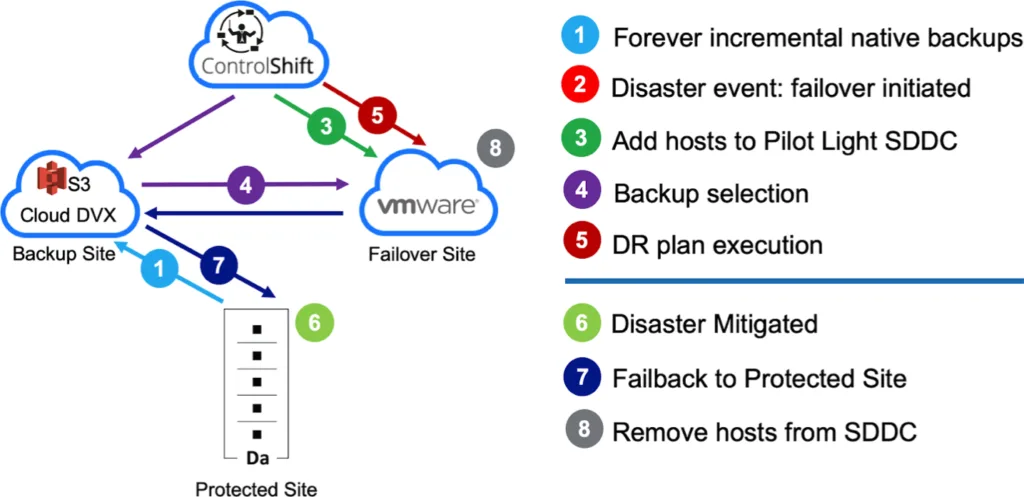
Pilot-Light with Cloud Burst - This mode is a compromise between the two options above. COntrolshift will create an SDDC on VMware Cloud with a minimal amount of hosts to failover the most critical VMs with very low RTO. Then, on-demand, new hosts are added to the SDDC to complete the failover of less essential VMs. In this mode, you pay for just a minimal number of hosts until DR is triggered, and full capacity only when DR is in full effect.
The advantages of using VMware Cloud in combination with Datrium DRaaS solves a massive problem for organizations that require bulletproof DR but at the same time would like to reduce costs. The picture below demonstrate each state of a DR plan with the existing vendor offerings (in red) vs. Datrium DRaaS (in green).
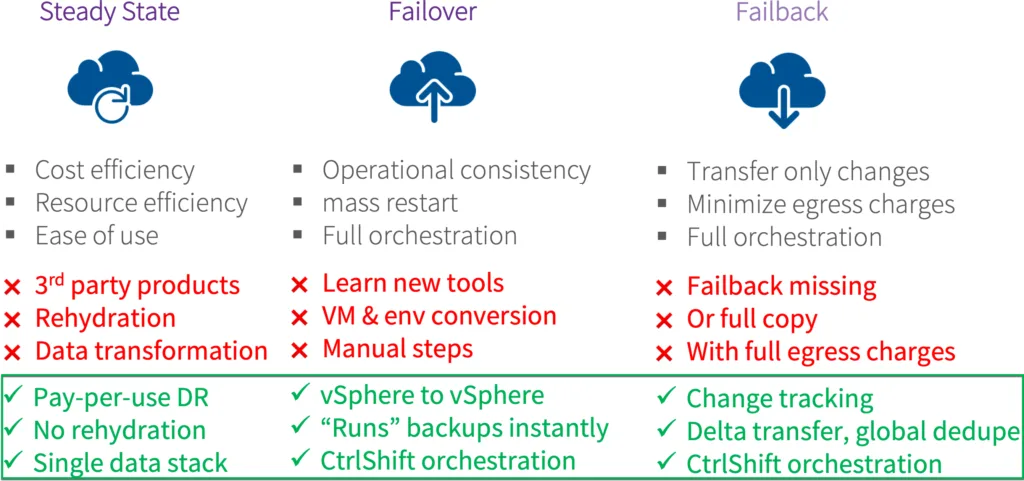
DRaaS offer autonomous deployment, configuration, maintenance, upgrades, and healing from component failures, and IT organisations don't need to touch or understand AWS or VMware Cloud. Datrium monitors and supports all components of the system, including AWS and VMware Cloud SDDC, aided by partnerships with both companies.