What changes when open-source Run:ai sits on your GPU stack

· 6 min read

On 13 October NVIDIA released Run:ai as open source under the Apache 2.0 licence. The whole platform is in one repository, dsx-ai-factory/run-ai. NVIDIA also lists four of its components that “can also be adopted independently”: KAI Scheduler, the GPU Fractioning Operator, KAI Resource Management (KRM) and Workload Map.

Because the components can be adopted one at a time, a team can start with the scheduler and add the rest when it needs it.

A platform I architected and manage already runs three of them on their own: KAI Scheduler, KRM and the GPU Fractioning Operator. It is a DSX-style AI factory deployment, built along the lines of the NVIDIA DSX AI Factory Platform. DSX is NVIDIA’s blueprint for designing, building and operating AI factories, from facility reference designs, power and cooling up to DSX OS, the open-source software that operates them. In DSX OS, KAI Scheduler and Run:ai provide the GPU-aware workload placement, with fractional allocation and hierarchical quotas.
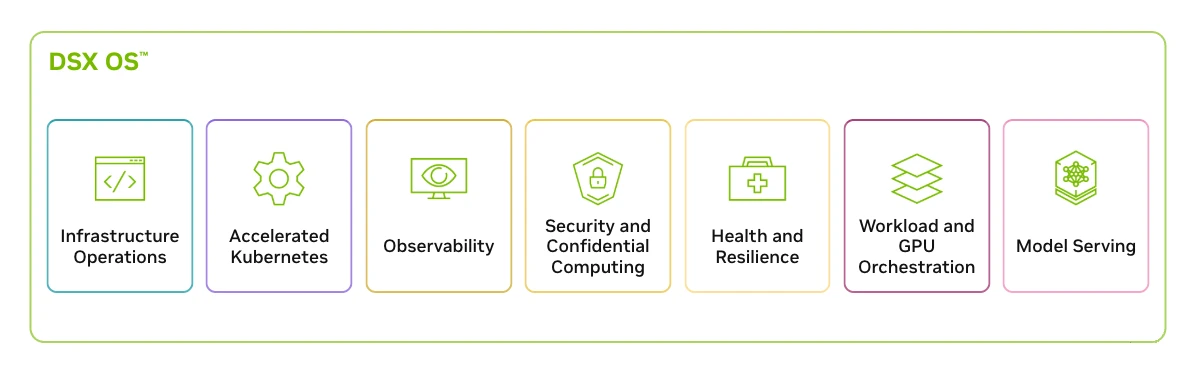
NVIDIA diagram of DSX OS, with seven capability tiles: Infrastructure Operations, Accelerated Kubernetes, Observability, Security and Confidential Computing, Health and Resilience, Workload and GPU Orchestration, and Model Serving.
DSX OS, the software layer of the NVIDIA DSX AI Factory Platform. Run:ai, KAI Scheduler and Workload Map sit under Workload and GPU Orchestration. Diagram from the NVIDIA DSX documentation.

The platform runs them on Kubernetes, with tenancy kept in git. I have written about its KRM departments and quotas and fractional GPUs under KAI. On a platform like that, adopting Run:ai doesn’t replace the scheduler. It adds a control plane above it, with self-service, policies and reporting.

This post compares open-source Run:ai with my own environment: what changes, when each design fits, and what migrating would take. It is my assessment, not NVIDIA guidance.

My starting point: KAI and KRM on their own

The platform I architected and manage models tenancy like this, with every object in git:

  • a team or research group is a KRM Department, with a guaranteed share of each GPU pool
  • a Project is one namespace
  • GPU classes are node pools
  • an admission policy refuses any GPU pod that doesn’t name the KAI scheduler

A GitOps tool such as Argo CD applies those objects from the repository. There is no API or UI for departments, projects and quotas, and no common set of workload types across notebook workspaces, agent sandboxes and batch jobs. Every quota change is a pull request, and KRM accepts quota splits that don’t add up, which is why I wrote a planner to check them before the pull request merges.

The scheduler stays the same

Run:ai comes as two installs: a control plane with the UI, the REST API, its own database and its own Keycloak, and a cluster install on each Kubernetes cluster that runs workloads.
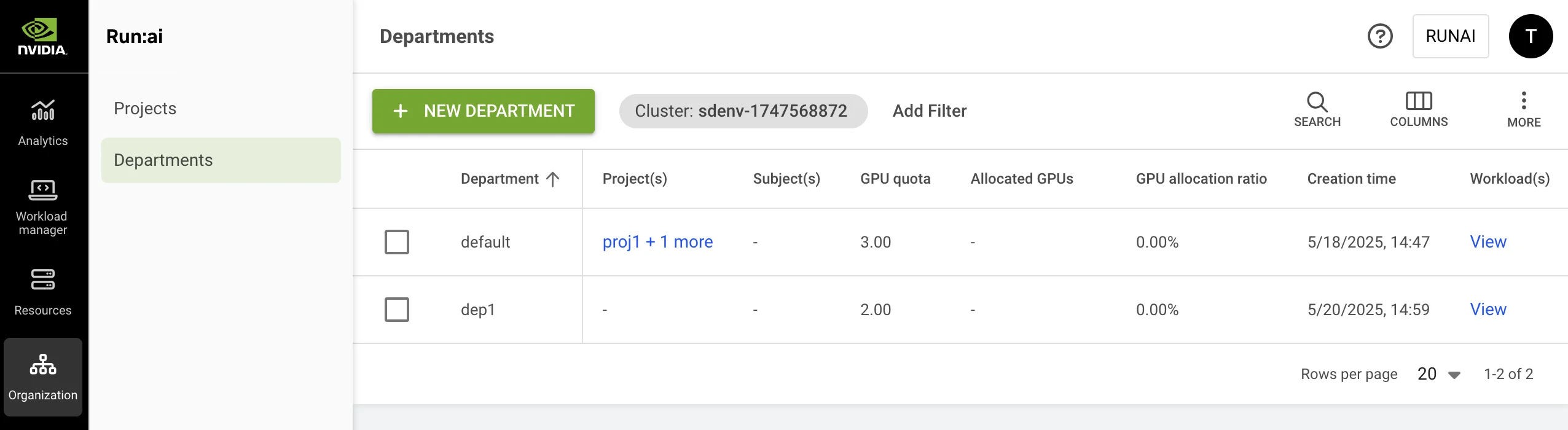
Screenshot of the Run:ai web UI on the Departments page. A dark left-hand navigation bar has Analytics, Workload manager, Resources, Organization (selected) and further items, and the Organization menu offers Projects and Departments. The page has a green New Department button, a cluster filter and a table with the columns Department, Projects, Subjects, GPU quota, Allocated GPUs, GPU allocation ratio, Creation time and Workloads. Two departments are listed: default, with two projects and a GPU quota of 3, and dep1, with no projects and a GPU quota of 2.
The Departments page in the Run:ai UI. Departments and projects that a standalone stack keeps as KRM objects in git are created and edited here. Screenshot from the Run:ai documentation, Apache 2.0.

The cluster install brings the scheduling stack with it: each Run:ai release ships KRM, KAI Scheduler and the GPU Fractioning Operator together. These are the components a standalone platform already runs. Department guarantees, over-quota borrowing, reclaim and GPU fractions run the same code, so they should behave the same way. That still needs testing on Run:ai’s pinned versions, and it is the second check further down.

Run:ai adds the layer above the scheduler. Without it, a platform that wants self-service tenancy has to build that layer itself: a governance console and a controller that writes KRM objects from a UI. Building it keeps one Keycloak and keeps tenancy in git. It also leaves the team maintaining an API, a UI and workload types that Run:ai already ships. Until October the alternative to building it was a commercial licence. Now the source is open under Apache 2.0.

Enterprise support stays a commercial offering. NVIDIA says the free Community Product needs no paid subscription and that “NVIDIA enterprise support is not included”, and supported Run:ai is available through NVIDIA’s commercial offerings. A team can start on the community version and decide on support once the platform carries production work.

What moves in the architecture

The scheduling stack doesn’t change: KAI Scheduler, KRM and the GPU Fractioning Operator run the same code before and after. What moves is tenancy. Departments, projects and access rules leave git and Argo CD and live in the Run:ai control plane and its PostgreSQL database, which becomes what has to be backed up. Identity splits in two: the existing Keycloak still signs people in, and Run:ai’s own Keycloak and access rules decide what they may do.
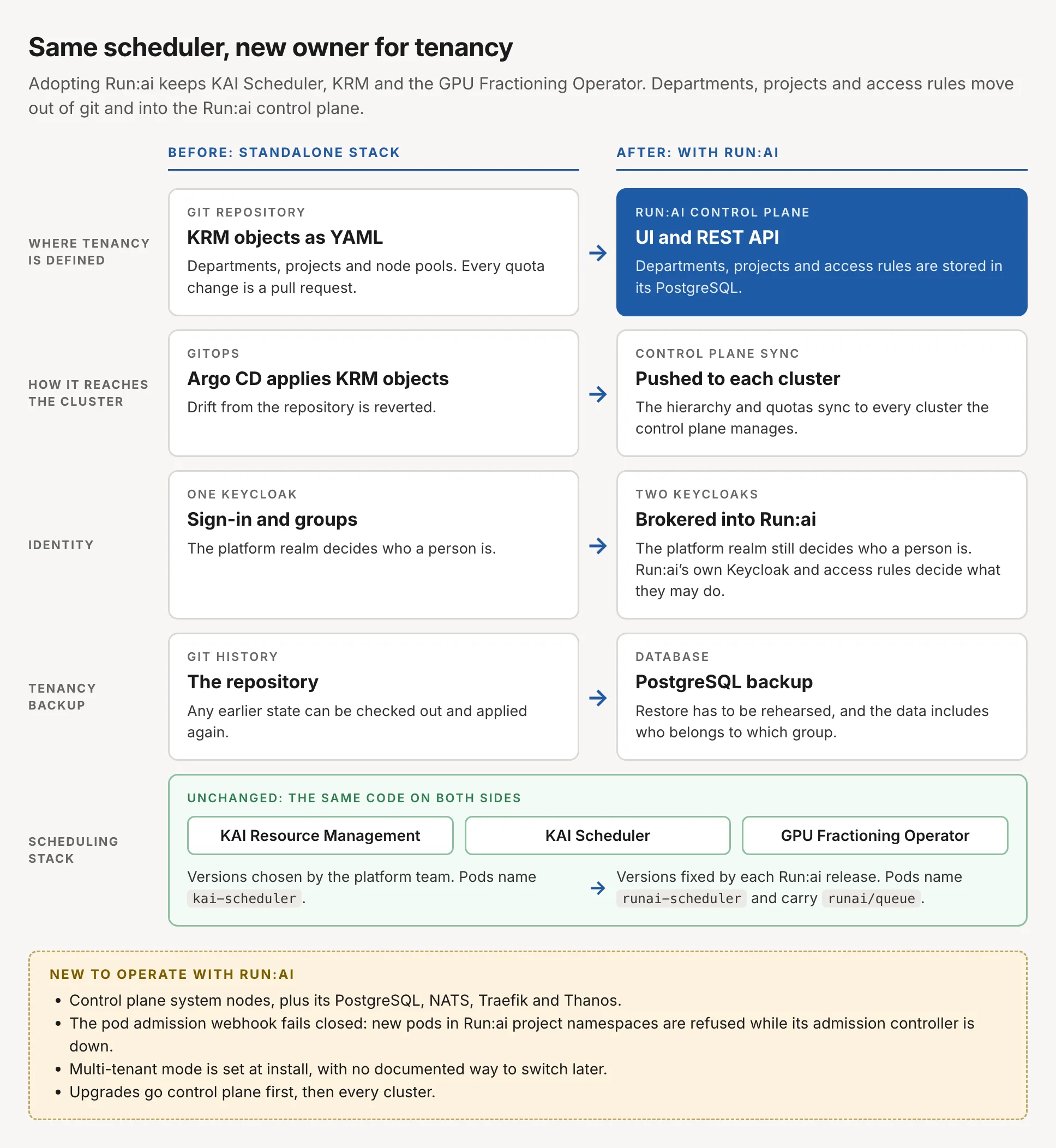
Diagram titled Same scheduler, new owner for tenancy. Adopting Run:ai keeps KAI Scheduler, KRM and the GPU Fractioning Operator, and departments, projects and access rules move out of git and into the Run:ai control plane. Two columns, before with the standalone stack and after with Run:ai, compared row by row. Where tenancy is defined: before, KRM objects as YAML in a git repository, where every quota change is a pull request; after, the Run:ai control plane UI and REST API, with departments, projects and access rules stored in its PostgreSQL. How it reaches the cluster: before, Argo CD applies the KRM objects and reverts drift; after, the control plane syncs the hierarchy and quotas to every cluster it manages. Identity: before, one Keycloak for sign-in and groups; after, two Keycloaks, where the platform realm still decides who a person is and is brokered into Run:ai, whose own Keycloak and access rules decide what they may do. Tenancy backup: before, git history, where any earlier state can be checked out and applied again; after, a PostgreSQL backup whose restore has to be rehearsed and whose data includes who belongs to which group. Spanning both columns, the scheduling stack is unchanged, the same code on both sides: KAI Resource Management, KAI Scheduler and the GPU Fractioning Operator. Before, the platform team chooses the versions and pods name kai-scheduler; after, each Run:ai release fixes the versions and pods name runai-scheduler and carry the runai/queue label. A note lists what is new to operate with Run:ai: control plane system nodes plus its PostgreSQL, NATS, Traefik and Thanos; a pod admission webhook that fails closed, so new pods in Run:ai project namespaces are refused while its admission controller is down; multi-tenant mode set at install with no documented way to switch later; and upgrades that go control plane first, then every cluster.
The scheduling stack is the same code before and after. What changes is where tenancy is defined, how it reaches the cluster, how identity is split and how tenancy is backed up.

When Run:ai is the better choice, and when the bespoke stack is

What separates the two designs is everything above the scheduler. On its own, KRM is a set of CRDs with no UI or API, and access control is plain Kubernetes RBAC.
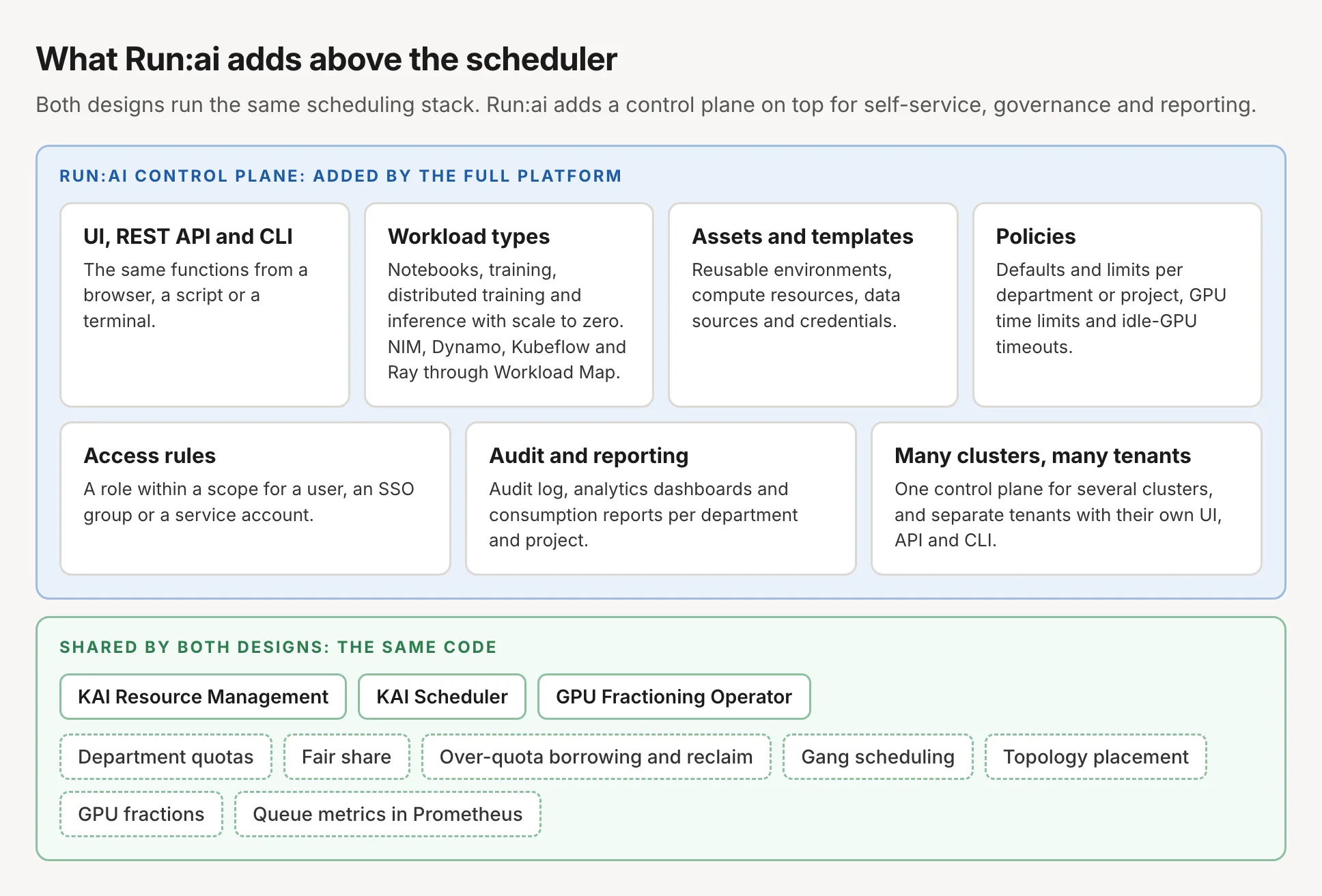
Layered diagram titled What Run:ai adds above the scheduler. Both designs run the same scheduling stack, and Run:ai adds a control plane on top for self-service, governance and reporting. The top layer, the Run:ai control plane added by the full platform, has seven cards: UI, REST API and CLI, the same functions from a browser, a script or a terminal; workload types, notebooks, training, distributed training and inference with scale to zero, plus NIM, Dynamo, Kubeflow and Ray through Workload Map; assets and templates, reusable environments, compute resources, data sources and credentials; policies, defaults and limits per department or project, GPU time limits and idle-GPU timeouts; access rules, a role within a scope for a user, an SSO group or a service account; audit and reporting, an audit log, analytics dashboards and consumption reports per department and project; and many clusters, many tenants, one control plane for several clusters and separate tenants with their own UI, API and CLI. The bottom layer, shared by both designs as the same code, holds KAI Resource Management, KAI Scheduler and the GPU Fractioning Operator, and the capabilities they provide: department quotas, fair share, over-quota borrowing and reclaim, gang scheduling, topology placement, GPU fractions and queue metrics in Prometheus.
Everything in the bottom layer works the same with or without Run:ai. The top layer is what the full platform adds.
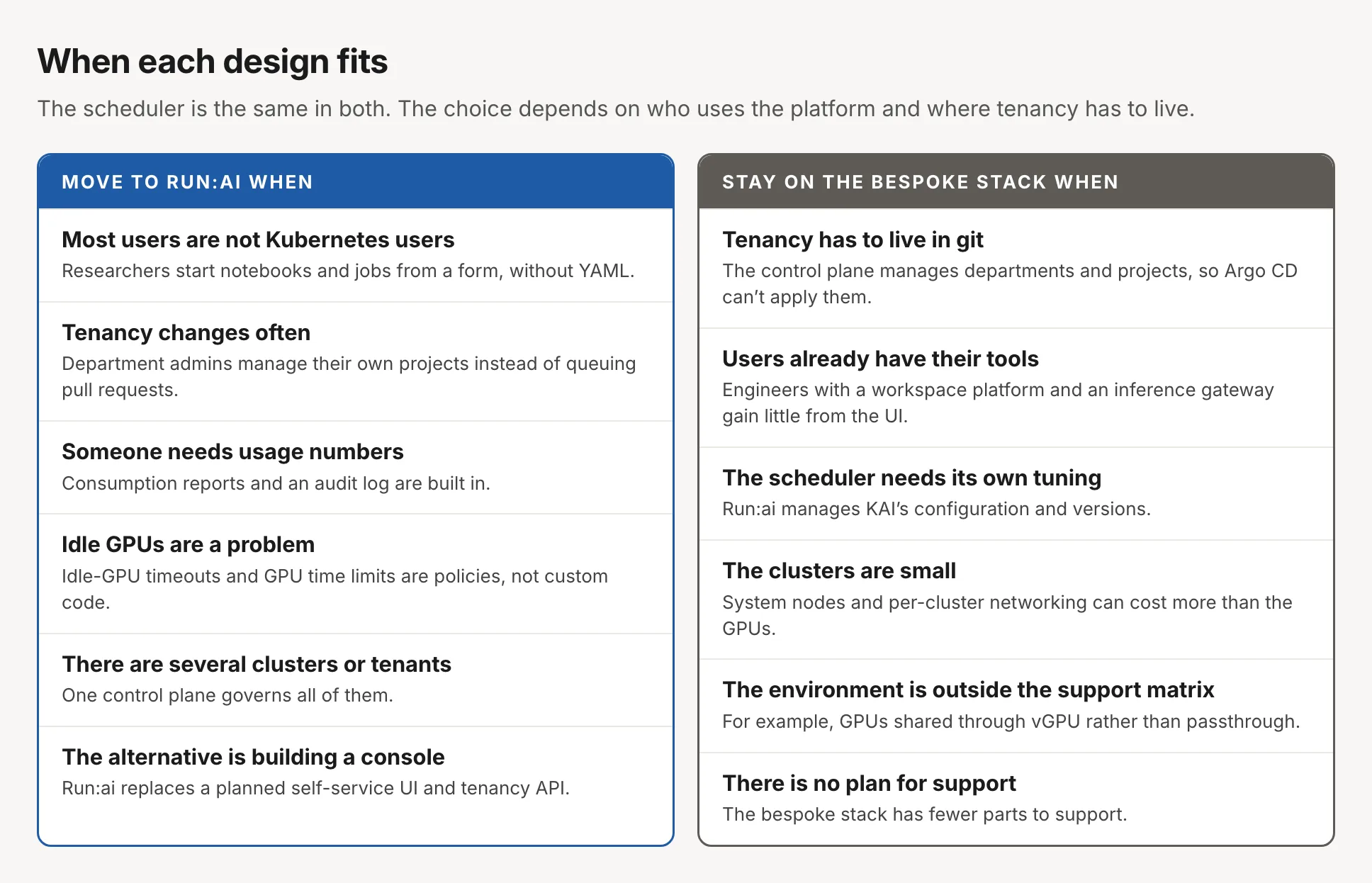
Two-column decision card titled When each design fits. The scheduler is the same in both, and the choice depends on who uses the platform and where tenancy has to live. Move to Run:ai when: most users are not Kubernetes users, so researchers start notebooks and jobs from a form without YAML; tenancy changes often, so department admins manage their own projects instead of queuing pull requests; someone needs usage numbers, since consumption reports and an audit log are built in; idle GPUs are a problem, since idle-GPU timeouts and GPU time limits are policies, not custom code; there are several clusters or tenants, which one control plane governs; and the alternative is building a console, which Run:ai replaces. Stay on the bespoke stack when: tenancy has to live in git, because the control plane manages departments and projects so Argo CD can't apply them; users already have their tools, such as a workspace platform and an inference gateway; the scheduler needs its own tuning, because Run:ai manages KAI's configuration and versions; the clusters are small, so system nodes and per-cluster networking can cost more than the GPUs; the environment is outside the support matrix, for example GPUs shared through vGPU rather than passthrough; and there is no plan for support, since the bespoke stack has fewer parts to support.
The left column is about who uses the platform. The right column is mostly about where tenancy lives and what the team wants to operate.

On the Run:ai side, self-service is the biggest gain: researchers get notebooks, jobs and their own projects without waiting on the platform team. On the bespoke side, the biggest reason is tenancy in git. The Run:ai control plane manages departments and projects and syncs them to each cluster, so Argo CD can’t apply them as it applies KRM objects. The route that keeps tenancy in git is a pipeline that calls the REST API with a service account, and review, history and rollback of quota changes then live in that pipeline.

What migrating my environment would take

Moving the platform I’m responsible for to Run:ai is mostly preparation. Departments, projects and node pools map one to one, so recreating them is a translation rather than a redesign.
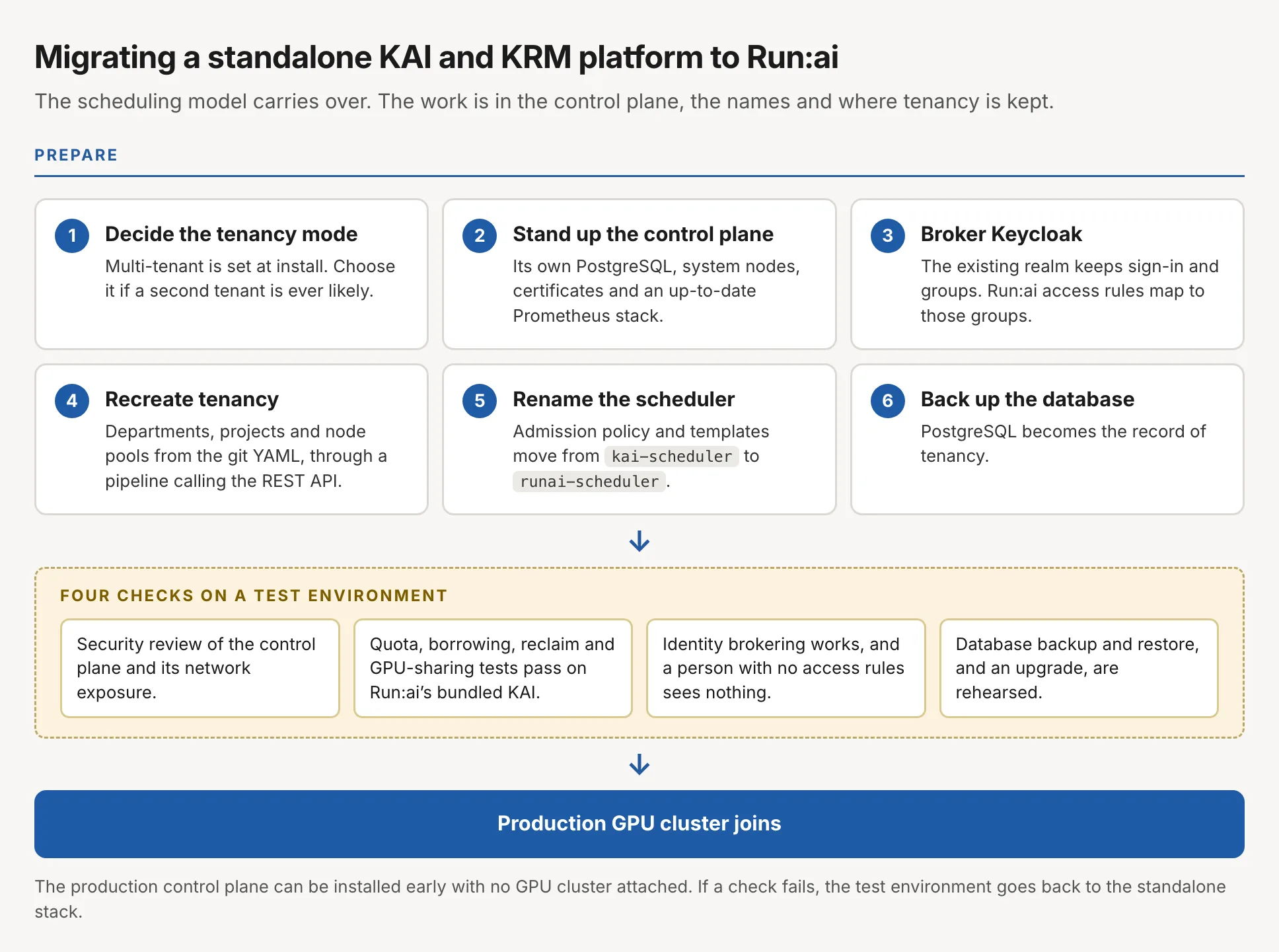
Flow diagram titled Migrating a standalone KAI and KRM platform to Run:ai. The scheduling model carries over, and the work is in the control plane, the names and where tenancy is kept. Six preparation steps: 1, decide the tenancy mode, since multi-tenant is set at install; 2, stand up the control plane with its own PostgreSQL, system nodes, certificates and an up-to-date Prometheus stack; 3, broker Keycloak, so the existing realm keeps sign-in and groups and Run:ai access rules map to those groups; 4, recreate tenancy, departments, projects and node pools from the git YAML, through a pipeline calling the REST API; 5, rename the scheduler in the admission policy and templates from kai-scheduler to runai-scheduler; 6, back up the database, since PostgreSQL becomes the record of tenancy. Then four checks on a test environment: a security review of the control plane and its network exposure; quota, borrowing, reclaim and GPU-sharing tests pass on Run:ai's bundled KAI; identity brokering works and a person with no access rules sees nothing; and database backup and restore and an upgrade are rehearsed. Then the production GPU cluster joins. A note says the production control plane can be installed early with no GPU cluster attached, and if a check fails the test environment goes back to the standalone stack.
Six preparation steps, four checks on a test environment, then the production GPU cluster joins.

A test environment built from production’s repository makes the quota and GPU-sharing check meaningful, because the tests then run against the same tenancy objects production uses.

Order of adoption

NVIDIA’s choice to release the components separately is what makes our path possible. We run KAI and KRM on their own today, and that is what I would recommend to a team that needs GPU sharing now. The departments, projects and node pools built that way carry over when the control plane arrives. The tenancy model is the decision to make before installing it.

The open-source release turns Run:ai from a licensing decision into a design decision. Both paths run NVIDIA’s scheduler, and a platform can start with one and grow into the other. If you are weighing the same move, I would like to hear how you plan to handle tenancy and support.

machine-learningkubernetesplatform-engineering

nvidiagpugitopsmlops