VMware View – Disconnect your session when the VM is IDLE
I have recently written an article on how to handle IDLE sessions in a VMware View environment. The title of the post was “VMware View – Disconnect, Logoff or Shutdown your VM when IDLE”. The post covered a simple method to monitor IDLE sessions based on mouse movements using a little free application available on the internet. As na action the little application would trigger system logoff.
Some people raised concern that a session disconnection method instead of logoff would be more useful and also allow the user to get back to the session on the same state. So, after a recent customer engagement I come up with a method to simply disconnect the session.
First, use the information provided in my first article on how to implement the IDLE monitoring solution and then utilise the the information bellow to kill the VMware View session.
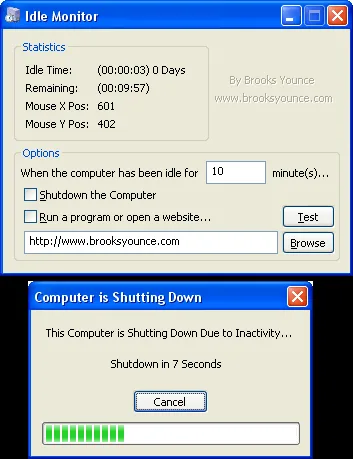
If you wish only to disconnect the session and not logoff the user use the following command from from within the application of from a batch file: taskkill pcoip_server_win32.exe /F
This command will kill the PCoIP engine process and disconnect the session. However, the process is restarted once the user tries to logon to the desktop.
Aditionally, if you still wish to force the logoff and close applications even if the have unsaved data, on Windows 7 its possible to issue the following command from a batch file: shutdown /l /f
UPDATE 08/06
My colleague Jeff O’Connor (@cloudpimps) pinged me with yet another method to cease the PCoIP session. Thanks Jeff! Just use the following command from from within the application of from a batch file: tsdiscon.exe
12 comments
MCMC_Support
how would I be able to just do a disconnect, so the end user could pick up where they left off on their next login.
Andre Leibovici
@MCMC_Support
If you force the logoff the session should be automatically disconnected.
Simon Rowan
The settings for idlemon are set on a per user basis. Is there a way you can configure the same setting, ie for tsdiscon to run, for all users, without resorting to login scripts or suchlike?
Ronny Steiner
Do you know if there is a way to configure this tool to use the same settings for all users?
Andre Leibovici
@Ronny Steiner
It's been a long time since I used the tool but I think it either create a config file or registry entries. If so, you should be able to apply it to any user logging into the desktop. Unfortunately I don't precisely remember. Sorry.
Andre
drew
i use vmware view, windows 7... i reseearched this for a while...
why not just use task scheduler? worked for me just pay attention to the settings, and know if you use a serviec account (i did) that it needs local admin rights (to execute script) though you can probably just permission things correctly and not to do that.
link below has the steps print screened....
http://social.technet.microsoft.com/Forums/en/w7itprogeneral/thread/d358382c-e91b-4e91-a1e8-04c53cfd91ce
mario
You could take a look at autologoff from wizardsoft. Seems to do it all. http://wizardsoft.nl/autologoff/autologoff.html
Joe Clarke
Is this still the best way to automatically terminate idle connected view sessions?
Andre Leibovici
As far as I'm aware there is no better method today to terminate IDLE sessions.
Ken Mickeletto
Looking to download a copy of this utility but the website www.brooksyounce.com is no longer valid. I searched around a bit but all I can find are fake file hosting sites and even if I do find it on one of them, I am now worried about if the file had been modified.
Anyone have a safe place to download this from?
sachin
Need help immidietly
my screen has gone black and i'm logged in.
hoqw can i logoff from it?? :/
mit
used windows task manager to run script to promt when idle for 1 hour to prompt then runs tsdiscon to then disconnect if no response from user no additional application required
Comments are preserved from the original site and are closed.