Unofficial Advanced VMware View Powershell Cmdlets
What if you could issue any function or feature available in VMware View GUI via PowerCLI cmdlets? What if you could call those cmdlets from a remote server?
Clint Kitson, Chris Horn and I worked together on a project to deliver the next-gen lab environment, and VMware View has been the demand management focal point. The core concept that we are working to deliver is essentially “desktop as a service” for lab environments.
The idea is that a pool of semi pre-configured VMs that make up for any given EMC application are packaged together in a vAPP container. Each vAPP has a domain controller, vCenter Server, ESXi servers and other required VMs to make the lab work. This vAPP container is then used as master image to create multiple running copies of that vAPP. Sounds very similar to vCloud Director, No?! Yes, but what we are trying to achieve is beyond today’s VCD capabilities.
Additionally, we wanted to provide users with an easy and seamless way to access each individual Lab (vAPP) without having to jump between console screens. For this reason we included a Windows 7 VM in each vAPP and scripted (PS) the sysprep process and the inclusion of that VM into VMware View desktop pools. I hinted that in my post VMware View Remote Agent Install using PowerCLI.
Great! Now we had a VMware View environment providing access via PCoIP to desktop pools that correlate to multiple vAPPs (labs).
However, infrastructure to support 3,000 of those labs is expensive and the least amount of VMs we have in a vAPP will help to reduce cost. That’s when my research on How to Access Windows 2K8 Server via PCoIP with VMware View came handy. We are now working to convert the vCenter VM into the access point for the vAPP and eliminate the requirement for the Windows 7 desktop. Furthermore, we will also be able to give users the same look and feel of a Windows 7 desktop (How to give Win Server 2K8 R2 a Win7 Look & Feel in VMware View).
We were working closely with the methods and cmdlets available in VMware View, but some key features were missing in our opinion. In the meantime Clint also created the VMware View Pool Membership Management using PowerCLI.
That’s when Clint had a breakthrough. Why not to use the Adobe AMF (action message format) messaging used by the GUI to talk directly to connection brokers. So, he developed a very cool scalable method for anyone to leverage AMF remoting with Powershell.
With the ability to call new cmdlets remotely the first step was to re-create the existing VMware View PS cmdlets an than expand. The cmdlets available today are:
Connect-ViewConnServer
Get-AccessSettings
Get-Administrators
Get-Desktops
Get-EventConfiguration
Get-Folders
Get-ImageRepositoryDetails
Get-LocalSessions
Get-PersistentDisks
Get-Policies
Get-Pools
Get-RemoteSessions
Get-Roles
Get-SecurityServers
Get-Servers
Get-ThinAppRepositories
Get-ThinApps
Get-TransferServers
Get-UsageList
Get-UsersGroups
Get-VDMServers
Get-ViewDashboard
Get-ViewGlobalSettings
Get-ViewStatus
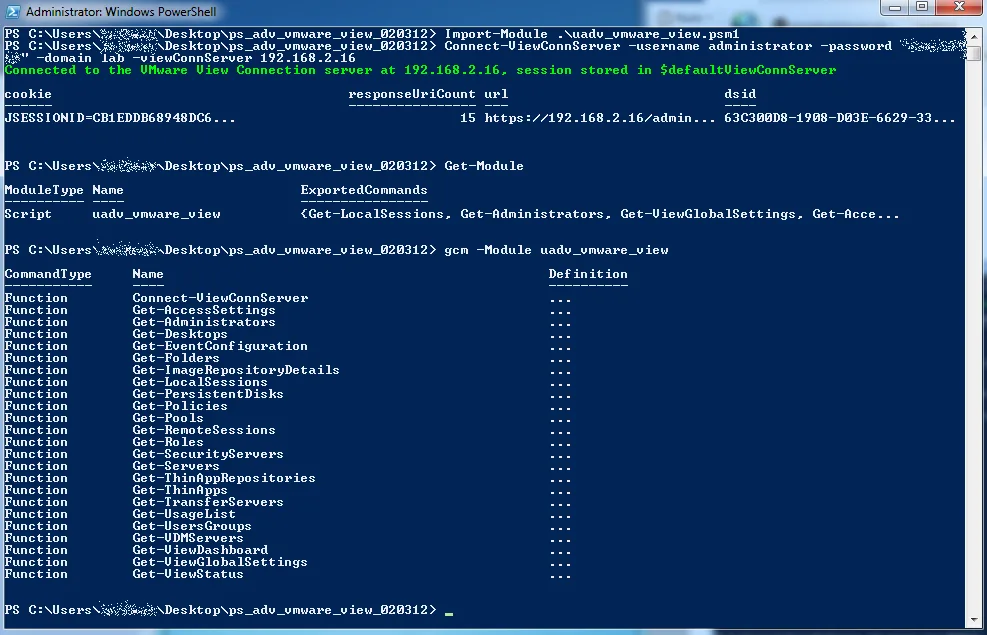
You can download the script module here, however I strongly recommend you to go over to Clint’s blog and read his article. His article contains details on how to intercept SSL calls using WireShark and how he is planning to further extended VMware View cmdlets. Read at http://velemental.com/2012/02/04/unofficial-advanced-vmware-view-powershell-cmdlets/
2 comments from the original blog
maha168 link
Asking questions are actually good thing if you are not understanding something fully, but this paragraph offers
good understanding even.
maboswayevent
One of the most popular online gambling games in Indonesia is
online slot games. Apart from inborn simple to play in and not requiring a
complicated strategy, slot gambling as a consequence offers a variety of no question engaging types of
games. It can even be said to be a game similar to the largest variety
of types compared to extra game categories.
Slot machines that used to play a role mechanically have
now been transformed into money-making machines bearing in mind hundreds or even thousands of titles that have been published in relation to the world and played by millions of people from
various countries. Who would have thought that a machine that was
considered a failure by its creators would become a major phenomenon in the online
gambling industry.
You compulsion to know that this online slot robot was created
by an inventor of French heritage who lives in the united States.
At first he wanted to create a robot that could automate the poker gambling
game consequently that there was no longer a need for a dealer to support the players.
However, it turned out that this machine was considered a failure because it could not take effect properly.
That was the extraction of slot machines that you can find upon online gambling
sites on the internet. In this article we will discuss
the Maboswayevent site, an online gambling site that provides various types
of the best online slot gambling games on the market.
on this site you can locate hundreds of types of online slot games from various renowned
providers as regards the world.
In addition, we will plus discuss some tips and behavior for winning online slot gambling games in an easy
way. So, for those of you who desire to partner in online slot games, save an eye on the
in the manner of explanation.
Comments are preserved from the original site and are closed.