Unique and Original Datrium Data Locality for Customers, Partners, and Competitors
I recently came across a piece of competitive collateral from an HCI vendor with a slew of incorrect information about Datrium. One of the topics that are clearly misleading is Data Locality, so I decided it's time to help customers, partners, and competitors to understand what is so unique about Datrium Data Locality – and defuse the FUD.
1) Data Is Always Local to VM
Data Locality is one of the design points where Datrium is fundamentally different from arrays and legacy HCI. For starters, by data locality, I allude to the data residing on flash devices on the host where a virtual machine or application is running.
In a Datrium DVX system, all the data in use by VMs on a given host is kept on local flash (SSD or NVMe). Coupled with inline data deduplication and compression the system is uniquely able to keep all data in flash with a very comfortable price point, and therefore eliminating the requirement for hot and cold storage cache and tiering – with just 2TB flash in each host and 3X-5X data reduction it is possible to have 6-10TB of effective flash per host. (Datrium supports up to 32TB of raw flash per host), and Datrium customers frequently get 100% hit rate on the host flash.
In this section, we understood that the data belonging to a VM or application is always stored in host flash, as close as possible to the CPU and the application.
2) Data Is Locally and Globally Deduplicated
Data is always inline deduplicated, but an important step is to understand how that happens because this is one of the features that makes Datrium so unique.
At a high level, data is inline deduplicated in each server and a unique reference, and a hash fingerprint is created for each unique variable data block – and these data blocks are never stored twice on local flash. If there are multiple references to the same piece of data, the Datrium filesystem always keeps only one copy of the data on the server, and all references to the data will then use this same copy.
Now, it is necessary to understand the critical role of Data Nodes as part of the Datrium architecture. Data Nodes store unique fingerprinted data blocks across all servers in a DVX system, and this block is stored using erasure coding (8+2) and represent the authoritative copy of that data.
(example 1) If we consider a VDI deployment where all VMs are identical, in each server there would be just a single deduplicated copy of the data, while Data Nodes would have a single deduplicated copy of the data across all VMs in all hosts.
(example 2) If we consider SQL VMs in different hosts, then each host will have unique deduplicated data on local flash, but Data Nodes would have a single deduplicated copy of the data across all VMs in all hosts. In this case, databases may have unique data, but guest operating systems and binaries are unique.
While it is possible to have the same fingerprinted data in multiple servers at the same time, on Data Nodes there will always be a single deduplicated protected copy.
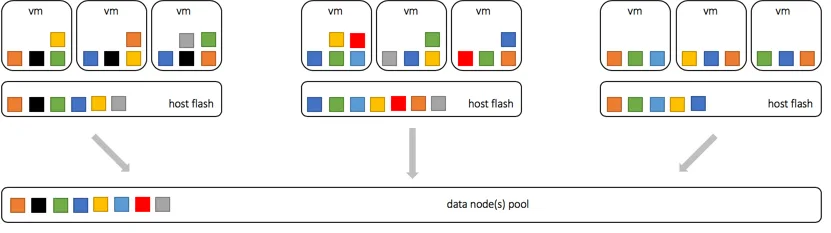
In this section, we understood that deduplication happens locally, on a host by host basis, but also globally, across the entire Datrium system.
3) Data moves from Flash to Flash
You now understand that in a Datrium system there are hosts with flash and there are one or more Data Nodes. You also understand that data is uniquely deduplicated at the host level, and also globally. Now let's understand what happens with data when hypervisor or host conditions are triggered.
What happens during a VMotion?
When a VM is moved to another host, Datrium uses F2F (flash-to-flash), allowing the target host to fetch unique data from the source host flash. Though, because all data is locally fingerprinted and deduplicated on both hosts, much of the data may already exist on the target host, especially data belonging to guest operating system binaries, consequently eliminating the need to move data between hosts and defeating networking latency.
In a VMotion condition, data movement happens from Flash to Flash, but only for data not existent on the target host.
What happens during a storage VMotion?
With Datrium a storage VMotion is similar to a standard VMotion from an write optics perspective. vSphere will still do the job of moving VM data over the network to the target host, but Datrium will drop any data blocks already present on the target host. Since all data is locally fingerprinted and deduplicated on both hosts, much of the data may already exist on the target host, especially data belonging to guest operating system binaries, consequently eliminating the need to write data to flash on the target host.
In a storage VMotion condition, data movement happens from Flash to Flash triggered by vSphere, but only data not existent on the target host is effectively committed to flash.
What happens when a host or VM fails?
Upon host failure, the VM is restarted on another host determined by the hypervisor manager.
When the VM is restarted on the new host, Datrium uses F2F (flash-to-flash), allowing the new host to fetch unique data from all other hosts on the cluster. Though, because all data is locally fingerprinted and deduplicated on all hosts, much of the data may already exist on the remaining host, especially data belonging to guest operating system binaries, consequently eliminating the need to move data between hosts and defeating networking latency.
The example below demonstrates a missing data block is moving from flash to flash.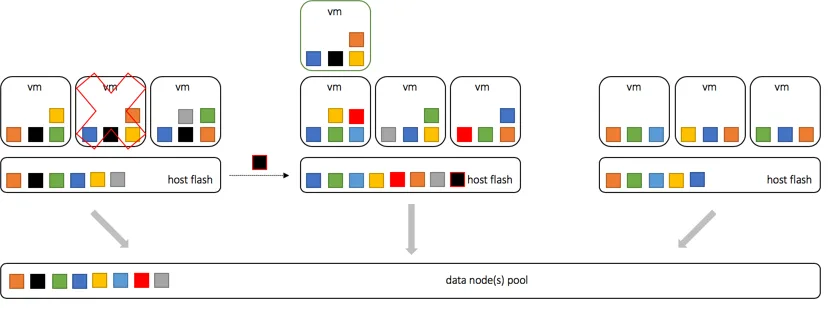
The example below demonstrate the same data block being upload from the data pool if not available from any other host in the cluster.
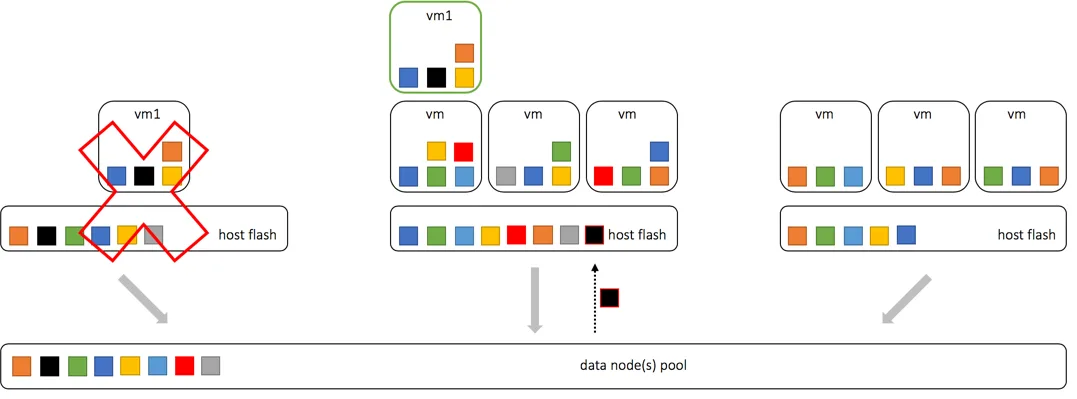
For the unique data not available in any of the surviving hosts, the Datrium system will fetch data from Data Nodes. Data Nodes are offered in disk and flash configurations, according to the customer latency requirements upon a host failure.
The Datrium filesystem is VM-aware, and for disk-based Data Nodes, it colocates blocks belonging to the same VMDK together on disk so that prefetching from works great. Disks are great at sequential reads and Datrium leverages that.
For those very latency-sensitive applications, flash-based Data Nodes is an option. When unique data is retrieved from Data Nodes, the latency and bandwidth at that point would be comparable to an All Flash SAN array, but only until the data is fetched and stored locally on host lash upon the first retrieval.
In this section, we understood that during VMotion, storage VMotion or host failure scenarios the systems uses Flash to Flash technology for data movement, but given it's unique local and universal deduplication, much of the data movement is bypassed. We also looked at how Data Nodes provide fast and reliable data upload when necessary.
Conclusion
I hope this was a valuable way to understand the benefits of Datrium data locality and it's unprecedented benefits. Network latency can be an order of magnitude higher than the device access latency, and flash does belong in the host, especially when utilizing NVMe drives with sub-50usec latency.
The scenarios above are the only situations where we see East-West traffic in a Datrium deployment, helping VM and applications to defeat latency, reduce network traffic and drastically improve the speed of data movement when necessary. That, in turn, support lower cost networking requirements.
Vendor competition is good and healthy for both, the customers and the industry, but misleading customers is not good. Competitors, please update your battle cards!