PCoIP Bandwidth Calculator and Settings Guideline
Teradici’s PCoIP display protocol provides real-time delivery with high fidelity desktop experience for VMware View virtual desktops. To ensure a responsive desktop, the PCoIP protocol must be deployed across a properly architected virtual desktop network infrastructure that meets bandwidth, QoS, latency, jitter, and packet loss requirements.
Teradici has recently released the 4th version of their Virtual Desktop Bandwidth Calculator. This is a must have tools for any administrator or architect working with the protocol. The calculator exemplify Network Requirements and allow administrators to specify Network Bandwidth, PCoIP Session Variables, latency, jittering and much more.
The picture below demonstrate bandwidth required by PCoIP for the most common workloads as of Nov,12.

(click to enlarge)
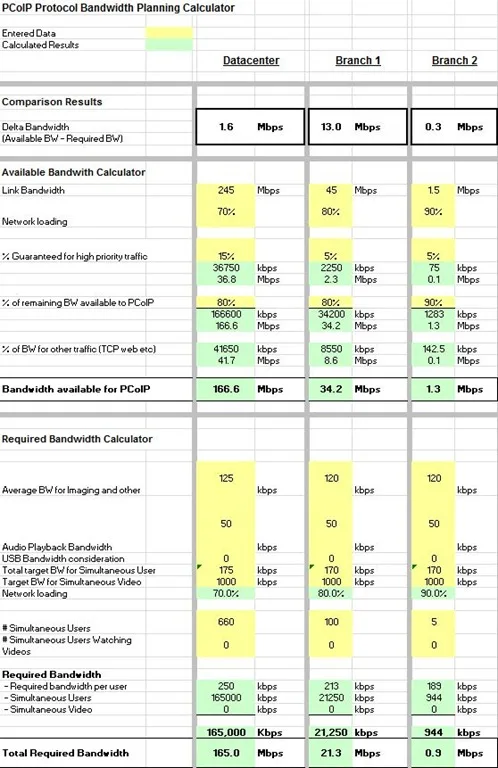
The calculator can be downloaded from Teradici’s TechSupport web site at http://techsupport.teradici.com/ics/support/DLRedirect.asp?fileNum=392&deptID=15164
1 comment from the original blog
digitalgaz
Went to grab this today, looks like the link has changed
https://techsupport.teradici.com/ics/support/DLList.asp?task=download&folderID=6500
You will need to create an account if they don't already have one.
Thanks for the post
Comments are preserved from the original site and are closed.