Oracle + Datrium provide Enterprise Performance and Granular Protection with ZERO Performance Impact for Millions of Snapshots
Providing continuity to my Oracle blog series I want to demonstrate how Datrium handles data protection and group policies during high-performance and sustained workloads. For starters, Datrium supports up to 1.2 Million native snapshots, and up to 2,000 snapshots per VM without disrupting running applications.
I primarily wanted to demonstrate that Datrium can easily handle high-performance workloads while performing critical functions for enterprises workloads, like continuous snapshots and granular restores.
However, a secondary reason for this demonstration is due to frequently seeing storage vendors demonstrating sustained burn-in benchmarks for just couple hours, when in reality any storage product can handle couple hours without the need to initiate background tasks to deal with Garbage Collection, Write-Cliff, Write Amplification, Data Rebalance or Over Provisioning. A honest burn-in benchmark has to be for way more than two hours.
In some extreme cases, I have witnessed vendors disabling Garbage Collection and other background tasks to demonstrate high performance – totally misleading customers.
We are confident in our technology, and I continue provide the precise parameters and configurations used in our tests so customers can easily replay them in their own environments; unlike I see some HCI and SAN vendors doing.
Finally, as always, Datrium always runs with all data services turned On, including checksumming, inline erasure coding (three-way mirroring), inline compression, and inline deduplication. Moreover, all backend storage tasks are enabled during my tests.
Let's get started!
The TestBed
For this test, I am using SLOB (Silly Little Oracle Benchmark) create by Kevin Closson, a tool focused on generating Oracle I/O workloads to stress the storage infrastructure.
Instead of trying to pursue complex VM and database configurations as I have seen other vendors do, I have opted for a more simplistic approach that doesn’t involve dozens of disks, LUNS or in-guest iSCSI protocol, which in production environments would be difficult to support. I even dropped Oracle ASM disk groups.
I used the same testbed as described in my previous article here. The only difference is that SLOB has been re-configured to run for 12 hours straight.
VM and OS Configuration
- 32GB RAM and 12 vCPU
- Oracle 12.2.0.1 Enterprise Edition – Single Instance
- VMware ESXi, 6.7.0, 8941472
- 1 x 100GB vDISK for Linux CentOS/7
- 6 x 250GB vDISK PVSCSI w/ LVM aggregation w/ XFS for the Oracle database
- 1 Terabyte SLOB database
Hardware Configuration
- PowerEdge R930 – E7-8890 v4 @ 2.20GHz / 2016
- 8 x SATA Samsung GC57 (MZ7LM240HMHQ0D3/2016)
- 1 x Datrium Datanode F12X2 2x25G-23TB
The configurations above represent in its totality one server, one datanode, and one virtual machine. Further, this is an old 2016 hardware configuration, like what most organizations would already have in its data centers.
SLOB
SLOB provides a multitude of possible configurations, but I decided to use what it seems to be the most common configuration used by vendors – 70:30 Read/Write ratio, running for 2 consecutive hours. The full configuration used is here. For this run 24 users were used with the following command: sh ./runit.sh 24
All other parameters for Linux Kernel and Oracle are also listed in my previous article.
12 Hour Oracle Burn-In with 10-minute Snaps
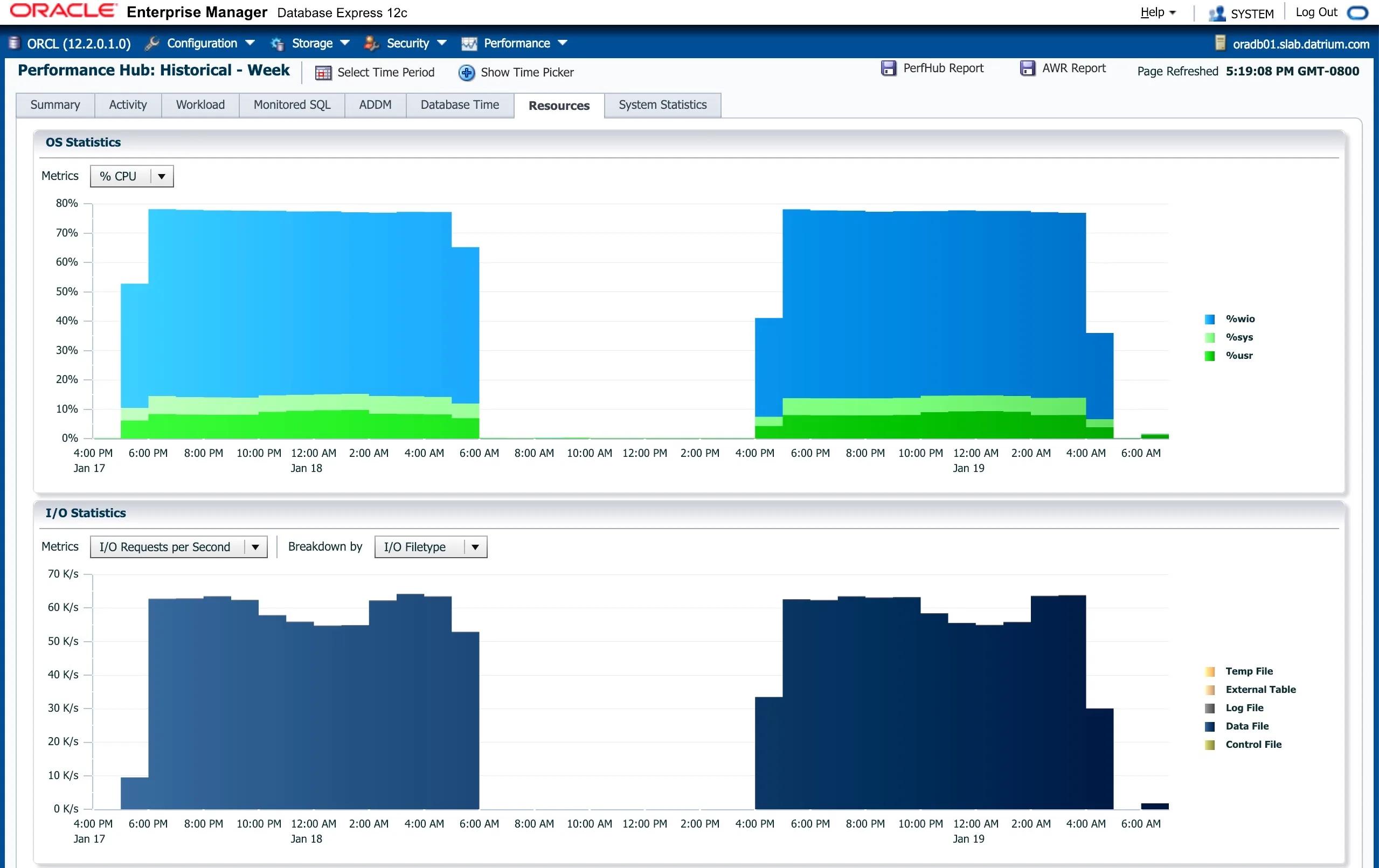
The picture below demonstrates two 12-hour Oracle burn-in tests, being the first one without snapshots, and the second one with Datrium native snapshots taken every 10 minutes, and retained for 24 hours.
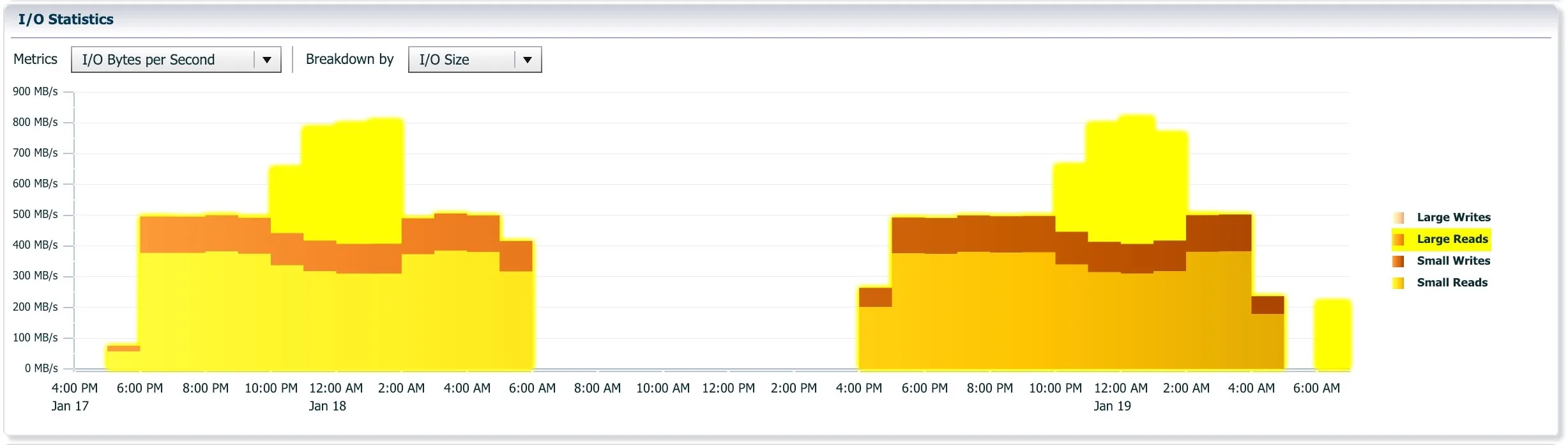
Over a 12 hour Oracle run with SLOB, the workload commonly varies over time and as we can see in Image 3 there is a decrease in the number of IOPS, but an increase on the number of Large Reads. This can be both related to SLOB dynamic workload load generation, or because of Oracle pre-fetching.
Please note that the pre-fetching is a feature that storage vendors like disabling during benchmarks to demonstrate lower latencies, but I kept it on to demonstrate real-production environment behavior.
The second run (4:00PM-5:00AM) demonstrates the same workload while Datrium takes real-time native snapshots every 10 minutes (retained for 24 hours), and where we observe that there's no meaningful disruption to performance or latency; see Image 2.
The image below shows us the Datrium overview of the two tests, including the number of IOPS, the increased Throughput due to Large Reads, the consistent low VM latency across tests and the Physical Capacity changing overtime, upwards and downwards, as Datrium background tasks are executed.
At the peak, we see SLOB/Oracle producing 64.7K IOPS with an average latency of 1.2ms.
(If you are curious about scale-out performance, read Scaling Oracle SLOB to 7M IOPS and 55.4GB/s Throughput with Datrium )
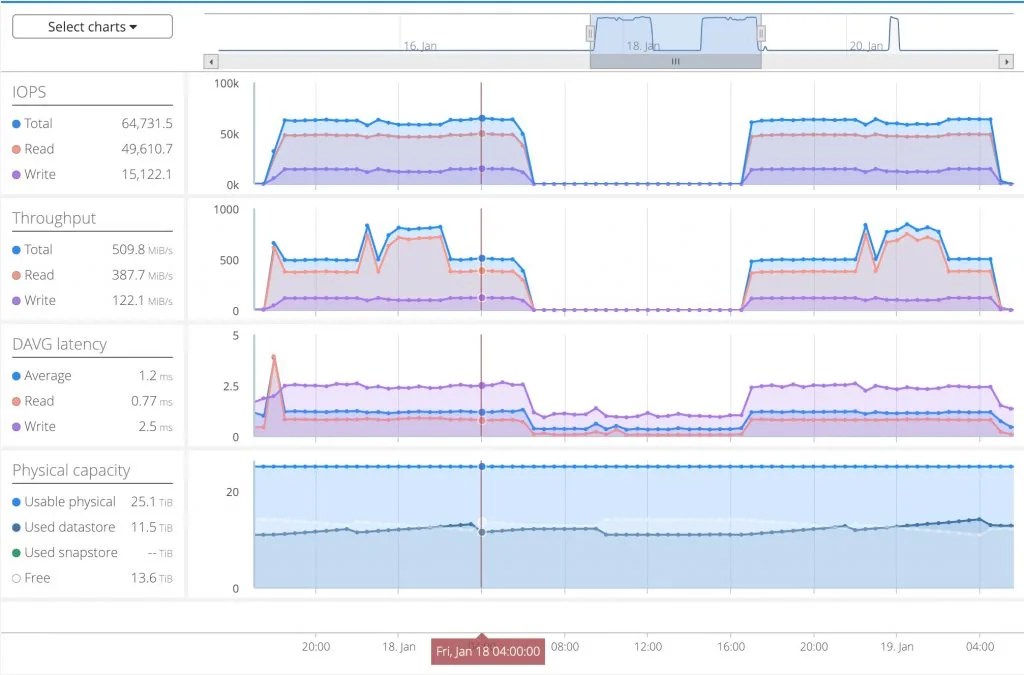
(Update) The initial spike in read latency in test number 1 is caused by me issuing a command that forces the SLOB database to be pre-loaded. With Datrium Oracle application datasets are stored on Flash devices on the host where the Oracle VM is running, and a secondary copy of the data is synchronously 3-way committed to nodes dedicated to persistently storing data, aka datanodes. That means all Read IO is local to the host, and only the Write IO traffic goes over the network, therefore decreasing Read latencies.
As discussed, the decrease in IOPS is a result of an increase in Large Reads, either because of SLOB dynamic workload load generation, or because of Oracle pre-fetching.
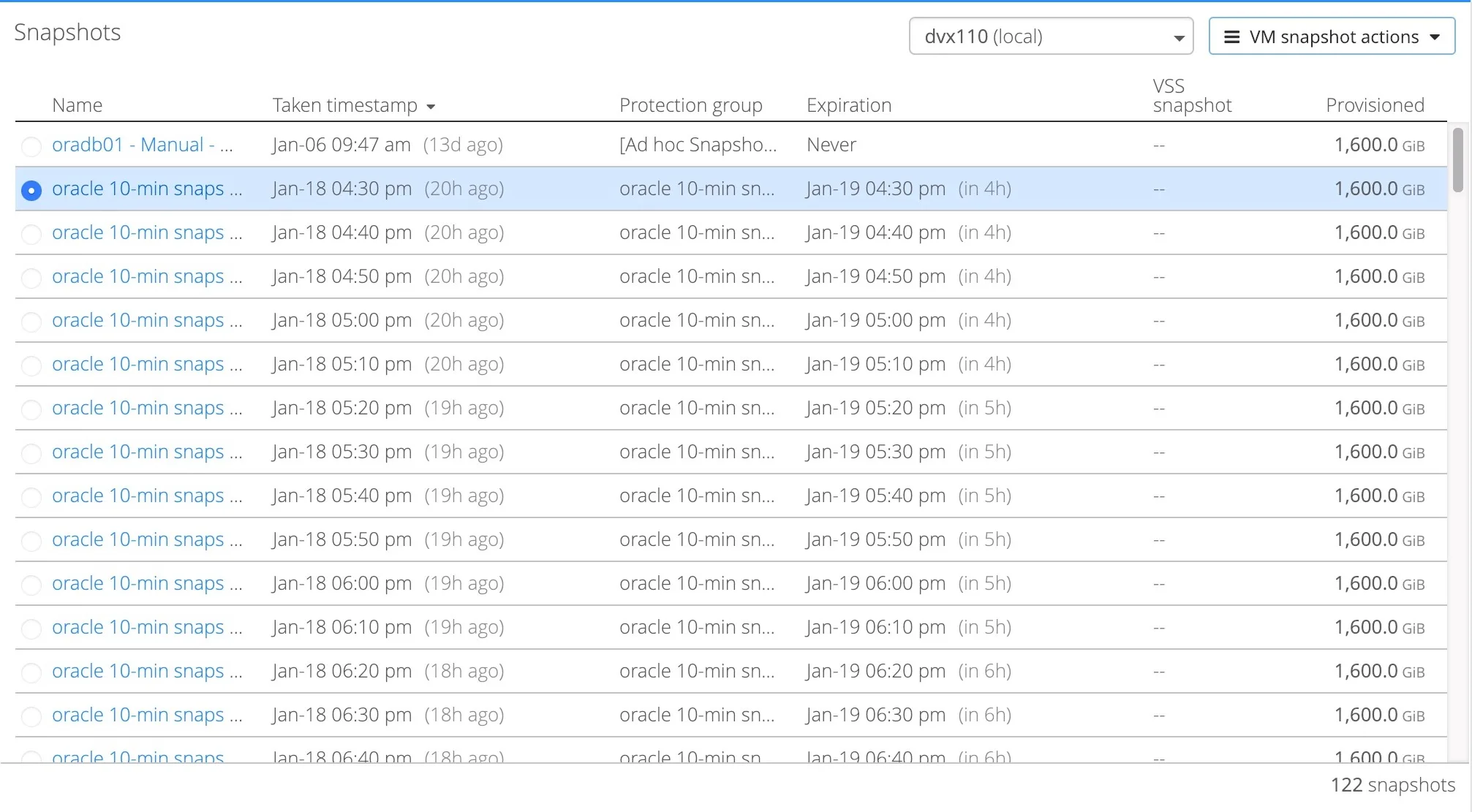
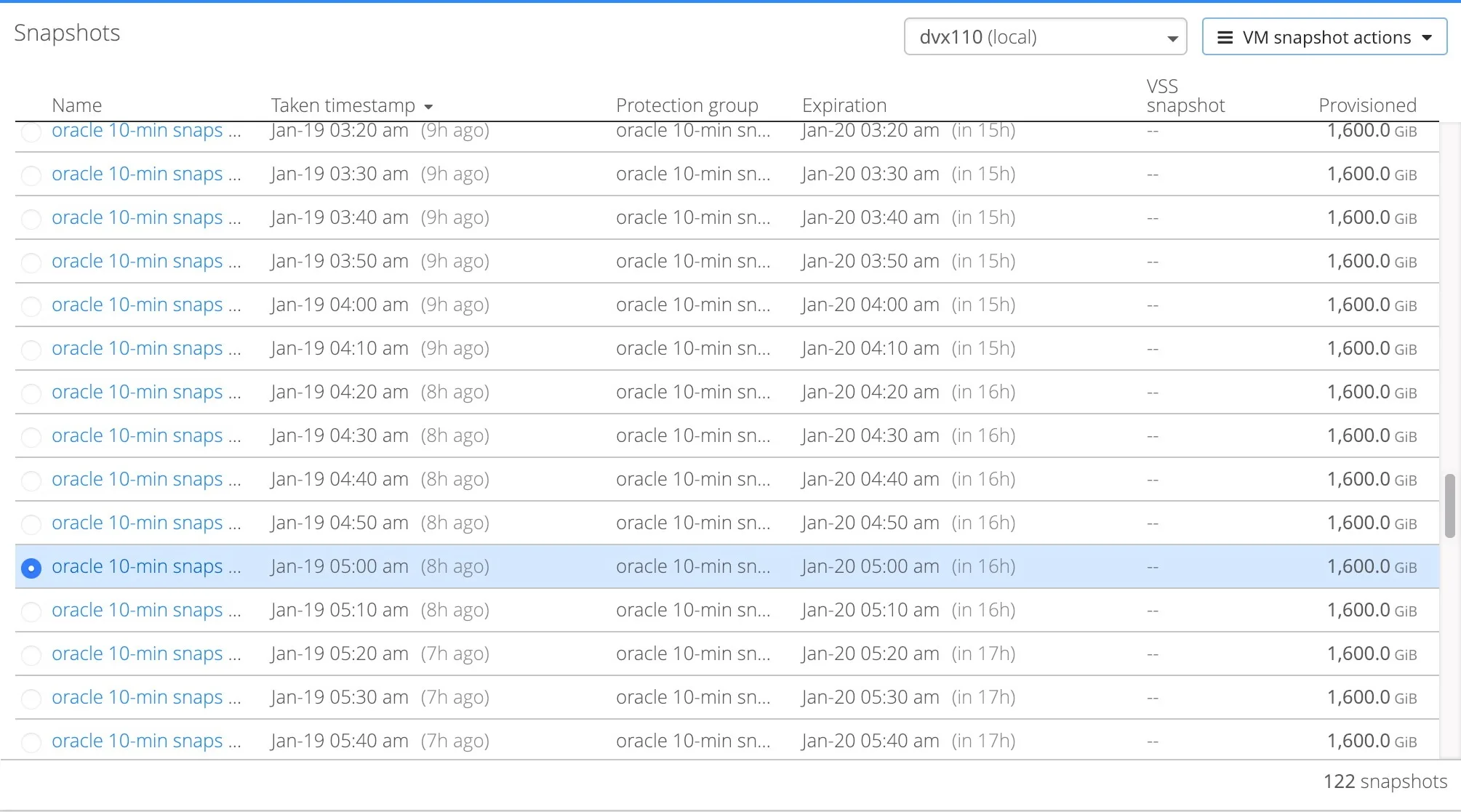
Finally, the thumbnails below prove that Datrium protection group policies were turned on during the second test and taking snapshots every 10 minutes. You can look at the times to compare.
Conclusion
Datrium Protection Groups and snapshot technology offer zero impact during high-performance workloads, unlike other HCI and SDS products. The restore of these snaps is also seamless and I will demonstrate how simple it is in a next article.
Datrium supports up to 1.2M snapshots, and up to 2,000 snapshots per VM. If you want to learn more about VM & vDisk-level granularity offered by Datrium here is a good intro.
Datrium is the perfect platform for running Oracle databases. Solutions can start with a single server and a single datanode and scale up to 10 data nodes and 128 servers as part of a single management domain, and single namespace.