Nutanix 4.0 PowerShell goes GA
One of the big new things for workflows and automation in Nutanix NOS 4.0 are the PowerShell cmdlets to interact with the Nutanix API’s. The POSH library covers the entire extent and functionality of the Nutanix platform and graphical user interface. In other others, anything that can be done via GUI can also be done via REST API and can also be done via POSH; including Alerts, Authentication, Backup and Disaster Recovery, Clusters, Containers, Disks, VM and Host, Remote Sites, Multi-Cluster, Storage Pools, SNMP etc.
A little while ago I published an article introducing the Beta version of the Nutanix Powershell API. Few people from the community came back to us asking for POSH Standards and to avoid conflicts with other POSH modules such as VMware PowerCLI. We heard you!! The GA release addresses most of the concerns and recommendations, if not all.
The Powershell installer can be easily downloaded PRISM under Admin options and it will need Powershell 2.0+ and .NET 4.0 installed on the computer running the commands. The command may be manually executed or via Powershell scripts with pipelining support.
(Click to Enlarge)
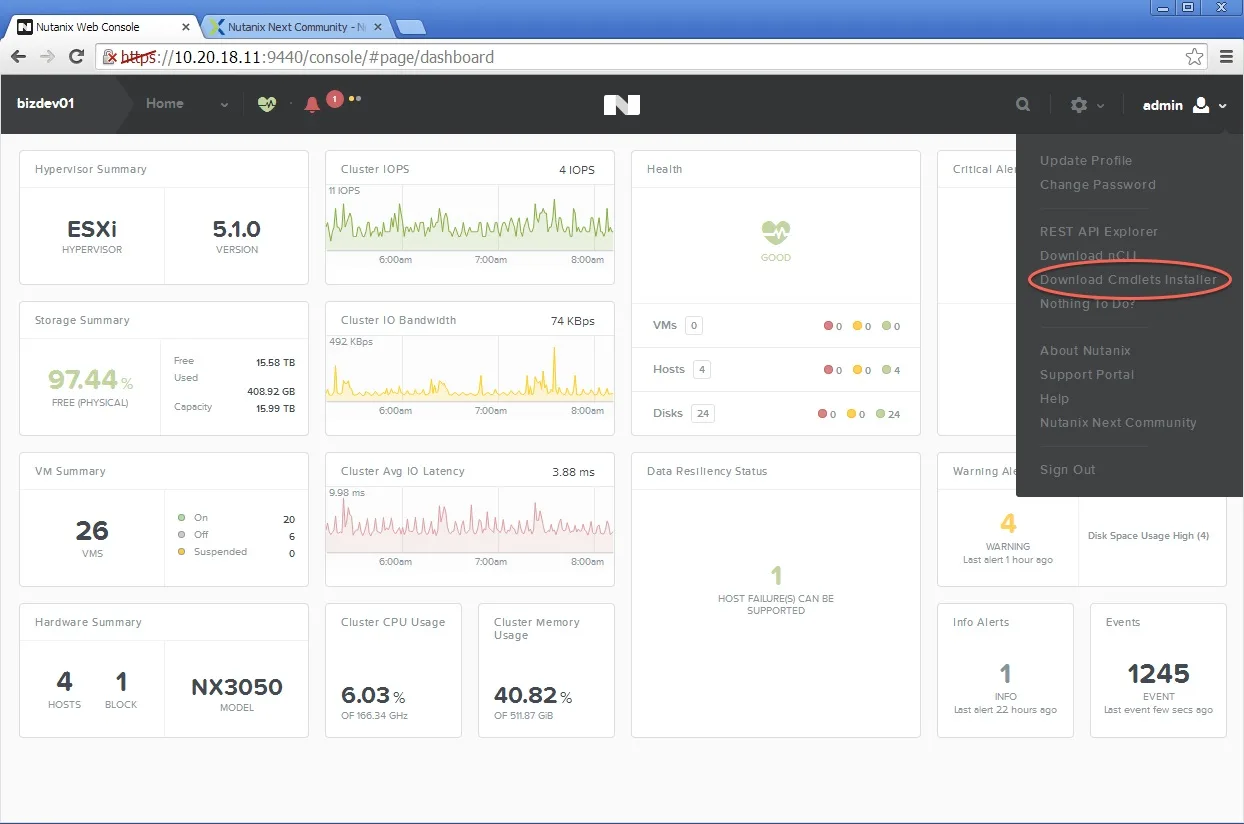
This article is just an introduction to Nutanix Powershell. In future articles I will select and explain specific cmdlets. In the meantime, to get help descriptions just use: Get-Help
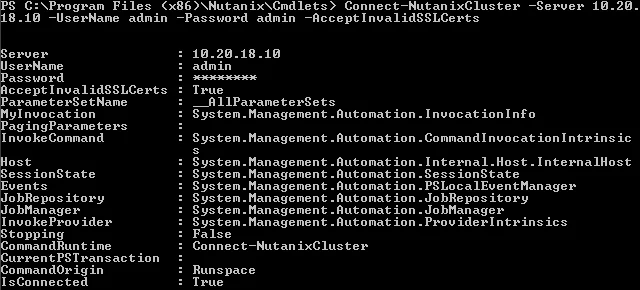
The example below demonstrates how to establish a connection to a Nutanix cluster.
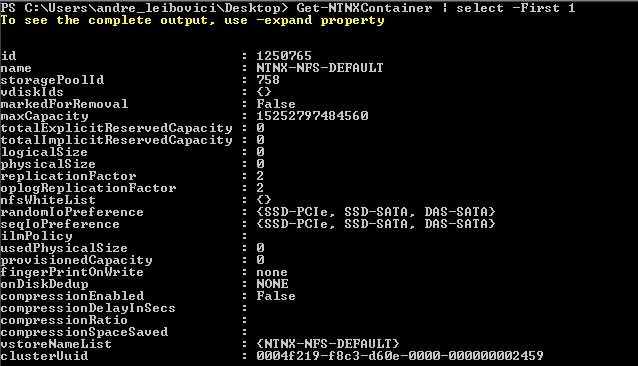
Here is another example of retrieving a Nutanix container.
Below you will find the full list with all cmdlets supported with Nutanix. To generate this list just use the following command: get-module | ForEach-Object {Get-Command -Module $_} | ForEach-Object {$_.Name}
| Name | ModuleName |
| Connect-NutanixCluster | Common |
| Disconnect-NutanixCluster | Common |
| Get-NutanixCluster | Common |
| Get-NutanixCmdletsInfo | Common |
| Acknowledge-NTNXAlert | AlertsAdministration |
| Get-NTNXAlert | AlertsAdministration |
| Get-NTNXAlertMetadata | AlertsAdministration |
| Get-NTNXHardwareAlert | AlertsAdministration |
| Get-NTNXStorageAlert | AlertsAdministration |
| Resolve-NTNXAlert | AlertsAdministration |
| Set-NTNXAlertMetadata | AlertsAdministration |
| Add-NTNXAuthConfigDirectory | AuthConfigAdministration |
| Add-NTNXAuthType | AuthConfigAdministration |
| Get-NTNXAuthConfig | AuthConfigAdministration |
| Get-NTNXAuthConfigDirectory | AuthConfigAdministration |
| Get-NTNXAuthType | AuthConfigAdministration |
| Get-NTNXClientAuthState | AuthConfigAdministration |
| Remove-NTNXAuthConfig | AuthConfigAdministration |
| Remove-NTNXAuthConfigDirectory | AuthConfigAdministration |
| Remove-NTNXAuthType | AuthConfigAdministration |
| Set-NTNXAuthConfig | AuthConfigAdministration |
| Set-NTNXAuthConfigDirectory | AuthConfigAdministration |
| Set-NTNXAuthType | AuthConfigAdministration |
| Set-NTNXClientAuthState | AuthConfigAdministration |
| Abort-NTNXProtectionDomainReplication | BackupAndDrAdministration |
| Add-NTNXOutOfBandSchedule | BackupAndDrAdministration |
| Add-NTNXProtectionDomainCronSchedule | BackupAndDrAdministration |
| Add-NTNXProtectionDomainVM | BackupAndDrAdministration |
| Clear-NTNXCronSchedule | BackupAndDrAdministration |
| Clear-NTNXProtectionDomainRetentionPolicy | BackupAndDrAdministration |
| Get-NTNXOutOfBandSchedule | BackupAndDrAdministration |
| Get-NTNXProtectionDomain | BackupAndDrAdministration |
| Get-NTNXProtectionDomainAlert | BackupAndDrAdministration |
| Get-NTNXProtectionDomainConsistencyGroup | BackupAndDrAdministration |
| Get-NTNXProtectionDomainCronSchedule | BackupAndDrAdministration |
| Get-NTNXProtectionDomainEvent | BackupAndDrAdministration |
| Get-NTNXProtectionDomainHealthCheckSummary | BackupAndDrAdministration |
| Get-NTNXProtectionDomainPendingAction | BackupAndDrAdministration |
| Get-NTNXProtectionDomainPendingReplication | BackupAndDrAdministration |
| Get-NTNXProtectionDomainReplication | BackupAndDrAdministration |
| Get-NTNXProtectionDomainSnapshot | BackupAndDrAdministration |
| Get-NTNXProtectionDomainStat | BackupAndDrAdministration |
| Get-NTNXUnprotectedVm | BackupAndDrAdministration |
| Mark-NTNXProtectionDomainActive | BackupAndDrAdministration |
| Mark-NTNXProtectionDomainForRemoval | BackupAndDrAdministration |
| Mark-NTNXProtectionDomainInactive | BackupAndDrAdministration |
| Migrate-NTNXProtectionDomain | BackupAndDrAdministration |
| New-NTNXProtectionDomain | BackupAndDrAdministration |
| Remove-NTNXOutOfBandSchedule | BackupAndDrAdministration |
| Remove-NTNXProtectionDomainCronSchedule | BackupAndDrAdministration |
| Remove-NTNXProtectionDomainSnapshot | BackupAndDrAdministration |
| Remove-NTNXProtectionDomainVM | BackupAndDrAdministration |
| Replace-NTNXProtectionDomainCronSchedule | BackupAndDrAdministration |
| Restore-NTNXEntity | BackupAndDrAdministration |
| Rollback-NTNXProtectionDomain | BackupAndDrAdministration |
| Set-NTNXProtectionDomainReplication | BackupAndDrAdministration |
| Set-NTNXProtectionDomainRetentionPolicy | BackupAndDrAdministration |
| Set-NTNXProtectionDomainSnapshot | BackupAndDrAdministration |
| Add-NTNXEmailAlertContact | ClusterAdministration |
| Add-NTNXNameServer | ClusterAdministration |
| Add-NTNXNfsSubnetWhitelist | ClusterAdministration |
| Add-NTNXNtpServer | ClusterAdministration |
| Add-NTNXPublicKey | ClusterAdministration |
| Get-NTNXClusterInfo | ClusterAdministration |
| Get-NTNXClusterStat | ClusterAdministration |
| Get-NTNXEmailAlertContact | ClusterAdministration |
| Get-NTNXEmailAlertSetting | ClusterAdministration |
| Get-NTNXNameServer | ClusterAdministration |
| Get-NTNXNfsSubnetWhitelist | ClusterAdministration |
| Get-NTNXNtpServer | ClusterAdministration |
| Get-NTNXPublicKey | ClusterAdministration |
| Get-NTNXRackableUnit | ClusterAdministration |
| Get-NTNXRemoteSupportSetting | ClusterAdministration |
| Get-NTNXSmtpServer | ClusterAdministration |
| Get-NTNXSmtpServerSecurityModeType | ClusterAdministration |
| Get-NTNXSpotlightSearchResult | ClusterAdministration |
| Remove-NTNXEmailAlertContact | ClusterAdministration |
| Remove-NTNXNameServer | ClusterAdministration |
| Remove-NTNXNfsSubnetWhitelist | ClusterAdministration |
| Remove-NTNXNtpServer | ClusterAdministration |
| Remove-NTNXPublicKey | ClusterAdministration |
| Remove-NTNXRackableUnit | ClusterAdministration |
| Remove-NTNXSmtpServer | ClusterAdministration |
| Send-NTNXEmailUsingSmtpServer | ClusterAdministration |
| Set-NTNXCluster | ClusterAdministration |
| Set-NTNXClusterDomain | ClusterAdministration |
| Set-NTNXEmailAlertSetting | ClusterAdministration |
| Set-NTNXRemoteSupportSetting | ClusterAdministration |
| Set-NTNXSmtpServer | ClusterAdministration |
| Get-NTNXCluster | ClustersDataQuery |
| Get-NTNXMultiClusterAlert | ClustersDataQuery |
| Get-NTNXMultiClusterEvent | ClustersDataQuery |
| Get-NTNXMultiClusterStat | ClustersDataQuery |
| Add-NTNXNfsDatastore | ContainerAdministration |
| Get-NTNXContainer | ContainerAdministration |
| Get-NTNXContainerAlert | ContainerAdministration |
| Get-NTNXContainerEvent | ContainerAdministration |
| Get-NTNXContainerStat | ContainerAdministration |
| Get-NTNXContainerVDisk | ContainerAdministration |
| Get-NTNXNfsDatastore | ContainerAdministration |
| New-NTNXContainer | ContainerAdministration |
| Remove-NTNXContainer | ContainerAdministration |
| Remove-NTNXNfsDatastore | ContainerAdministration |
| Set-NTNXContainer | ContainerAdministration |
| Get-NTNXDisk | DiskAdministration |
| Get-NTNXDiskAlert | DiskAdministration |
| Get-NTNXDiskEvent | DiskAdministration |
| Get-NTNXDiskHealthCheckSummary | DiskAdministration |
| Get-NTNXDiskStat | DiskAdministration |
| Remove-NTNXDisk | DiskAdministration |
| Acknowledge-NTNXEvent | EventsAdministration |
| Get-NTNXEvent | EventsAdministration |
| Get-NTNXHardwareEvent | EventsAdministration |
| Get-NTNXStorageEvent | EventsAdministration |
| Get-NTNXHealthCheck | HealthCheckAdministration |
| Set-NTNXHealthCheck | HealthCheckAdministration |
| Get-NTNXHost | HostAdministration |
| Get-NTNXHostAlert | HostAdministration |
| Get-NTNXHostEvent | HostAdministration |
| Get-NTNXHostHealthCheckSummary | HostAdministration |
| Get-NTNXHostStat | HostAdministration |
| Get-NTNXHttpProxy | HttpProxyAdministration |
| New-NTNXHttpProxy | HttpProxyAdministration |
| Remove-NTNXHttpProxy | HttpProxyAdministration |
| Set-NTNXHttpProxy | HttpProxyAdministration |
| Get-NTNXClusterLicenseInfo | LicenseAdministration |
| Get-NTNXLicense | LicenseAdministration |
| Get-NTNXLicenseAllowance | LicenseAdministration |
| Get-NTNXRemoteSite | RemoteSiteAdministration |
| Get-NTNXRemoteSiteAlert | RemoteSiteAdministration |
| Get-NTNXRemoteSiteEvent | RemoteSiteAdministration |
| Get-NTNXRemoteSiteHealthCheckSummary | RemoteSiteAdministration |
| Get-NTNXRemoteSitePendingReplication | RemoteSiteAdministration |
| Get-NTNXRemoteSiteSnapshot | RemoteSiteAdministration |
| Get-NTNXRemoteSiteStat | RemoteSiteAdministration |
| Mark-NTNXRemoteSiteForRemoval | RemoteSiteAdministration |
| New-NTNXRemoteSite | RemoteSiteAdministration |
| Set-NTNXRemoteSite | RemoteSiteAdministration |
| Get-NTNXServiceCenter | ServiceCenterAdministration |
| New-NTNXServiceCenter | ServiceCenterAdministration |
| Remove-NTNXServiceCenter | ServiceCenterAdministration |
| Set-NTNXServiceCenter | ServiceCenterAdministration |
| Add-NTNXSnmpTransport | SnmpAdministration |
| Add-NTNXSnmpTrap | SnmpAdministration |
| Add-NTNXSnmpUser | SnmpAdministration |
| Get-NTNXSnmpInfo | SnmpAdministration |
| Get-NTNXSnmpStatus | SnmpAdministration |
| Get-NTNXSnmpTransport | SnmpAdministration |
| Get-NTNXSnmpTrap | SnmpAdministration |
| Get-NTNXSnmpUser | SnmpAdministration |
| Remove-NTNXSnmpTransport | SnmpAdministration |
| Remove-NTNXSnmpTrap | SnmpAdministration |
| Remove-NTNXSnmpUser | SnmpAdministration |
| Set-NTNXSnmpStatus | SnmpAdministration |
| Set-NTNXSnmpTrap | SnmpAdministration |
| Set-NTNXSnmpUser | SnmpAdministration |
| Get-NTNXStoragePool | StoragePoolAdministration |
| Get-NTNXStoragePoolAlert | StoragePoolAdministration |
| Get-NTNXStoragePoolEvent | StoragePoolAdministration |
| Get-NTNXStoragePoolStat | StoragePoolAdministration |
| New-NTNXStoragePool | StoragePoolAdministration |
| Remove-NTNXStoragePool | StoragePoolAdministration |
| Set-NTNXStoragePool | StoragePoolAdministration |
| Get-NTNXSnapshotForVDisk | VDiskAdministration |
| Get-NTNXVDisk | VDiskAdministration |
| Get-NTNXVDiskAlert | VDiskAdministration |
| Get-NTNXVDiskEvent | VDiskAdministration |
| Get-NTNXVDiskSnapshot | VDiskAdministration |
| Get-NTNXVDiskStat | VDiskAdministration |
| New-NTNXVDisk | VDiskAdministration |
| New-NTNXVDiskSnapshot | VDiskAdministration |
| Remove-NTNXVDisk | VDiskAdministration |
| Set-NTNXVDisk | VDiskAdministration |
| Get-NTNXVirtualDisk | VirtualDiskAdministration |
| Get-NTNXVirtualDiskStat | VirtualDiskAdministration |
| Get-NTNXVM | VMAdministration |
| Get-NTNXVMAlert | VMAdministration |
| Get-NTNXVMEvent | VMAdministration |
| Get-NTNXVMHealthCheckSummary | VMAdministration |
| Get-NTNXVMStat | VMAdministration |
| Get-NTNXVMVDisk | VMAdministration |
| Get-NTNXVMVirtualDisk | VMAdministration |
| Get-NTNXVStore | VStoreAdministration |
| Protect-NTNXVStore | VStoreAdministration |
| UnProtect-NTNXVStore | VStoreAdministration |
11 comments from the original blog
Aleksandar
I'm pretty sure that provided command cannot produce that output. :(
Bjorn Houben
Why are the first commands using nutanix instead of ntnx? Otherwise you could just use: Get-Command *ntnx*
Andre Leibovici
Yes, 'Get-Command *ntnx*' will work.
I pasted a command-line I used for the Beta version that did not have NTNX in the name.
If you still want to use the original command-lie, add $_.ModuleName
'get-module | ForEach-Object {Get-Command -Module $_} | ForEach-Object {$_.Name,$_.ModuleName}'
Aleksandar
That command doesn't work either.
First, Get-Module returns all imported modules. That's not what you want, right?
If all commands had the same prefix (which they don't right now):
Get-Command -Noun NTNX* | Format-Table Name,ModuleName
Andre Leibovici
I just tested in my machine and it works for me. What error or output do you get?
get-module | ForEach-Object {Get-Command -Module $_} | ForEach-Object {$_.Name,$_.ModuleName}
Aleksandar
Here is partial output in freshly started PowerShell session:
PS C:\> get-module | ForEach-Object {Get-Command -Module $_} | ForEach-Object {$_.Name,$_.ModuleName}
Get-IseSnippet
ISE
Import-IseSnippet
ISE
New-IseSnippet
ISE
Add-Computer
Microsoft.PowerShell.Management
Add-Content
Microsoft.PowerShell.Management
Checkpoint-Computer
Microsoft.PowerShell.Management
I really don't understand how can you get info only about Nutinix cmdlets when you don't filter based on their names or module.
Andre Leibovici
Did you load the Nutanix Powershell cmdlets?
Have you got NOS 4.0 running in your environment?
Aleksandar
No, I don't have them installed on my computer. However, that doesn't change anything. I'm just looking at your command and don't understand how can you get output about Nutanix cmdlets only.
Andre Leibovici
Aleksandar, it doesn't only return Nutanix cmdlets. I have cleaned up what is not Nutanix to posts here on the blog.
James Birley (@jbirley)
Guys I think I can clear up some confusion, hopefully. :-)
They way Nutanix decided to implement POSH support involves providing a desktop shortcut that launches a batch file to start a new powershell host session. (Similar to PowerCLI). It then runs a set of nested POSH scripts that, among other things like checking some prerequisites, imports all of the Nutanix modules. (There are 21 based on my count).
By like most POSH scripters, I prefer to have all of my modules, both third party and my own, in my existing powershell host configuration. Usually, I add these import steps to my profile. However, it turns out that Nutanix modifies the cmdlet names on import using the –prefix parameter of the ‘Import-Module’ cmdlet. So the snippets of their code look like this:
[string] $nounPrefix = "NTNX"
Import-Module $currFile -WarningAction silentlyContinue -Prefix $nounPrefix
Just before they loop through importing all their modules, they import one set of cmdlets which they consider “common” first that they do NOT put the “NTNX” on.
So to get all of the Nutanix related cmdlets in their “custom” POSH session, you could run the following command:
gcm | ? implementingtype -like "Nutanix*" | ft Name,Modulename
Again, I prefer to import modules in my profile, so I added these two lines which do the trick.
Import-Module "C:\Program Files (x86)\Nutanix Inc\NutanixCmdlets\Modules\Common\Common.dll"
Get-ChildItem -Path 'C:\Program Files (x86)\Nutanix Inc\NutanixCmdlets\Modules' *.dll -recurse | ForEach-Object {Import-Module -Name $_.FullName -WarningAction silentlyContinue -Prefix "NTNX"}
It imports the common module twice, but the second time it modifies it with the “NTNX” prefix. Then as Bjorn and Alexandar mention, you can simply run Get-Command *ntnx* (I get 193 cmdlets).
My request is for Nutanix to fix the cmdlet naming convention natively and to consolidate the modules if possible.
Andre Leibovici
James, that a great feedback and thank you for providing your POSH profile configuration. I'm pointing the engineers to your request.
-Andre
Comments are preserved from the original site and are closed.