When GPUDirect Storage adds no bandwidth, and when it does
GPUDirect Storage (GDS) is built on an appealing idea. Normally, data read from storage lands in the server's own memory first and is then copied across to the GPU. GDS lets the network card write it straight into GPU memory and skip that copy. Fewer steps sounds like more speed, and that is how GDS is usually presented.
So when I benchmarked GDS over an NFS mount with RDMA, I expected it to win, and it was slower. Reading a file into host memory and then copying it to the GPU beat reading it straight into the GPU, on the same mount, for both reads and writes. On reads the host path reached almost 7 GB/s, against about 4.2 GB/s for GDS.
That does not make GDS slow in general. The published results with large GDS gains come from servers that pull data through several network cards at once, where the copy through host memory runs out of CPU or memory bandwidth. One mount at a few GB/s never gets near that limit, and I return to those results after the measurements. What I want to pass on is the test itself. It takes little time to run, it compares the two paths fairly, and it tells you whether GDS is worth planning around on your own servers before you commit hardware or software to it.
On this setup GDS took the CPU and host memory out of the data path and added no bandwidth. That is still worth having, when three things are true:
- The application reads through cuFile straight into GPU memory. Software can run on a GDS-capable mount and never use GDS.
- The application spends its time waiting on storage. If most of the time goes elsewhere, a faster storage path barely shows.
- The server is short of CPU time or host memory bandwidth, which the copy through host memory would otherwise use. A server moving tens of GB/s through several network cards reaches this point, and there GDS adds bandwidth as well.
I have not measured the CPU and memory saving on this setup yet, and a multipath mount or tuned cuFile settings may well show a throughput gain. The test below shows which of these applies to a given setup.
The earlier post on NVLink, RDMA rails and GPUDirect Storage explains how the GDS stack is put together: cuFile, the nvidia-fs kernel module, an NFS client with the nvidia-fs hook, and a mount with proto=rdma. This post assumes all of that is in place.
The setup
The test ran on a GPU server in Kubernetes, with the NVIDIA GPU Operator, NVIDIA's open GPU driver, the in-kernel mlx5 network driver with no OFED, and an all-flash NFS store over NFSv3 with RDMA. The storage vendor's NFS client supplies the hook GDS needs, and storage traffic travels in the same lossless priority class the network already uses for RDMA.
Each of those pieces is supported on its own. The combination, a recent kernel with the open driver and no OFED, is not one that NVIDIA or the storage vendor documents for GDS, so the result describes this setup and yours may behave differently.
First, make sure GDS is really being used
GDS can stop working without any error, and the application carries on as if nothing happened. On the first server where I enabled it, every GDS transfer failed, and the only sign was one line in the kernel log. Before measuring anything, rule out the two usual causes.
The first is the IOMMU, the part of the server that translates memory addresses for devices. Many Linux distributions boot it in translated mode, and in that mode nvidia-fs refuses every transfer. The earlier post has the exact kernel message and the iommu=pt setting that fixes it. Changing the IOMMU mode needs a reboot of each server, so check it while you are still planning the maintenance window.
The second is a safety net in cuFile called compatibility mode. It is on by default (allow_compat_mode in cufile.json). When a direct transfer fails, cuFile quietly does an ordinary read through host memory instead. That keeps applications running, which is what you want in normal use. In a benchmark it means you can end up measuring the fallback and reporting it as GDS.
For the test, switch compatibility mode off, so that a failed transfer shows up as an error. Then turn on rw_stats_enabled under /sys/module/nvidia_fs/parameters and watch the byte counters in /proc/driver/nvidia-fs/stats. If they move during the run, GDS did the work.
Three runs on the same mount
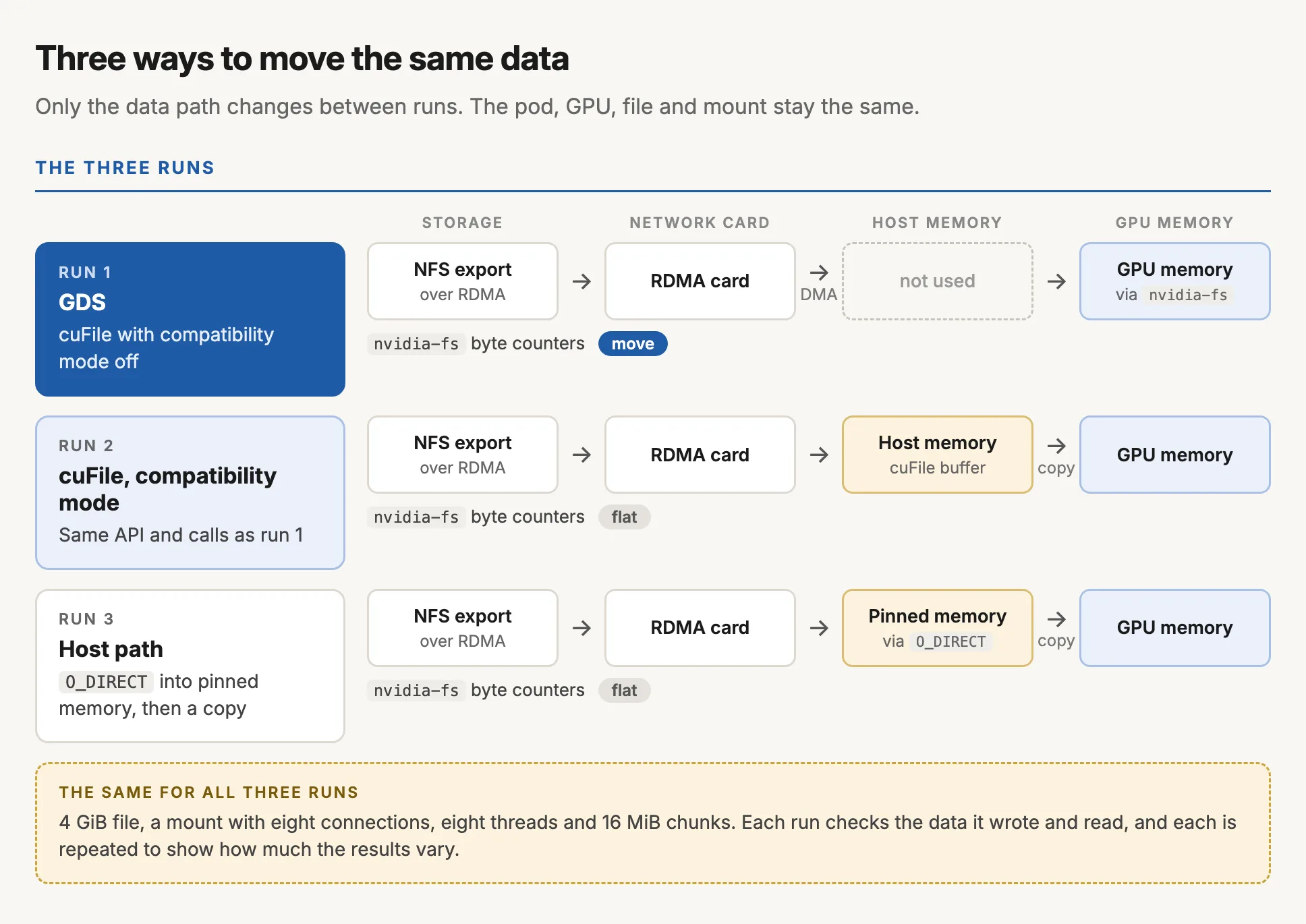
The test moves the same data three ways and changes nothing else: the same pod, the same GPU, the same file and the same mount. I used a 4 GiB file, a mount with eight connections, eight threads and 16 MiB chunks.
- GDS, with compatibility mode off. The network card writes straight into GPU memory. This should be the only run that moves the
nvidia-fscounters. - cuFile in compatibility mode. The application makes exactly the same calls as in run 1, but cuFile reads into a buffer in host memory and copies from there to the GPU.
- The host path. A plain direct read (
O_DIRECT) into pinned host memory, followed by a copy to the GPU. This is the path GDS is meant to improve on.
Each run checks that the data it reads back matches what it wrote, and each run is repeated, so you can see how much the results move around on their own before you read anything into a difference.
A single mount to one storage address comes nowhere near filling a 400 Gb card, so these numbers are only good for comparing the three runs with each other.
nvidia-fs counters.Reading the result
These are the numbers from an eight-GPU HGX H200, in MB/s. The GDS row is the range across all eight GPUs.
| Run | Write (MB/s) | Read (MB/s) | nvidia-fs bytes |
|---|---|---|---|
| 1. GDS, compatibility mode off | 2,372 to 2,578 | 4,004 to 4,264 | 4 GiB each way |
| 2. cuFile in compatibility mode | 2,515 | 4,248 | none |
| 3. Host path | 3,461 | 6,972 | none |
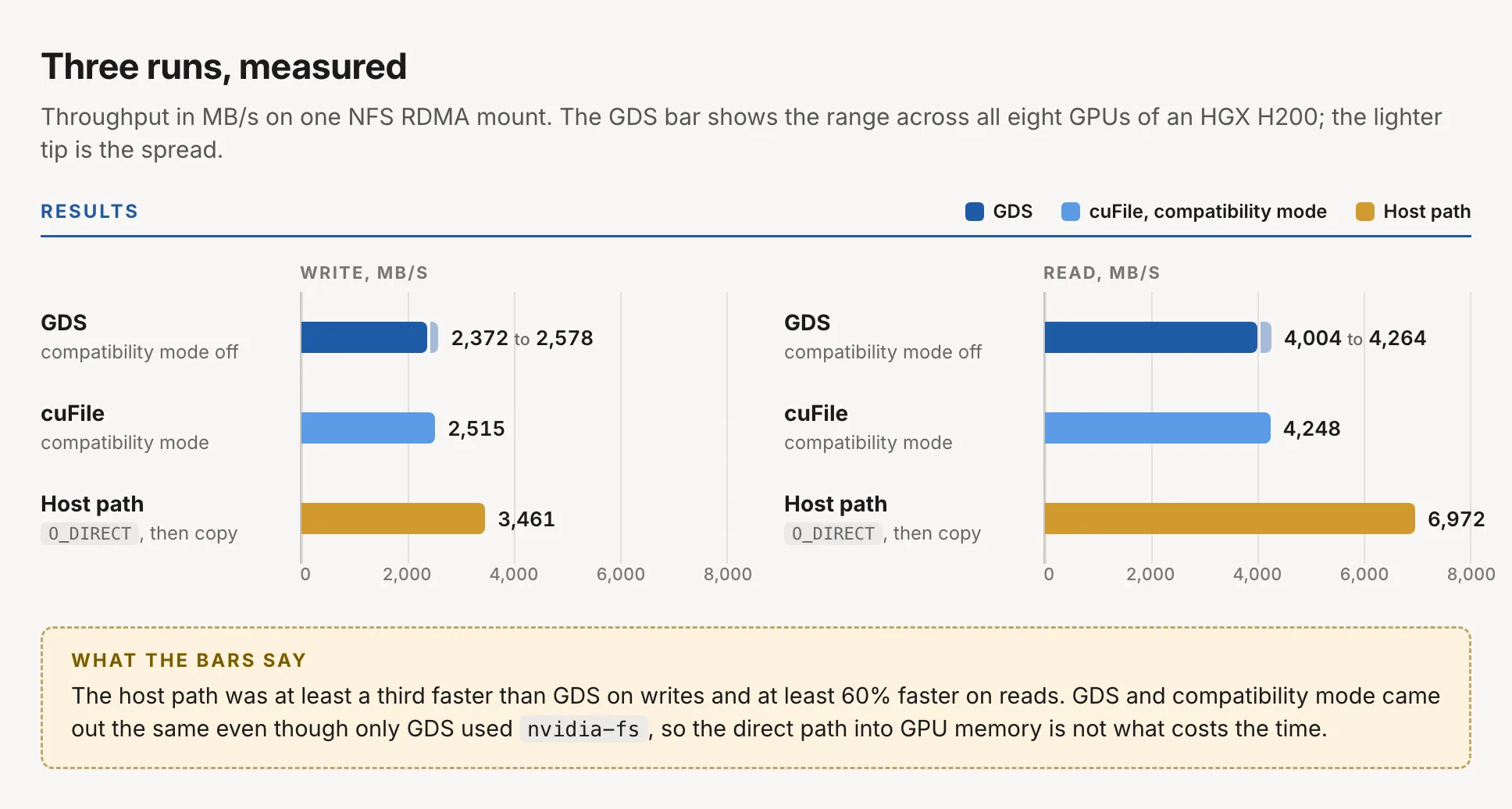
The host path was at least a third faster than GDS on writes and at least 60% faster on reads. A second server with a different PCIe layout showed the same pattern, and repeat runs agreed within 3%.
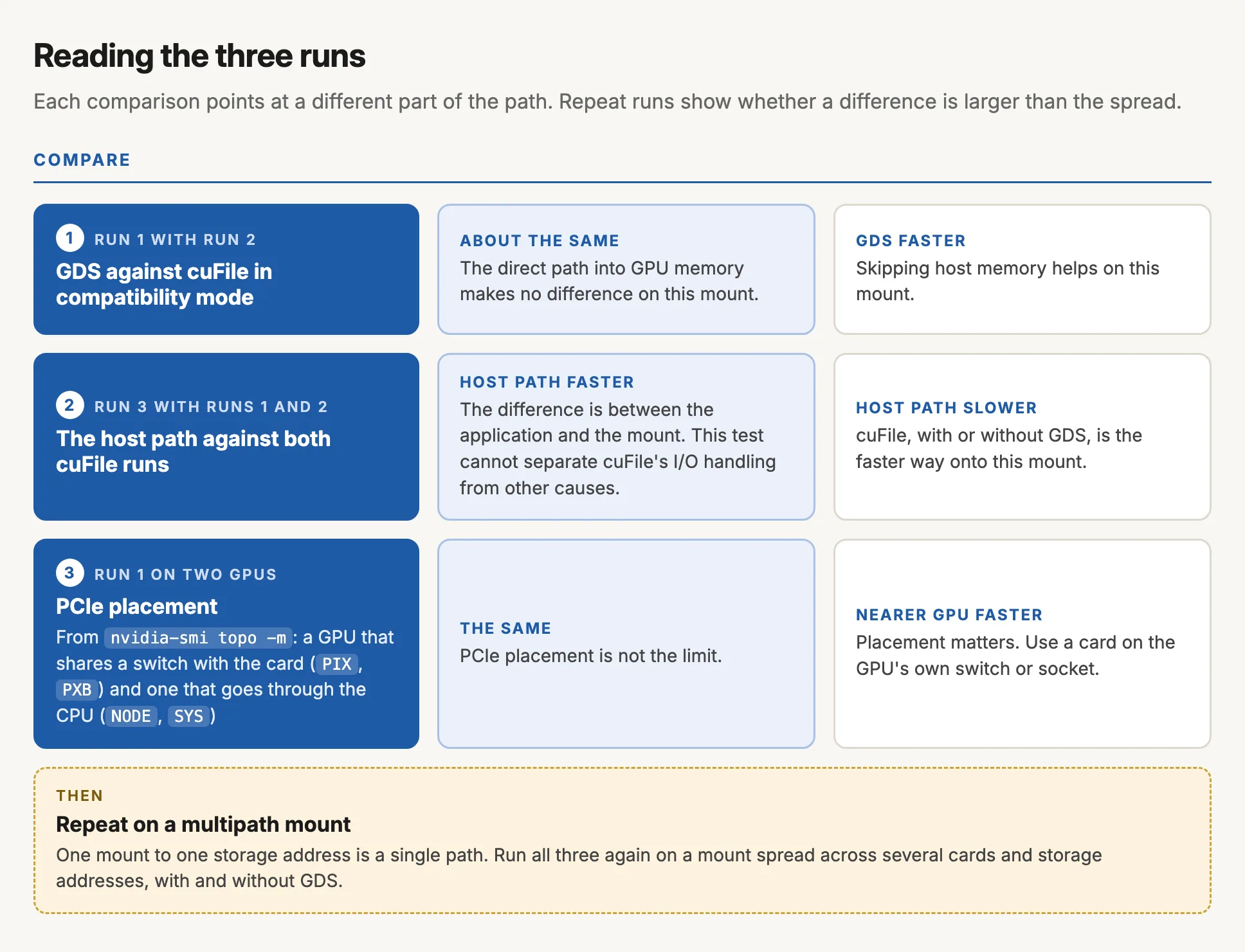
GDS and compatibility mode came out almost the same, even though only the GDS run used nvidia-fs, so the direct path into GPU memory is not what costs the time. A plain read on the same mount beat both, which puts the difference somewhere between the application and the mount. My test could not narrow it further, to cuFile's I/O handling or to something else.
There are a few likely candidates, and I have not tested any of them yet. One is that GPU memory gets mapped for every NFS request; with a 1 MiB rsize and wsize, a 4 GiB file means 4,096 mappings. Others are repeated pinning of GPU memory in the BAR1 window that nvidia-fs uses, and the way cuFile splits large transfers. The settings worth trying are the mount's rsize and wsize, and max_direct_io_size_kb and parallel_io in cufile.json.
I suspected the PCIe layout first: perhaps the GPU sat too far from the network card. nvidia-smi topo -m shows how each GPU connects to each card. PIX or PXB means they share a PCIe switch, and PHB, NODE or SYS means the traffic goes through the CPU. I ran the GDS test on all eight GPUs of the H200. The GPU that shares a PCIe switch with the network card wrote at 2,553 MB/s and read at 4,199 MB/s, inside the range of the other seven, so placement was not the limit.
A mount to one storage address is also a single path through the network. Storage vendors' NFS clients can spread a mount across several cards and storage addresses. Before drawing conclusions for a larger setup, I would repeat all three runs on a multipath mount, with and without GDS.
Where GDS does add bandwidth
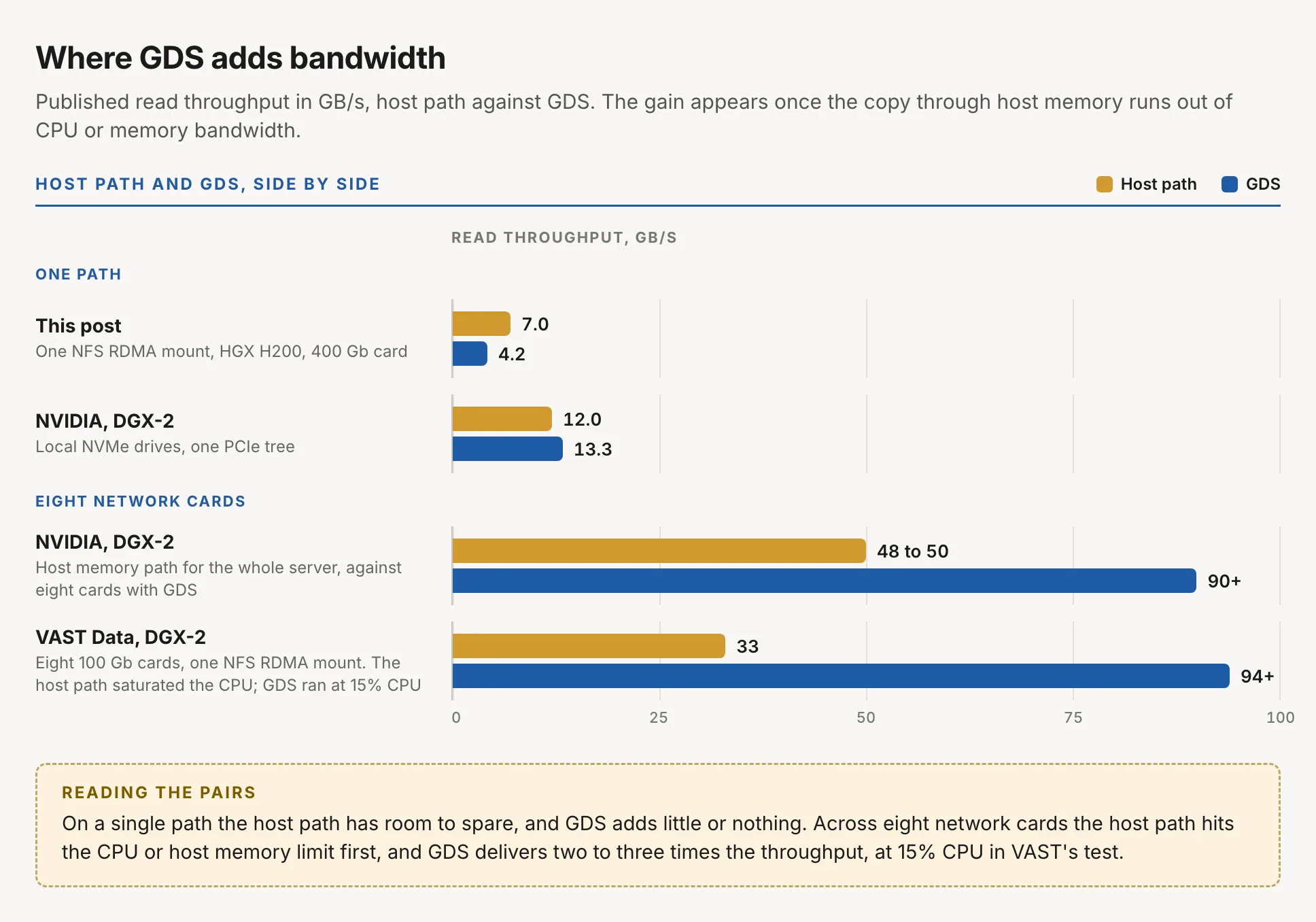
The published results with large GDS gains come from a different situation. VAST Data tested a DGX-2 with eight 100 Gb InfiniBand cards and a single NFS over RDMA mount. Through host memory, reads reached no more than 33 GB/s before the CPU was saturated. With GDS the same server sustained over 94 GB/s at about 15% CPU. NVIDIA's own measurements on a DGX-2 put the path from host memory to the GPUs at 48 to 50 GB/s for the whole box, while eight network cards writing straight into GPU memory reached over 90 GB/s.
In those tests the host path ran out of CPU or memory bandwidth, and GDS removed that limit. Where nothing is saturated, the gain is small. In NVIDIA's first GDS measurements, local NVMe drives writing straight into GPU memory reached 13.3 GB/s per PCIe tree, against the 12.0 GB/s that the path from host memory can carry, about 10% more. The test in this post ran one mount at under 7 GB/s. The host path had plenty of room, so GDS had no limit to remove.
The GDS numbers here are also low against NVIDIA's reference. The GDS configuration guide reports 9.48 GiB/s of reads and 6.96 GiB/s of writes with GDS from one NFS over RDMA mount over 100 Gb InfiniBand. Those runs used 32 or more threads against eight here, so the numbers do not compare directly, but the gap suggests that GDS on this combination of driver and kernel has room to improve. Thread count goes on the list of settings to try.
Most vendor GDS results publish the GDS figure on its own, which shows what the storage delivered and nothing about what GDS added. Running the same test through host memory shows the gain, and tells you which of the two situations a given server is in.
What are your workloads waiting on?
The benchmark shows which path is faster. It does not show whether that matters to your workloads. GDS can only speed up work that reads through cuFile and spends its time waiting on storage, and that is often a smaller share than it first appears.
Model weights are the usual reason people give for adopting GDS. When I timed the cold start of a large model server, most of it went on pulling the container image, compiling, and capturing CUDA graphs. Loading the weights over plain NFS on TCP was a small part of the total, so even a perfect GDS loader would have saved little, and the weights stayed on TCP. Time each stage of a cold start before buying hardware to speed up one of them.
An inference KV cache on the RDMA mount looked like a natural GDS user. It worked, but when I checked the counters, they had not moved. The cache server writes to storage from a cache it keeps in host memory, so its traffic was NFS over RDMA without GDS. Whether GDS is used depends on how the software moves its data, so check the counters under the real workload as well as the benchmark.
What GDS gives a setup like this is a data path that leaves the CPU and host memory alone. That helps workloads short of CPU time or memory bandwidth, and on a server pulling data through several network cards it is what turns into extra bandwidth. Measuring the saving needs its own test, one that records CPU use and memory bandwidth during the run.
What I check now
Before planning around GDS, I go through four checks:
- The
nvidia-fsbyte counters move during a run with compatibility mode off. Pod status does not show which path was used. - The same test has been run without GDS, on the same mount, before anyone quotes a GDS number.
- The IOMMU mode is known before the maintenance window, because changing it means a reboot of each server.
- Each stage of a model cold start has been timed before buying hardware for one of them.
If you have compared GDS with the host path over NFS RDMA, especially on a multipath mount, I would like to hear what you measured.