Launching VDI Calculator v3 with Partner support
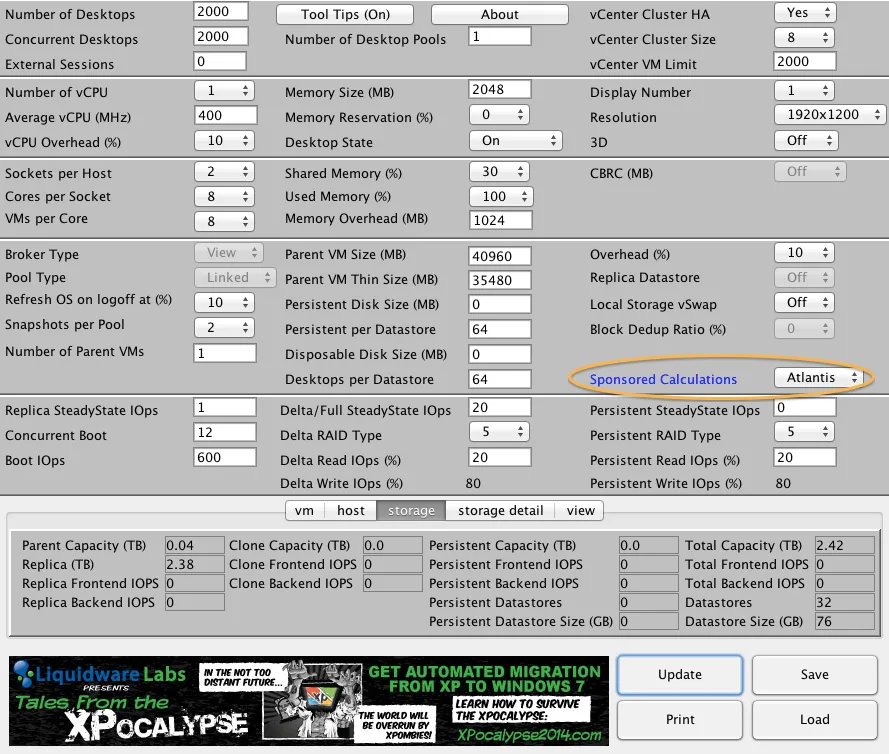
I am excited to announce the version 3.0 of my VDI calculator. This new version introduces partner support, allowing 3rd party vendors to quickly demonstrate the benefits of their solutions, and allowing consultants and architects to see how those solutions impact their VDI and DaaS requirements. The first partner to be supported is Atlantis Computing with their ILIO diskless solution.
What’s Next
- Android support
- Block Size and IO calculations for even better accuracy
- Scale-out approaching using hyper-converged architectures
- Server Profiles – you select the brand, and the calculator will spit out the model you should buy
- Upload configuration to Cloud and be able to access it from anywhere
- Add in version of vcenter/view/esxi for auto-fill on the max sizes
- Drop down for some “canned” reference architectures (such as a 8-blade UCS chassis (HP, EMC, Netapp, IBM, Nutanix etc) and the usually set up for pools/Vms).
- much more…
If you are not yet familiar with the new VDI Calculator, just launch it using the green button below.

11 comments from the original blog
gchapman
How will you be validating the reference architectures?
Andre Leibovici
gchapman,
What reference architectures are you talking about? If you are talking about numbers after applying the partner solution settings; those are validated by the vendor and I have no responsibility over the results. Please check the About and read the disclaimer.
Andre
xu
Update so fast!
Marcel
When selecting Atlantis as sponsored calculations I notice a difference in total capacity of storage. This is as expected because dedup is a feature of Atlantis ILIO. But IOPS are set to zero. Why is that?
Andre Leibovici
Marcel,
Because Atlantis is a virtual appliance that runs in RAM there is almost zero IOs going through the storage fabric. I think I've read somewhere that ILIO will support up to a 1 million IOPS. I will defer the answer to the Atlantis team.
Marcel van den Berg
When Atlantis is selected, both frontend IOPS and backend IOPS are set to zero. As far as I understand frontend IOPS are the IOPS leaving the hypervisor (VM level). Backend IOPS are IOPS at storage level. Because of RAID levels IOPS at the backend are higher than those frontend.
I was expecting frontend IOPS and backend IOPS shown in the calculator like shown in this slide http://www.atlantiscomputing.com/downloads/WTB_Webinar_Presentation5-30-2012.pdf
It shows a reduction of 90 % in IOPS when Atlantis ILIO is used.
Andre Leibovici
Marcel, I don't think you completely understand how Atlantis ILIO works, and you are also basing your numbers in an old release. For Stateless/Linked-Clone for both IOPs offload is 100% since runs only in memory. No SAN required. For persistent desktops, only available with the new ILIO release, read IO reduction is 100% and for write IOs is 90%.
Change the model in the calculator from linked-clone to full-clones and you will see that start getting 90% reduction.
These are numbers provided and validated by Atlantis.
Andre
solgae
Why is there no longer an option to specify read/write cache % in your Java-based calculator as opposed to your flash-based calculator in the past?
Andre Leibovici
Solgae,
Good catch... (I knew about it).
I will make sure it is added for the next release of the calculator.
Keep tuned!
Nucky
Atlantis stays greyed out for me. What else must be enabled to enable this drop down?
Andre Leibovici
Nucky, at this point in time there's no sponsored calculation. This will not affect the results of your calculations.
-Andre
Comments are preserved from the original site and are closed.