How to enable USB 3.0 in Horizon View 5.2
USB 3.0 is capable of transfer speeds of up to 5Gbps (gigabits per second); that's a little over 10 times faster than USB 2.0's 480Mbps. In practice, it won't always be this much faster — mileage may vary depending on hardware configuration — but it will always be much faster than USB 2.0 (USB 2.0 vs USB 3.0)
USB 3.0 devices are not supported in Horizon View 5.2 or earlier. The instructions below are The steps outlined below are TOTALLY UNSUPPORTED BY VMWARE. I recommend testing in development environment. If you decide to test or implement you are doing it on your own risk.
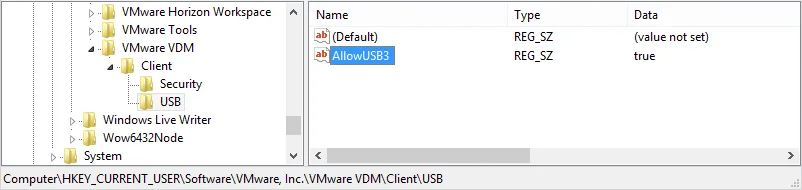
In order to enable USB 3.0 for Horizon View Windows soft-clients you will need to create a Windows registry key which enables Horizon View client to see USB 3.0 devices.
[HKEY_CURRENT_USER\Software\VMware, Inc.\VMware VDM\Client\USB]
"AllowUSB3"="true"
For Horizon View Client for Mac OS X you will need to use the shell (/Applications/Utilities/Terminal.app) to edit the settings. For more information on how to edit settings for Mac OS X refer to the documentation here.
#defaults write com.vmware.viewusb AllowUSB3 true
Confirm with:
#defaults read com.vmware.viewusb

Depending on the USB 3.0 chipset you may have issues with Windows 7, Vista and XP Guest OSes.
To validate that USB3 functionality is enabled you should look for the following item in the log files
[vmware-view-usbd] DevFltr: Device Speed = Super
4 comments
dstafford
Any initial estimates of peak throughput for a USB3 device over the TCP channel? (Do I need to upgrade my MBAir to 10Gb/E :-?)
Davoud Teimouri
Very good document, thank you.
Do you test that on Zero Clients?
Andre Leibovici
David, this has more to do with device compatibility than transfer speeds.
Andre
Andre Leibovici
Davoud, I have not tested with Zero Clients.
-Andre
Comments are preserved from the original site and are closed.