Extending GPU fractions to a B200 hit an immutable node selector
This week I extended fractional GPU sharing from one server to a second, an NVIDIA B200 node. I expected a one-line change. It took longer than that because of a single setting. The list of nodes that run the fractioning daemons lives in one Kubernetes object, and its node selector is immutable. To change it, you delete the object and create it again.
If you run shared GPUs on Kubernetes, you will probably hit this too. And when the cluster rejects a change, your GitOps tool may not report it the way you expect.
What was already working, and what was missing
Fractions run through the open source KAI Scheduler in its NvFractions sharing mode. A pod asks for a slice of a card, say 0.25 or 4 GiB. The scheduler places it, and two daemons on the node enforce it. One, fractiond, is a plugin for containerd's NRI (Node Resource Interface) that injects a memory limit into the container. The other, mpsd, runs the NVIDIA MPS (Multi-Process Service) control daemon so several processes can share the GPU.
This had been running on an RTX PRO 6000 server for about ten days. Most of what the B200 needed was already in place. The scheduler's sharing mode is cluster-wide. The driver's memory-accounting setting comes from a cluster-wide GPU Operator policy and was already active on the new node.
Only the daemons were missing. To confirm it, I sent a 4 GiB fractional probe at the B200 pool. It stayed Pending with "node is not ready for fractional GPU scheduling".
I was glad to see that. Without the daemons, a node that accepted the pod would have run it with no memory limit. The scheduler refused it instead. I would check for this behaviour on any node before enabling fractions there.
One object, one name, one selector
The daemons are placed by a custom resource called GpuFractioningConfig. Its CRD has two CEL (Common Expression Language) validation rules:
- The object must be named
default, so only one can exist. - The
nodeSelectorhas the transition ruleself == oldSelf. When you try to change it, the API server tells you exactly what to do: "nodeSelector is immutable; delete and recreate the GpuFractioningConfig to change it".
Our selector matched a GPU class label with the value rtx-pro-6000. Adding the B200 to it would be an edit, which the rule blocks. A second object for the B200 would need a second name, which the other rule blocks. The selector is also a plain key-value map, so it cannot match two label values at once.
So the object had to be deleted and recreated, on a node where fractional workloads were already running.
A label for the capability
Because the map cannot match two GPU classes, both nodes needed one new shared label. I named it for what the node does, example.org/gpu-fractions=enabled, and left the hardware out of it.
The node-join script sets that label on RTX and B200 nodes. It never sets it on our H200 nodes, which run inference serving and should never get MPS daemons. The recreate script checks the labels before it does anything. It stops if a fraction node is missing the label, or if an H200 has it.
I think most node-scoped operator config should be selected this way. A hardware class label says what a node is. An opt-in label records a decision about what the node should run, and you can review that decision in one place. When a third GPU class arrives, enabling fractions on it means labelling the node. The config object stays as it is.
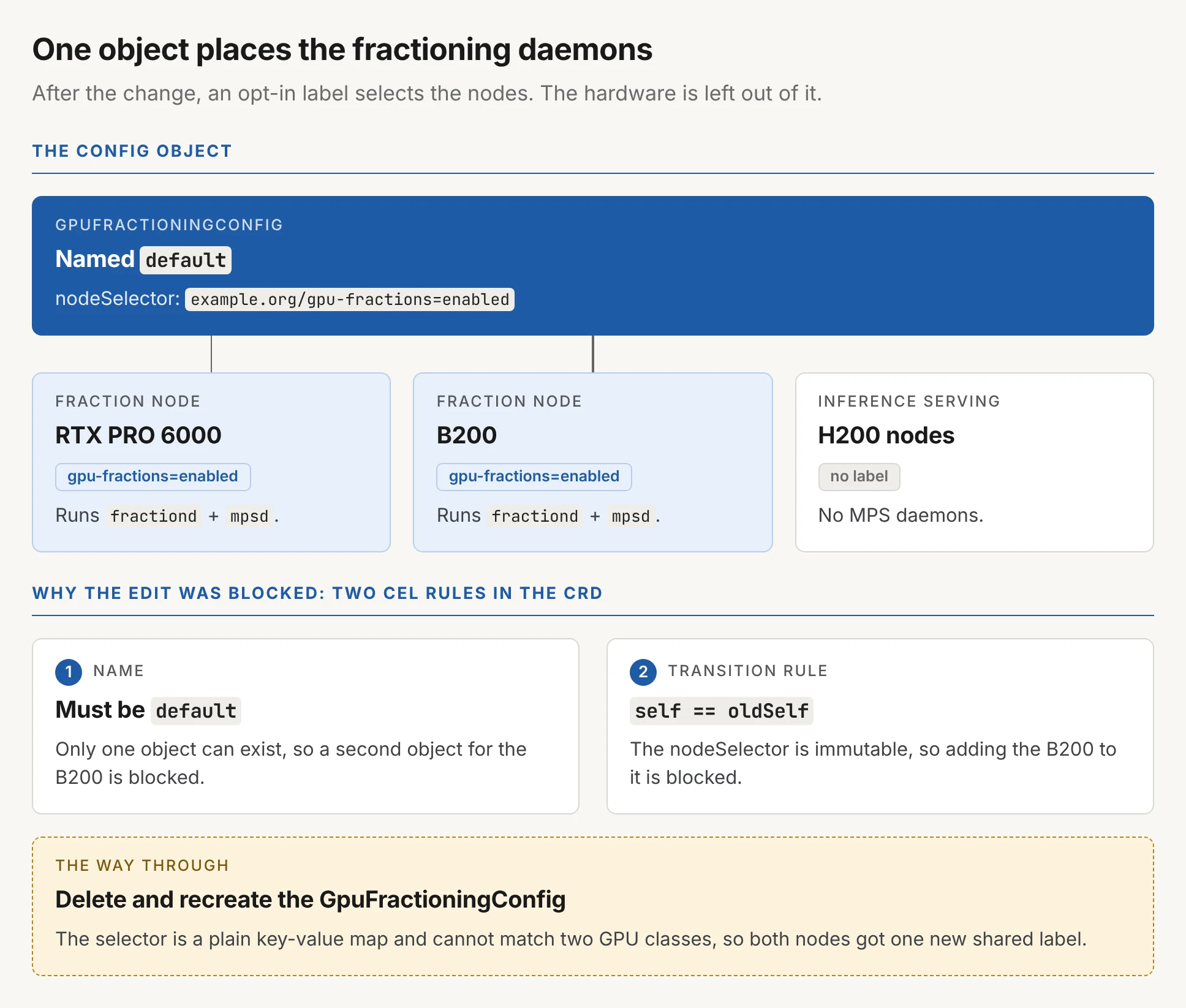
GpuFractioningConfig selects the RTX PRO 6000 and B200 nodes by an opt-in label; the H200 nodes get no MPS daemons. Two CEL rules blocked editing the selector in place.What Argo CD reported
I expected the merge to fail. Once git carried the new selector, the API server should reject it and Argo CD should mark the app SyncFailed. That failure was going to be my cue to run the recreate step.
Argo CD reported "successfully synced" instead. The live object still had the old RTX-only selector. My best guess is that server-side apply did not report the immutable-field rejection as a sync failure. I have not confirmed that.
From the dashboard, the change looked finished. The recreate script showed otherwise. It reads the live spec.nodeSelector and compares it with the selector rendered from git, and it ignores the sync status.
My advice for immutable fields is to check the live value after every sync.
Argo CD can also do the delete for you if you set the Force=true,Replace=true sync options. It will then delete and recreate the object on every sync, and it has no check for workloads that are about to lose their GPU daemon.
Making the delete safe to run, and to run twice
Recreating the object restarts mpsd on every fraction node, including the RTX server that was already serving fractions. Any running fractional pod would lose its CUDA context. Pods using whole GPUs are unaffected. So the recreate step is a script with guards. In order, it:
- stops if any fractional pod exists anywhere in the cluster,
- checks the node labels as described above,
- renders the manifests from git and confirms they contain the new selector,
- deletes the object, asks Argo CD to recreate it, then waits up to ten minutes for every fraction node to report ready and fails with an error if one doesn't.
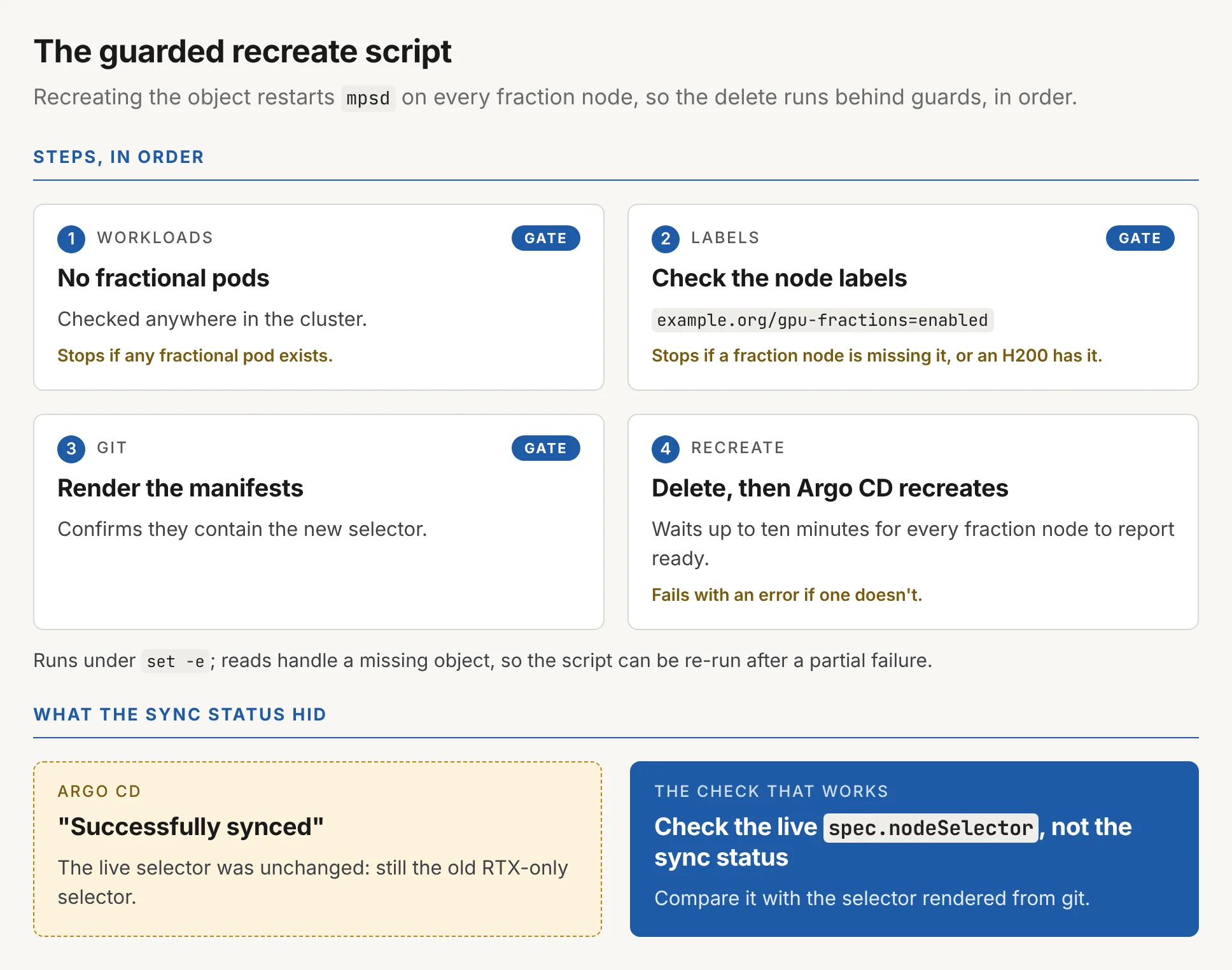
spec.nodeSelector.When I ran it there were no fractional pods, so restarting the daemon on the RTX server affected nobody.
Code review found one more problem. The script runs under set -e. If a first run deleted the object and then timed out, a second run would exit on the read of the missing object. Those reads now handle a missing object, so you can re-run the script after a partial failure.
To prove the limit holds, I used an allocation test. nvidia-smi inside the pod only reports the limit the container was given. A pod on the B200 got a 4,096 MiB limit and allocated memory in steps. It reached 3,328 MiB and ran out of memory on the next step, the same result as on the RTX card. The CUDA context uses the difference, and that memory counts against the limit. Users should know this before they size a fraction to fit their model exactly.
I still do not know why Argo CD reported that sync as clean. If you have seen the same thing, I would like to hear what caused it.