DRaaS Connect gives LOVE to SAN/NAS and HCI with VMware Cloud Integration (...and Instant RTO)
Datrium announces integration with VMware Cloud for Disaster Recovery for customers using SAN, NAS, and HCI.
It's been fun writing about Datrium tech over the past few years as it unfolded as a cloud-first data management stack without leaving behind its on-prem components. Datrium is genuinely the multi-cloud solution that CIOs and Operators always dreamed of - a high-performance platform with integrated data management, backup, and Disaster Recovery policies that follow Apps wherever they go.
Datrium products and services are under very fast development, and there's always plenty to write about; more than I have time to write. If you are a customer under NDA, ask your Datrium rep or SE to show you the roadmap. Let's get to the new announcements. (here is the official press-release)
Today Datrium announced that its own native integration with VMware Cloud on AWS for Disaster Recovery is also available for customers using SAN, NAS, and HCI products from other vendors (think Pure, Nutanix, 3PAR, HDS, NetApp and others).
In my opinion, this is an awesome win-win situation as it gives vendors and customers the ability to provide on-demand, pay-per-use, disaster recovery and orchestration services for VMware workloads using the VMware Cloud.
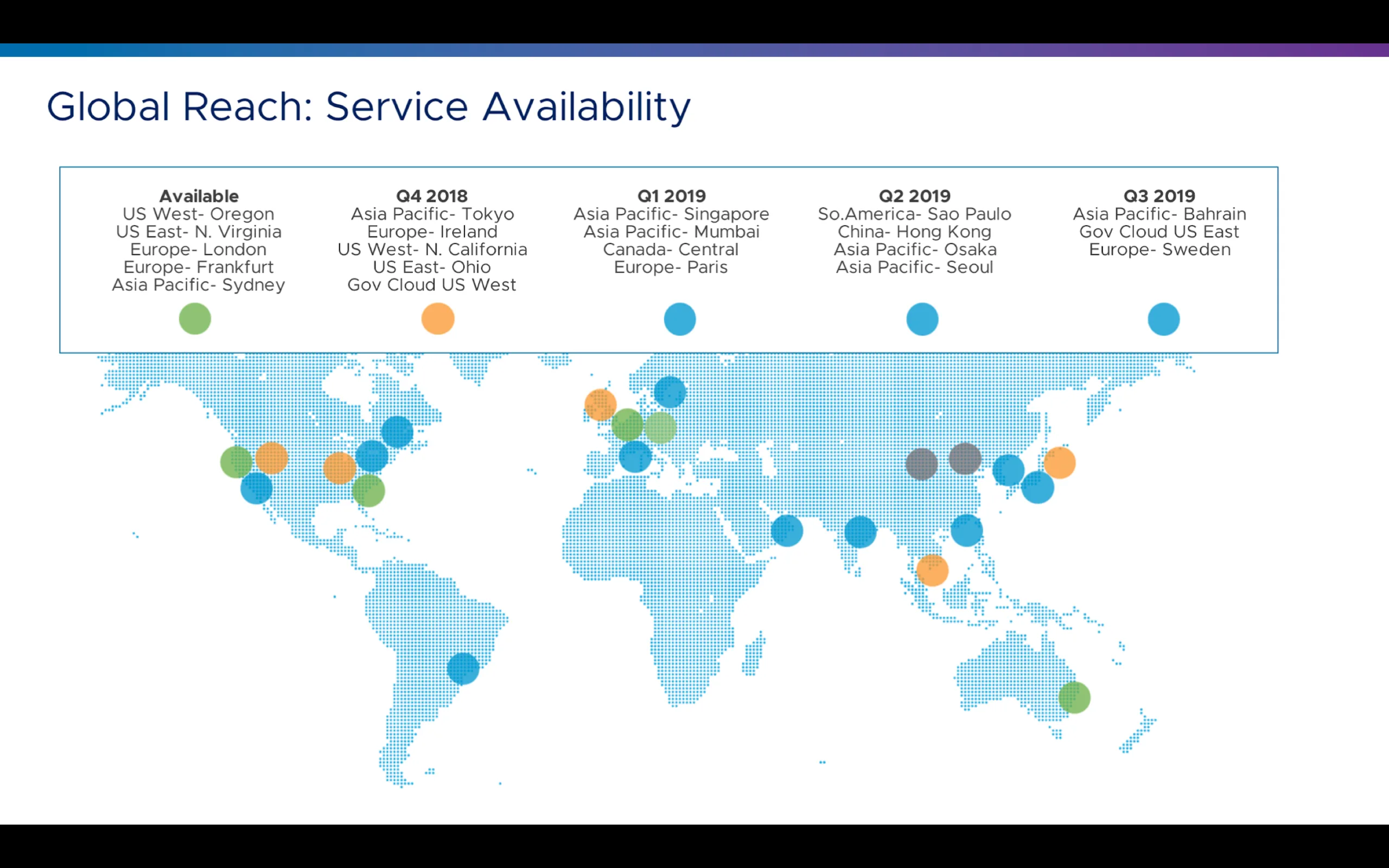
VMware is the de-facto standard for the enterprise datacenter, and AWS has the broadest set of cloud services with a global scale and reach. The VMware Cloud on AWS has a massive global presence and Datrium has been helping many global organizations to leverage VMware Cloud for Disaster Recovery, and in many cases helping organizations to shutdown expensive and idling DR datacenters.
Here are today's announcements:
- DRaaS Connect for VMware workloads on-prem, but not running on Datrium infrastructure
- Instant RTO for recovering VMware workloads on VMware Cloud
- DRaaS Connect for AWS workloads to protect VMware Cloud workloads
What is DRaaS and DRaaS Connect?
DRaaS is a complete DR solution offered as a subscription that leverages the VMware Cloud and native Datrium cloud-based backups to deliver a fully-orchestrated low cost, low RPO, and instant RTO disaster recovery for the VMware ecosystem. Until now, only customers adopting the Datrium DVX on-premises infrastructure could leverage the benefits of DRaaS, but this is now changing with DRaaS Connect, and the functionality will be available for existing storage platforms.
DRaaS Connect, a feature of DRaaS, is downloadable, lightweight software for any vSphere infrastructure that enables customers to protect VMs in just minutes. DRaaS Connect for vSphere On-Prem extends Datrium DRaaS to any vSphere on-premises infrastructure including SANs, NAS, HCI, and DHCI. DRaaS Connect for VMware Cloud on AWS enables DRaaS to orchestrate failover from a VMware Cloud SDDC in one AWS AZ to another AZ.
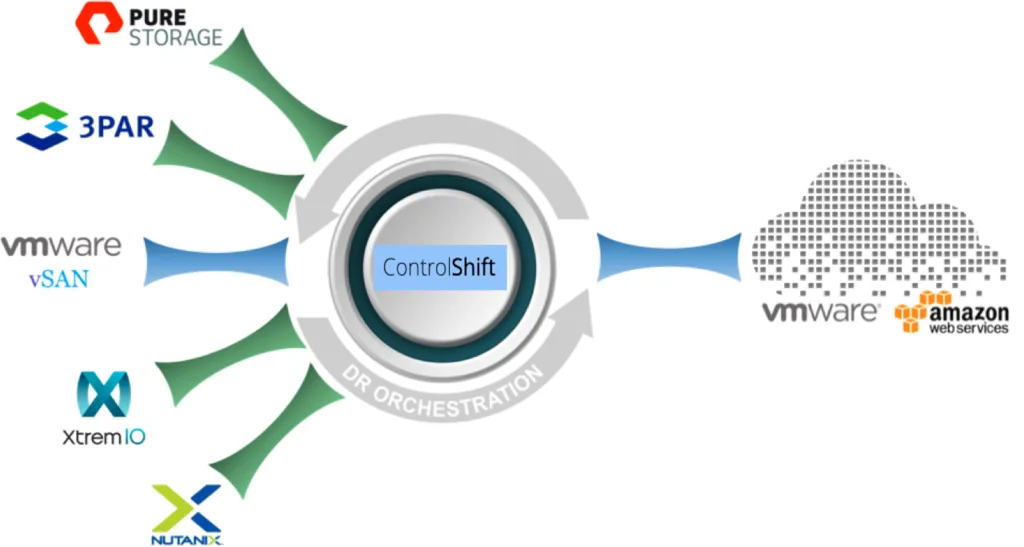
- If you are interested in learning more about DRaaS architecture and deployment modes, read this.
DRaaS Connect + Instant RTO
Let me preface saying that DRaaS Connect with Instant RTO is an industry-first for VMware Cloud. The service combines the RTO of primary storage, DR with the low cost of backups, and Instant recoverability from power fails or ransomware.
I personally like to call it Zero RTO from the data angle, but purists will argue that there's also the time necessary to spin and boot the VMs and Apps before applications are actually ready to be used. So, our marketing team decided to call it Instant RTO to please everyone.
Here is how it works...
1) Datrium DVX on-premise primary storage provides high-performance storage with built-in backup. Individual and granular native VM snapshots can be kept on the system for many years, and the universal dedupe and compression make the whole solution very cost-effective.
(this on-prem component is now optional when the customer only would like to utilize DRaaS with VMware Cloud)
2) Backups are replicated to DRaaS Cloud Vault on AWS. The DRaaS Cloud Vault uses S3 as a repository of backups stored in a native compressed and deduplicated form. On-premises DVX systems send native forever-incremental backups to Cloud Vault, and global deduplication ensures that data is transferred only when needed while the built-in Datrium VPN ensures there are no transfer charges during backup.
(this now be done by the on-prem DVX, or also now by a downloadable proxy VM that utilizes VMware's native VADP capabilities, eliminating the need for a physical Datrium DVX deployment)
3) ControlShift is an orchestration service in DRaaS that executes DR plans, provisions and monitors SDDCs in VMware Cloud on AWS. DR plans and states are stored in a highly-available Plan database replicated across multiple availability zones. Built-in self-healing ensures that, in the event of public cloud unavailability, all affected Datrium services automatically migrate to a healthy availability zone without any data loss.
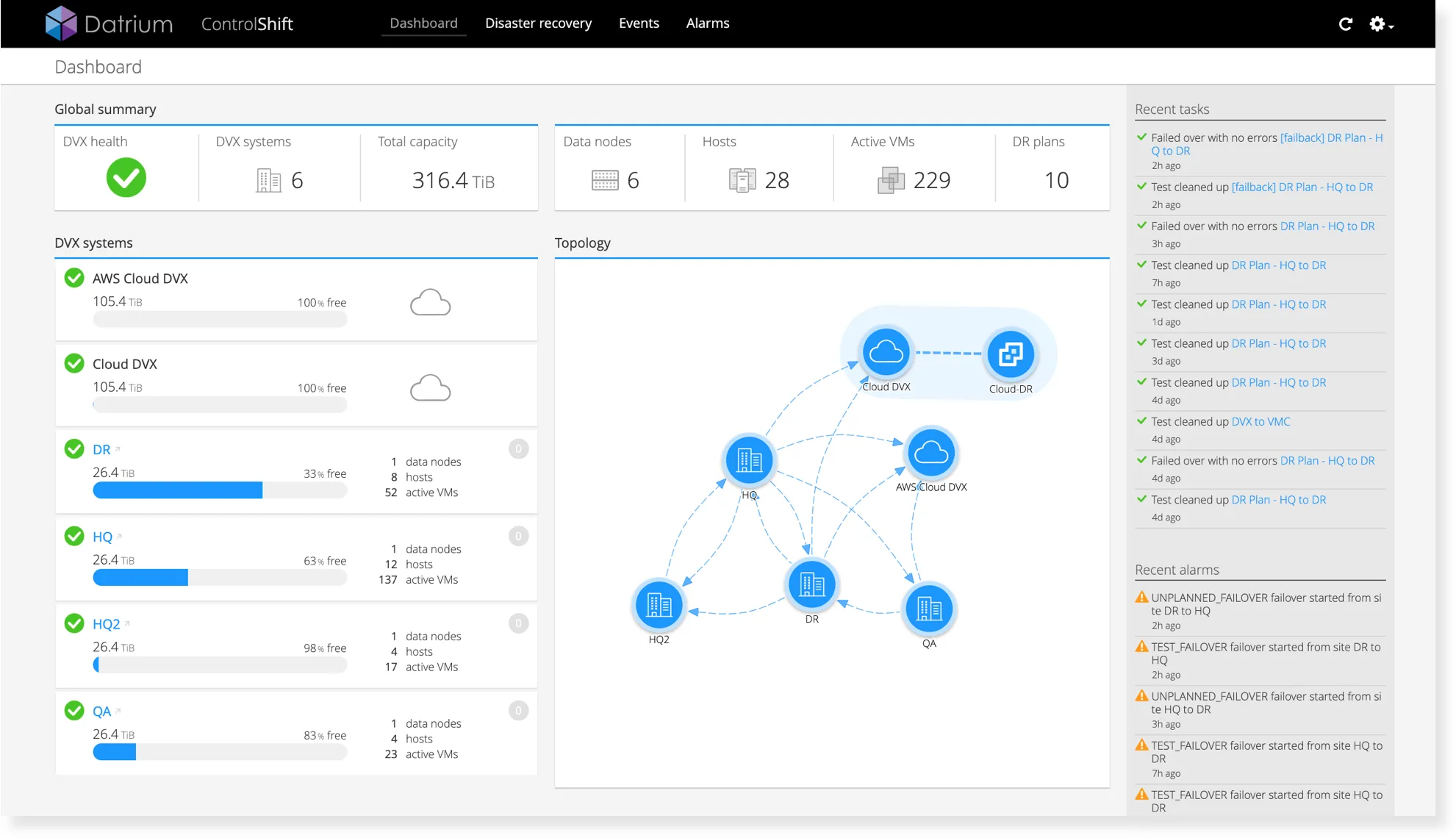
4) VMware Cloud SDDC provides a vSphere-based execution environment for a DR target. An SDDC can be provisioned on-demand, and a provisioned SDDC only incurs hourly charges. DRaaS performs automated network configurations for both AWS and VMware Cloud to make S3 backups from Cloud DVX available for spin-up in SDDC.
(VMs are registered with the VMware Cloud vCenter and start booting instantly from the Cloud DVX NFS target, providing instant RTO for any VMware infrastructure on SAN/NAS/HCI, and then in the background VMs are migrated to the local VMware Cloud SDDC NVMe storage)
5) Data change while in the VMware Cloud SDDC is tracked using VMware VADP, and later, when the DR event is finished and the primary site is back online, DRaaS efficiently failback VMs with minimal AWS egress charges by transferring unique and globally deduplicated data. Similar to failover, failback is fully automated. While in the SDDC Datrium leverages pre-deployment snapshots to establish a baseline “pre-power-on” point-in-time prior to any modifications, and only data changes that occur while executing VMs in the VMware Cloud are captured using VADP and stored as snapshots in AWS S3.
6) DRaaS orchestrates the transfer back to the on-premises datacenter, which includes just the data that changed while in the VMware Cloud. Cloud egress charges are minimized by unique and globally deduplicated delta transfers, which only occur when deltas are not already present in the on-premises data center.
(VMs are registered and restarted on the primary site for both on-prem DVX infrastructure or for the downloadable Proxy VM)
7) Finally, VMware Cloud SSDC is torn down automatically and the replication for new data on-prem is restarted.
DRaaS Connect for AWS workloads
VMware has thousands of customers on VMware Cloud on AWS. Still, existing options for backup and DR are limited today; therefore, Datrium is making the same technology used for protecting data and orchestrating DR for prem-to-prem and prem-to-cloud, also available for cloud-to-cloud. VMware Cloud customers now have an easy and effective way to protect, replicate and orchestrated their cloud workloads between SDDCs.
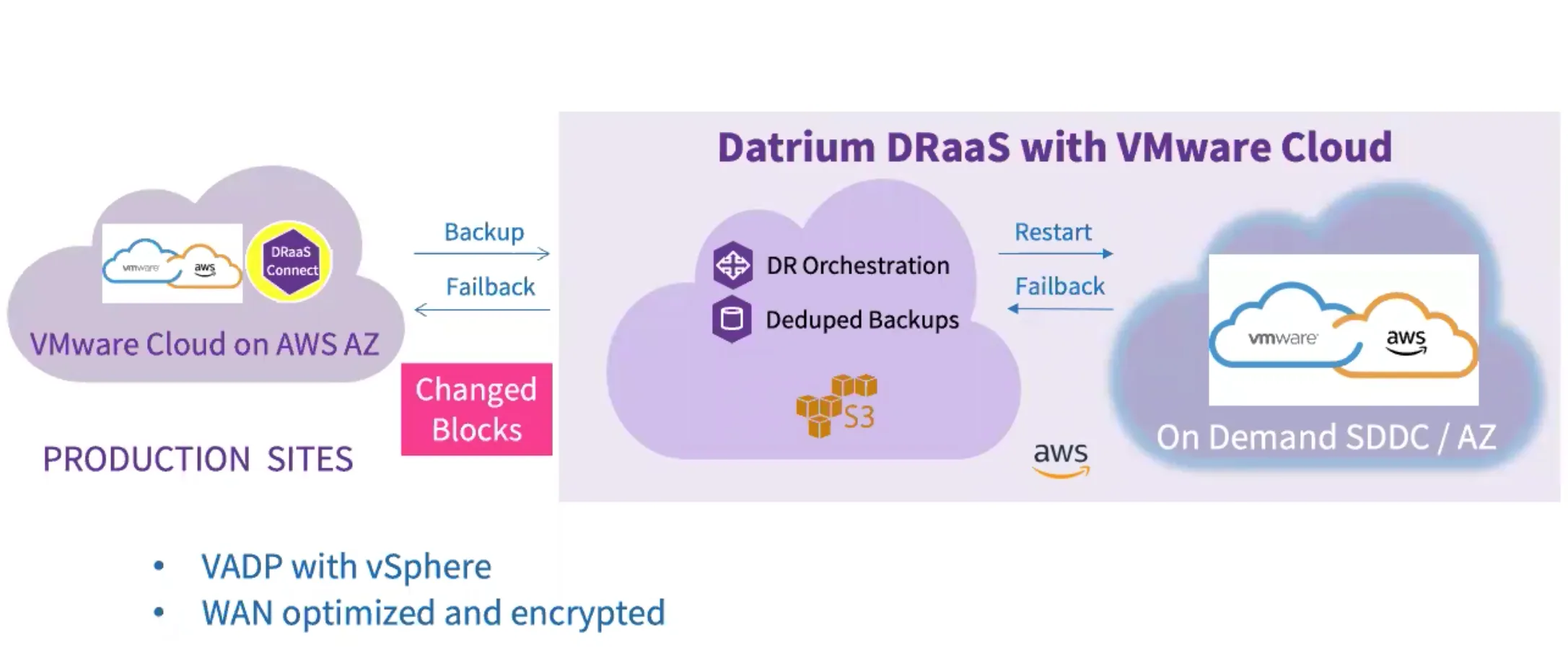
DRaaS Connect for VMware Cloud automatically replicates vSphere snapshots within a VMware Cloud SDDC to the DRaaS backup vault for protection and a later failover from an SDDC in one AWS AZ (Availability Zone) to another AZ. Failover and restores to a new AWS AZ follow the same Instant RTO pattern existing for DRaaS and the data in the backup vault is optimized and encrypted.
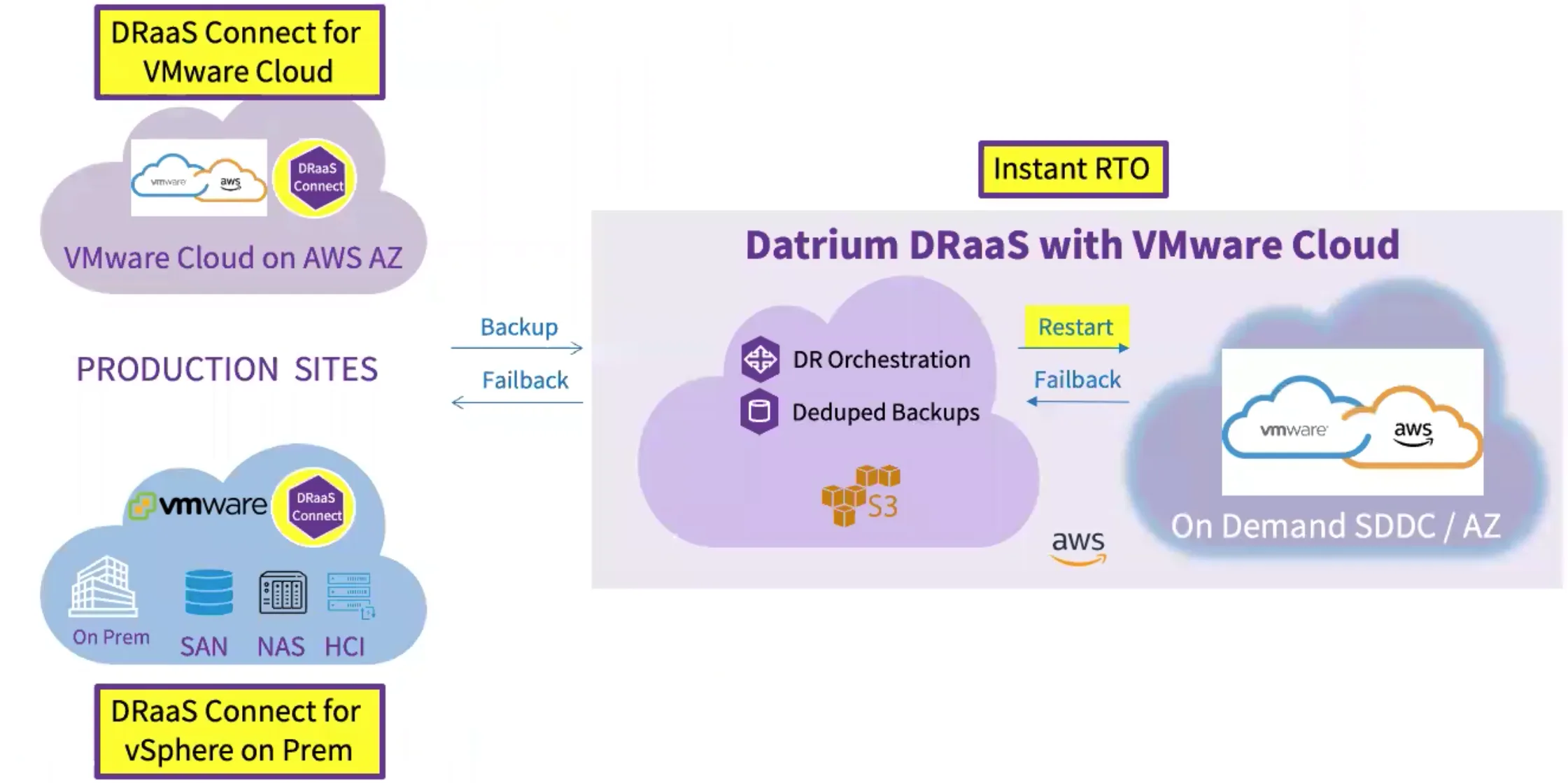
Above we have the whole platform architecture picture with DRaaS (bottom left) supporting on-prem deployments with Datrium DVX and other storage solutions; Instant RTO recovery on Vmware Cloud with the use of DRaaS Vault (right), and DRaaS Connect for VMware Cloud (top left) enabling backup and DR across VMware Cloud SDDCs and AZs.
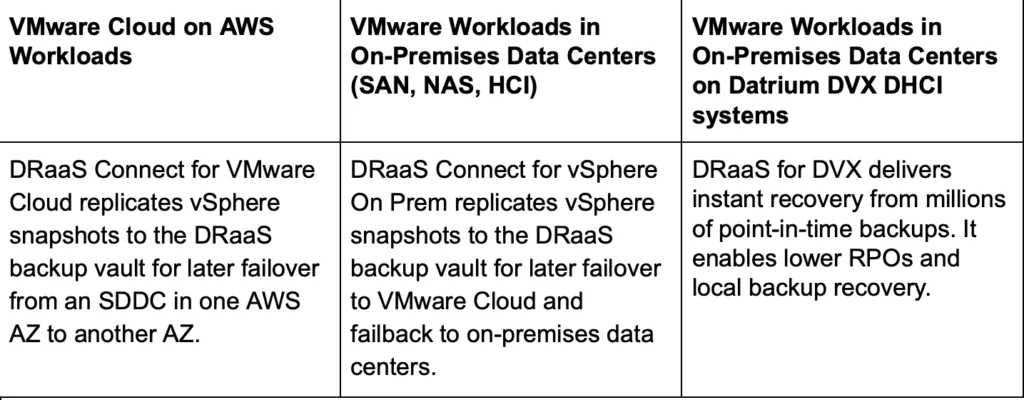
Here is a quick table summary with service modes available for DRaaS and DRaaS Connect.
- If you are interested in learning more about DRaaS Networking and Connectivity options, read this.
[Webinar] Secrets to Recovering from Ransomware and Disasters with VMware Cloud on AWS
As part of this launch, Datrium and VMware are jointly hosting a webinar "Secrets to Recovering from Ransomware and Disasters with VMware Cloud on AWS" on Thursday, November 21st at 9:00 am PT / 12:00pm ET. I highly recommend you to join this session with Jason Crandall (Staff Cloud Solution Engineer for VMware Cloud on AWS) and Sazzala Reddy (Datrium CTO and Co-Founder).
If you want to learn even more, Sazzala Reddy, CTO and co-founder wrote a piece on How Should DR Work in a SaaS World? (here)
Important: If you are interested, check service availability with your Datrium rep as some services are available today while others are yet to be delivered or not available to all Geos.