Datrium 5.0 Features Overview and Big Welcome to Automatrix (Beyond Marketing)
It’s that time again… Datrium is dropping a new release with awesome features! This is one those long posts… be patient, get a coffee and read through, or simply go to the section that you are interested in.
- New Branding
- ControlShift (and Demo!)
- DVX updates
- Cloud DVX updates
- Datanode updates
- The Small Stuff
- Oldies But Goodies
Our announcements are always characterized by tech improvements as an evolution of the current platform and customers get new features by-default. However, we are on a journey to deliver the best converged data platform that delivers breakthrough performance for running any apps with extreme data resiliency and uber-simple data mobility that enables true hybrid cloud. As part of this mission, we unceremoniously deliver:
(1) simplified on-premise infra, collapsing and eliminating enterprise storage silos, and removed day-2 complexity and maintenance requirements;
(2) we enable backup and data protection to be an integrated primary storage feature with cloud storage and long-term archiving integration;
(3) and now, with this release, we are taking the steps to enable applications to seamlessly move and failover between sites and clouds.
Let’s get to the announcements….
New Branding! ...and Welcome Automatrix!
Datrium in growing fast and as our product and vision evolve so does our marketing. We have a new logo, new colors, and a renewed message that goes deep into data mobility. In all honesty, I don’t believe there’s another vendor on the market today that has similar capabilities and easiness for running, moving and protecting applications and data like Datrium.
What is Automatrix?
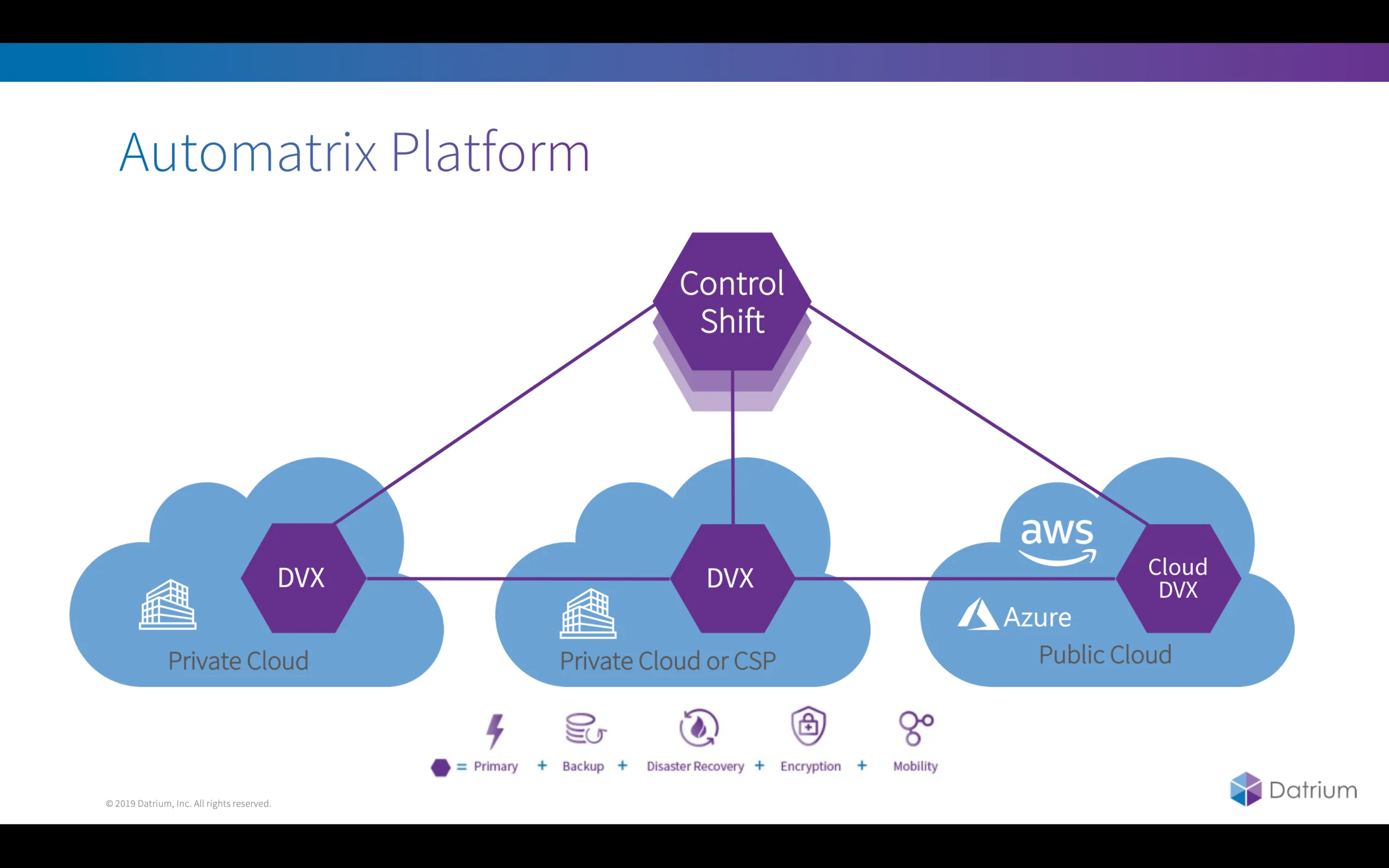
Automatrix is all about simplification (only 1 thing to manage, not 5 things), and portability (one data platform, not 5 products handholding your data). Automatrix is the name for the Datrium platform, including Datrium DVX with all it’s capabilities (primary storage, persistent data layer, de-dupe, compression, encryption, scale-out, replication etc.), the Cloud DVX for long-term archiving and Cloud DR, and ControlShift for automating disaster recovery with full data mobility orchestration.
What’s New!
ControlShift is now Generally Available
(previously known Project CloudShift)
Delivering a real hybrid cloud experience is really hard, and anyone who says that it can be achieved without an integrated data fabric that spans on-prem and public clouds with cost-effective data movement is just fooling themselves; andI don’t say it lightly, because a hybrid cloud is a journey and requires multiple parts of the stack to be perfectly aligned for successful delivery.
On the other hand, Cloud DR holds promise, but the reality is that tech vendors have not been able to deliver solutions that are simple and cost-effective, and there’s too much complexity in the datacenter, making most DR solutions fragile and brittle. Furthermore, inefficient data protection forces a choice between low RPO and low cloud costs.
Solutions like VMware SRM are robust and have evolved to handle complex environments, but the underneath complexity in dealing with multiple infrastructure silos, many copies of data, and data transformations, make DR solutions complicated and with a high management overhead.
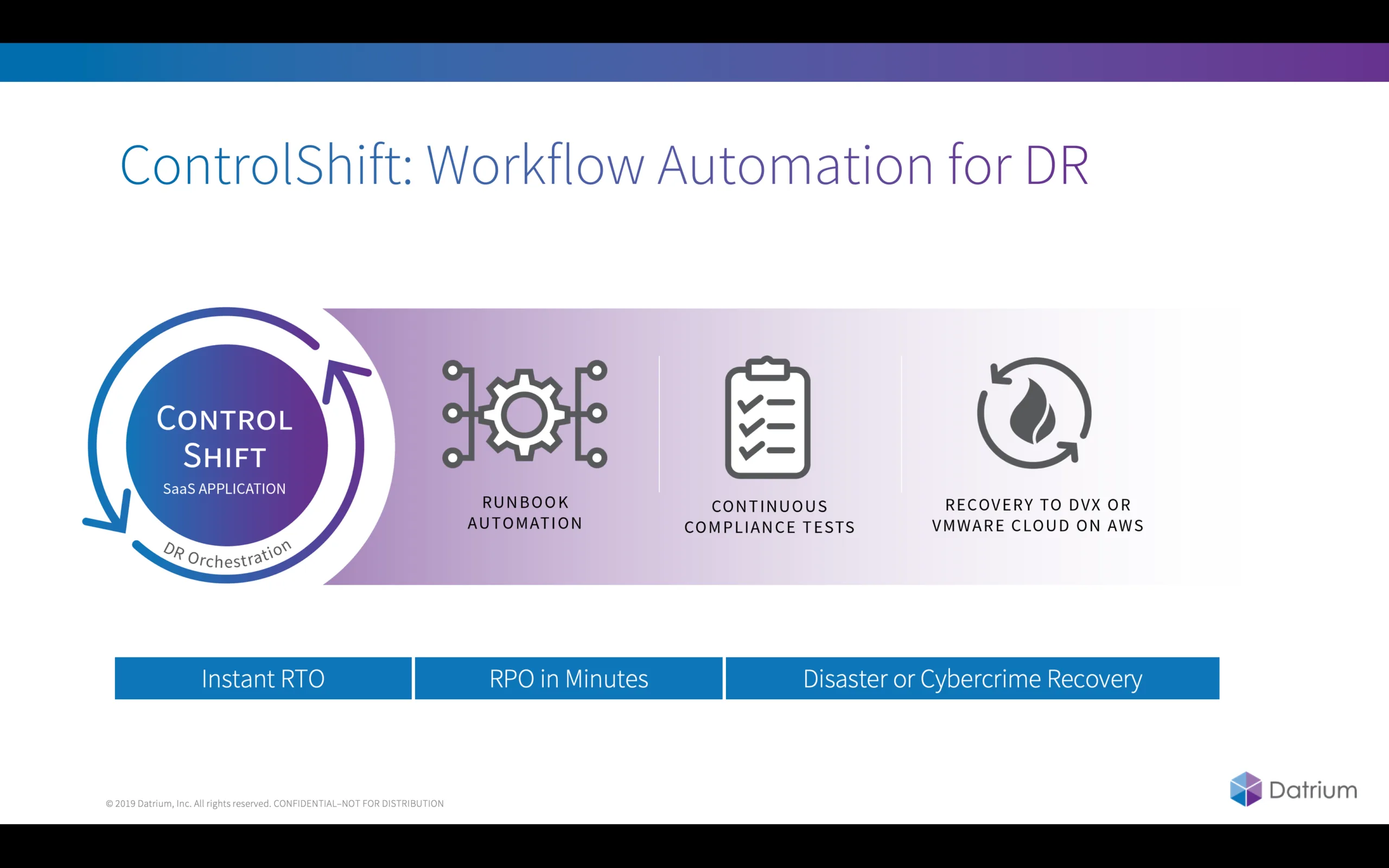
ControlShift is another element of the Datrium platform, offered as a SaaS model, it delivers full run-book orchestration for site-to-site, site-to-cloud, cloud-to-site and cloud-to-cloud. The first release focus on site-to-site with site-to-cloud and cloud-to-site following.
We are enabling customers to move their workloads and apps to VMware Cloud on AWS (VMC) because the vast majority of organisations are happy VMware customers and many of them are looking to leverage VMC in multiple ways. Furthermore, with VMC there are no risky VM conversions, making the DR process simple and integrated.
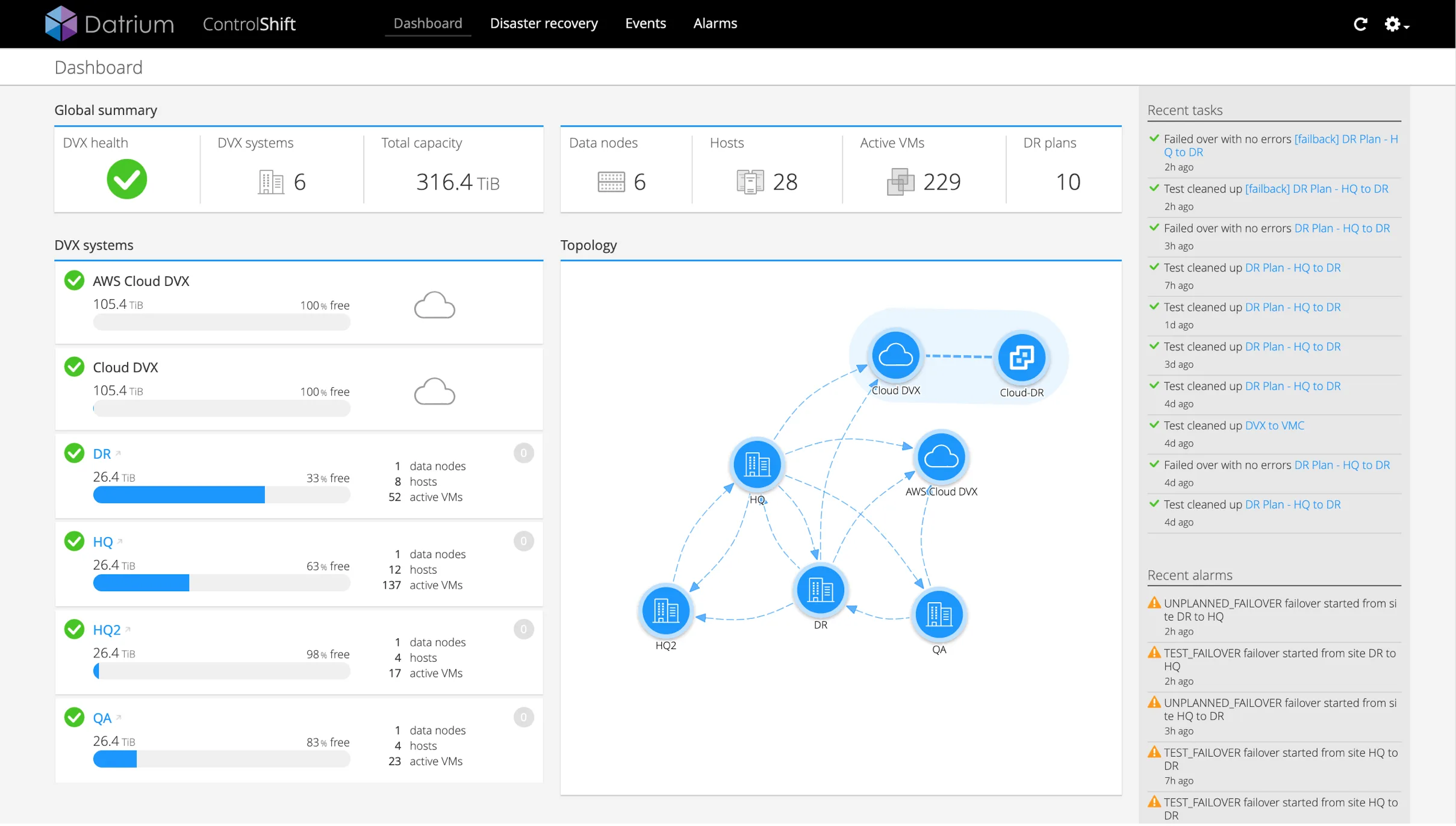
To use ControlShift customers have the option to configure data replication between on-prem sites or (and) CloudDVX, our cloud-based long-term archiving on AWS. With any of the options, the app data across all possible instances are completely de-duplicated, considerably reducing bandwidth requirements.
Continuous Compliance Checks
A key ControlShift proposition is the ability to ensure that Disaster Recovery will always work according to the plan. To that end, the first step is to provide a unified data platform to run and protect applications; the second is to provide end-to-end compliance checks to ensure that all recovery steps are frequently validated, every few minutes. We are adding new compliance checks with every minor release, and here are the initial compliance categories:
- Failover Site Connectivity Compliance
- Source Site Connectivity Compliance
- Destination Datastore Compliance
- Source Datastore Compliance
- Replication Health Compliance
- Vcenter Compliance
- Scheduled Replication Compliance
- Protection Group Compliance
- IP Mapping Compliance
- Workflow Compliance
- Script Server Compliance
- Source Network Compliance
- Source Resource Pool Compliance
- Source Folder Compliance
- Destination Network Compliance
- Destination Resource Pool Compliance
- Destination Folder Compliance
I will write more about ControlShift in upcoming posts, but a good start is to read World’s First Hybrid and Multi-Cloud Data Fabric with Initial support for VMware Cloud – Welcome Datrium CloudShift!
..and for now, enjoy a short ControlShift demo.
DVX
DVX is the on-prem part of the Datrium data fabric, and it provides simplified infra, collapsing and eliminating storage silos, and removing day-2 complexity and maintenance requirements. It provides breakthrough performance (yes, it is faster than pretty much anything on the market today..curious? Read here) and with integrated enterprise-grade data protection.
What’s New!
Microsoft SQL Server and Exchange Native Log Truncation
VSS (Volume Shadow-Copy Service) is a Microsoft Windows service that allows backup and snapshot applications to “quiesce” applications –, i.e., put them on a consistent on-disk state before taking a backup. Application-consistent snapshots are used to ensure on-disk consistency for applications, and they can also help reduce recovery time for database applications. Datrium already has its own VSS Requester and VSS Provider to perform native instant app-consistent snapshots for Microsoft workloads.
Previously DVX would take the full backup of databases and mailboxes every few minutes with VSS, but application logs were not touched, and they would keep growing in size.
Now, with native log truncation during the VSS snapshot, the Datrium guest agent will automatically truncate the application logs. Using the native log truncation DVX is now able to provide 15 minute RPO without relying on log replay by third-party backup tools.
For Microsoft SQL Server, the Datrium guest agent connects to using ODBC and runs a query to truncate the logs.
[Easter Egg] Native Point-In-Time recovery (PITR) with log replay is also coming for DVX, and it will enable organizations to have granular restores, to any point in time since the last snapshot.
Warning! Log truncation should not be used if you plan to keep using 3rd-party backup because they rely on the logs for backup and restores.
Notifications & Compliance Email!
This release introduces the ability to modify compliance and alerting for backup and replication. This can be particularly useful when users with different responsibilities should be segmented for notifications. In this first release the configuration is done via CLI, with UI configuration coming in upcoming releases.
- Turn On/Off
- Selectively notifies emails
- Keyword / Color coded
- Snapshots
- Success Protection Group snaps
- Warning (VSS snaps failed)
- Error (Timed out)
- Replication
- Successful Replication
- Warning (Behind or skipped)
- Error (No link, etc.)
The thumbnail below demonstrates a ‘replication completion’ email sent to PG administrators.
Cloud DVX
Cloud DVX is our SaaS offering responsible for providing long-term archiving for DVX systems across the globe. Cloud DVX provides native deduplication, secure backup and archiving capabilities, collapsing the long-term archiving tier traditionally owned by tape vendors, and enabling extremely cost-effective and remarkable RTO. Cloud DVX is hosted on your AWS account and uses EC2 and S3 for managing and storing data.
Think of Cloud DVX as your enterprise-grade self-managed cloud backup that supports multi-site, multi-system, and multi-object with end-to-end global deduplication and encryption.
If you are not yet familiar with Cloud DVX read Datrium 4.0 – Welcome to The Cloud DVX! BaaS, CloudView and RBA for more information.
What’s New!
- Support for 10 Cloud DVX instances per on-premise DVX system
- Support for 1.15 PB cloud storage from a single DVX system
- DVX can now replicate to Cloud DVXs deployed in multiple AWS regions
- Support for 10 DVX systems replicating to one Cloud DVX instance
- Total number of incoming and outgoing replications for Cloud DVX is 10
- New 115 TB capacity Cloud DVX instance, using larger i3.4xlarge EC2 instance vs i3.xlarge for 30TB.
- Increased snapshot limits for large Cloud DVX instance
- 1 Million VM snapshots across all connected on-premises DVX systems
- Limit stays at 500K VM snapshots for small cloud DVX instance across all connected on-premises DVX
- Replication now stops at 95% full for both small and large Cloud DVX instances
Compatibility & Upgrades!
- Customers using i3.xlarge can upgrade to i3.4xlarge from the DVX UI
- Upgrade option available once Cloud DVX is deployed
- For this release the instance does not auto-upgrade based on capacity used (manual action required)
- Cloud DVX can now be used with ControlShift
- Cloud DVX can be the data source for failover across sites.
- Both 30TB & 115TB instances can be orchestrated to on-prem DVX.
- 115TB Cloud DVX instance can be orchestrated to VMware Cloud on AWS (TechPreview)
Data Nodes
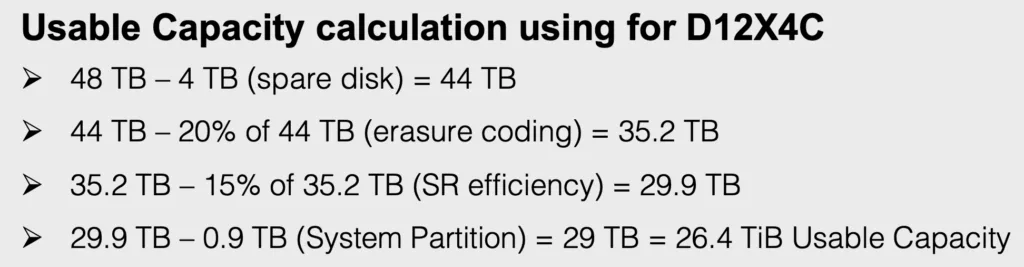
Datanodes form the persistent data tier and are the components that enables the DVX system to scale capacity and performance independently. Datrium employs a disaggregated architecture where compute nodes operate independently from storage nodes. Compute nodes have local flash for inherent data-locality, keeping the data that belongs to that node always local to the node, while datanodes work as a highly resilient JBOD preserving the authoritative fully deduplicated and three-way replicated copy of the data.
New: D12x10, 12-drive 10TB disk
Available early June
Updated: F24x2, 24-drive 2TB flash
New components, but same specs
Below you will find how the three different platforms stack in terms of raw and usable capacity. Datrium always protect data with erasure encoding (three-way replication).


Here are other goodies from the previous release that we did not make a big deal or announcements, but in my opinion are essential from the manageability and administrative point-of-view.
Multi-Datastore for Multi-Tenancy
Support for multiple datastores in a DVX Data Pool. A single Data Pool can contain up to 32 datastores and a single host in the DVX System can mount up to of 8 datastores.
This feature is particularly fantastic to segregate and create multi-tenancy between data and compute nodes access. It is particularly awesome for Service Providers that host multiple customers with Datrium.
Guest File Restore (GFR)
The DVX system now supports the retrieval of a single file from the context of a virtual machine operating system environment on the local site or on a remote site, either on-premise or with Cloud DVX.
Today organizations rely on numerous vendors to allow users to perform Single File Restore, as opposed to restoring the whole virtual disk (VMDK). Datrium GFR works in tandem with Cloud DVX, enabling guest objects, such as Microsoft Word documents, to be seamlessly retrieved from any Datrium storage tier.
More importantly, it gives power to users to execute their own restores.
VMware SRA
Datrium now provides a Storage Replication Adapter (SRA) for integration with vCenter Site Recovery Manager (SRM). If you are a customer, just head to the support sit and download it.
Host SSD/NVMe Capacity Increase
Each host can now support up to 32TB raw capacity or 10 devices for the total amount of flash across per compute node. This is particularly good for big datasets to remain in host cache at all times. With 4x dedupe and compress up to 128 TB of effective capacity is now supported.
Replication Throttling by DVX site
DVX now divides the replication bandwidth to produce individual bandwidth settings for each incoming. For example, if you previously established two remote sites to produce incoming traffic with a throttle bandwidth setting of 100 Mbps, the new release will divide the throttle bandwidth setting equally between the two sites such that each would get a throttle setting of 50 Mbps.
Protection Groups Limits
DVX now supports up to 50 protection groups. The limit of 2000 snaps per VM and 1.2 Million spaps per DVX remain the same.