How to configure GPUDirect Storage for performance, starting with cufile.json
GPUDirect Storage (GDS) matters when GPUs pull large amounts of data from shared storage: model weights at start-up, or a KV cache offloaded to storage and read back during inference. GDS lets the network card write that data straight into GPU memory. The usual route, which I call the host path, reads into host memory first and then copies to the GPU. Over three posts I’ve measured whether skipping that copy pays off on an NFS-over-RDMA mount. The first and second posts found GDS behind the host path at low thread counts. The cause turned out to be one setting.
In the last post, a newer cuFile library closed most of that gap. An engineer on NVIDIA’s GDS team read it and asked two questions: what does gdscheck -p print, and is there an /etc/cufile.json?
There was no cufile.json in the container. Without one, cuFile 1.15.1.6 caps each request at 1 MiB, so every 16 MiB request went to storage in sixteen pieces. I set that one value to 16 MiB, and GDS matched the host path from a single thread up. The library, mount and GPU were the same as before.
Last time I put the gap down to thread count and the library version. That was wrong. I also wrote that max_direct_io_size_kb made no difference, but that test never tried 16384.
This isn’t only a benchmark problem. Any application on that cuFile version without a config file gets the same 1 MiB cap.
Across three posts, GDS closed the gap to the host path
GDS throughput as a share of the host path measured in the same run, at 8 threads with 16 MiB requests. 100% is parity. I show shares rather than GiB/s because the GPU, test tool, day and storage address changed between posts.
max_direct_io_size_kb 16384What one setting changed
I changed only max_direct_io_size_kb, from 1024 to 16384, and ran NVIDIA’s gdsio at 1 to 8 threads. The host path ran in the same session for comparison. That is gdsio -x 2: storage into host memory, then a copy to the GPU.
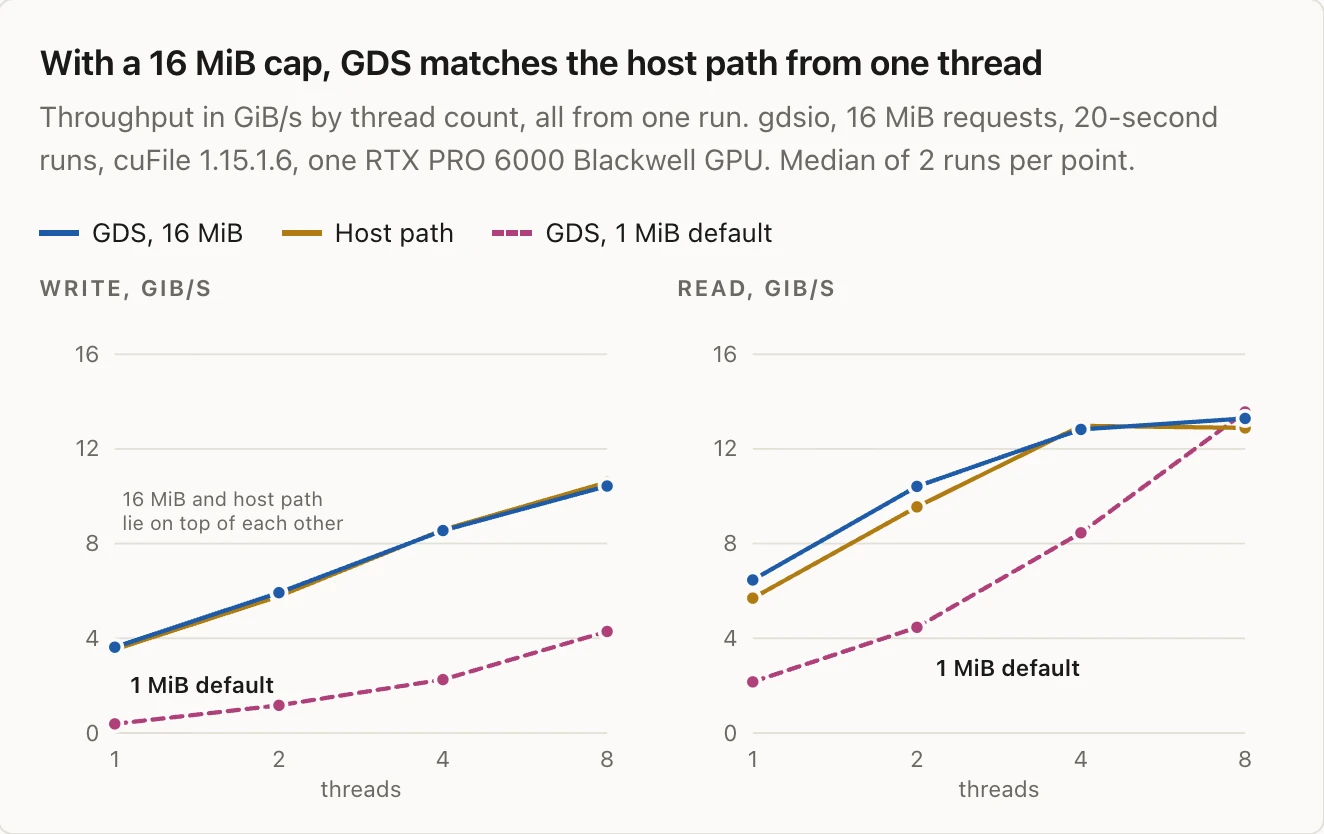
With a 16 MiB cap, GDS matches the host path from one thread
Throughput in GiB/s by thread count, all from one run. gdsio, 16 MiB requests, 20-second runs, cuFile 1.15.1.6, one RTX PRO 6000 Blackwell GPU. Median of 2 runs per point.
Write, GiB/s
Read, GiB/s
Show the numbers
| Threads | Write, GiB/s | Read, GiB/s | ||||
|---|---|---|---|---|---|---|
| 1 MiB default | 16 MiB | Host path | 1 MiB default | 16 MiB | Host path | |
| 1 | 0.4 | 3.6 | 3.5 | 2.2 | 6.5 | 5.7 |
| 2 | 1.2 | 5.9 | 5.8 | 4.5 | 10.4 | 9.6 |
| 4 | 2.3 | 8.6 | 8.6 | 8.5 | 12.8 | 13.0 |
| 8 | 4.3 | 10.4 | 10.6 | 13.6 | 13.3 | 12.9 |
At one thread, GDS reads went from 2.2 to 6.5 GiB/s, and writes from 0.4 to 3.6 GiB/s. With 16384, GDS writes stayed within 3% of the host path at every thread count. Reads were level with the host path within run-to-run noise, which reached ±20% at one thread.
With the default, GDS writes were less than half the host path, even at 8 threads. Reads only caught up at 8 threads, where all three lines reach about 13 GiB/s.
In a separate run at 8 threads, cuFile 1.15.1.6 with 16384 was as fast as 1.20 at its defaults. Setting 1.20 back to 1 MiB lost most of its lead, and turning parallel_io on in 1.15.1.6 cost 10 to 17%.
Here is why I think the size matters so much. It fits the data, but NVIDIA hasn’t confirmed it. The mount uses a 1 MiB read and write size. When the host path reads 16 MiB with O_DIRECT, the kernel’s NFS client splits it into sixteen 1 MiB requests and sends them all at once. cuFile with a 1 MiB cap gives the kernel one 1 MiB request at a time per thread, so there is nothing to split. With a 16 MiB cap, cuFile passes the whole request down and the kernel splits it the same way.
Before you start: the platform
The post on NVLink, RDMA rails and GPUDirect Storage explains the GDS stack layer by layer. In short, you need:
- The open GPU driver and
nvidia-fs. In Kubernetes, setgds.enabledin the GPU Operator. NVIDIA’s GDS team says the operator, with CDI handing/dev/nvidia-fs*to pods, is the supported way to do this. - An NFS client with the
nvidia-fshook. The in-kernelrpcrdmamodule doesn’t have it. Use the NFS-over-RDMA package from OFED or DOCA, or your storage vendor’s client. NVIDIA’s documentation lists MLNX_OFED or DOCA as a requirement for GDS over RDMA. This setup ran on the in-kernelmlx5driver without either, and the GDS team told me that is supported.gds-diagflags it as a failure today, and NVIDIA plans to fix that in the tool. - IOMMU off or in passthrough mode. In translated mode,
nvidia-fsrejects every transfer. The documentation recommendsiommu=offfor the best results and supportsiommu=pton some platforms. This setup usediommu=pt. The GDS team says translated mode will work from driver 630. - PCIe ACS off. The documentation says to disable PCIe ACS at boot for the best GDS performance, with the
pci=disable_acs_redirkernel parameter.gdscheck -preports “Found ACS enabled for switch” when it is on. - The NIC close to the GPU. The documentation recommends putting the NIC on the same PCIe switch as the GPU.
nvidia-smi topo -mshows the path between them. In these tests the GPU and NIC sat on different root complexes (SYS), and GDS still kept pace with the host path at these rates. - Storage traffic in the lossless class. NFS over RDMA doesn’t pick up your RDMA QoS marking on its own. Set the RDMA connection manager’s default ToS so it lands in the PFC class.
Step 1: check what cuFile is using
Run gdscheck -p inside the container that does the I/O, not on the host. The container doesn’t see the host’s /etc/cufile.json. You’ll find gdscheck in NVIDIA’s gds-tools package, under /usr/local/cuda-<version>/gds/tools/.
Look at the GDS release version, the NFS line (it should say Supported) and these four values:
 properties.max_direct_io_size_kb : 1024
 execution.parallel_io : false
 execution.max_io_threads : 0
 execution.max_request_parallelism : 0
The same output also shows the compatibility setting (as properties.use_compat_mode), the IOMMU state and any PCIe switch with ACS on.
The four values above are what cuFile 1.15.1.6 printed with no config file. cuFile 1.20.0.107 printed 16384, true, 8 and 4. If max_direct_io_size_kb says 1024, every large request goes to storage in 1 MiB pieces.
Hosts and containers usually get different answers, because the Python wheel that puts cuFile in most containers installs no config file:
Where cuFile gets its settings
cuFile reads its settings once, when the application starts. Pick a setup to see which file it finds and which values it uses.
From the application down
The library the application calls instead of normal reads and writes. This is where the request size is set.
nvidia-fs kernel moduleFrom the GPU Operator with
gds.enabled.nvidia-fs hookSplits each request into RPCs of the mount’s read and write size.
proto=rdma1 MiB read and write size,
nconnect connections.Where cuFile looks, in order
CUFILE_ENV_PATH_JSONnot set/etc/cufile.json✓ usedA link thelibcufilepackage creates to its template under/usr/local/cuda-<version>/gds/.- Built-in defaults
cuFile ends up with
max_direct_io_size_kb 16384 ✓ full 16 MiB requests
parallel_io true ! set false on 1.18.0 or older
CUFILE_ENV_PATH_JSON✓ usedPoints at/etc/cufile/cufile.json, mounted from a ConfigMap./etc/cufile.jsonnot read- Built-in defaults
cuFile ends up with
max_direct_io_size_kb 16384 ✓ full 16 MiB requests
parallel_io false ✓ set to match the cuFile in the image
/etc/cufile.json. Run gdscheck -p where the application runs.Step 2: write a cufile.json for your version
| cuFile version | max_direct_io_size_kb | parallel_io |
|---|---|---|
| 1.18.1 or newer (CUDA 13.3 Update 1 on) | Default. Confirm 16384 in gdscheck | Default (on) |
| 1.18.0 or older | 16384 | false |
NVIDIA’s GDS team recommends cuFile 1.18.1 or later with the default settings. On 1.18.0 and older, they advise turning parallel_io off, because those versions can slow down on distributed filesystems with it on. In 1.18.0.66 (CUDA 13.3) this is the issue fixed in 13.3 Update 1.
Check gdscheck on every version, including new ones. NVIDIA’s release notes say to set max_direct_io_size_kb to 16384 to keep a 16 MiB maximum. In 1.20, the bounce-buffer slab settings can also set the value for you.
On a host, NVIDIA’s libcufile package links /etc/cufile.json to a template that sets 16384 and turns parallel_io on. That’s right for 1.18.1 and later. On a host with an older library, change parallel_io to false.
One caution for 1.18.0 and older: the documentation says the cuFile stream API (cuFileReadAsync and cuFileWriteAsync) is not supported with parallel_io off. If your application uses it, test that combination before production.
A minimal production file for cuFile 1.15 looks like this:
{
  "properties": {
    "max_direct_io_size_kb": 16384,
    "allow_compat_mode": true
  },
  "execution": { "parallel_io": false }
}
Leave allow_compat_mode on in production. If a direct transfer fails, cuFile falls back to normal I/O through host memory and the application keeps running. Turn it off only for acceptance tests (Step 4).
For mostly single-threaded workloads on 1.18.1 and later, the GDS team suggests raising execution.max_io_threads. I haven’t tested it.
Step 3: ship the config with the application
cuFile reads /etc/cufile.json, or whatever file the CUFILE_ENV_PATH_JSON environment variable points to. In Kubernetes, put the file in a ConfigMap, mount it into the pod and point the variable at it. The generator below writes both.
Match the file to the cuFile version in the image, and check it again whenever the image moves to a new CUDA version. cuFile only reads the file when the process starts, so restart the application after you change it.
Build the config for your setup
Choose your cuFile version, where the application runs and what the config is for. The files below update as you choose.
Step 4: verify
- Run
gdscheck -pagain in the same pod and confirm the new values. - On the host, set
/sys/module/nvidia_fs/parameters/rw_stats_enabledto 1. It resets whennvidia_fsreloads. - Run a short transfer and watch the read and write counters in
/proc/driver/nvidia-fs/stats. If they don’t move, the I/O didn’t go through GDS. - For acceptance testing, do one run with
allow_compat_modeset to false. A failed direct transfer then shows up as an error instead of quietly falling back. - If the counters don’t move, read
cufile.logand checkdmesgfornvidia-fserrors. cuFile writes the log to the application’s working directory, at level ERROR unless you raiselogging.level.
Step 5: the mount and the network
- Mount options. Use NFSv3 with
proto=rdma,port=20049, plusnconnectfor more connections per mount. The GDS team recommends 16. On one storage address, 16 made no measurable difference against 8 in my tests, for GDS or the host path. A second mount to the same address on a node reuses the first mount’s connections and ignores its ownnconnect, so count thexprt:lines for the mount in/proc/self/mountstatsto see what you really got. - Each storage address has its own limit. I tested two addresses on the same storage, on the same day. One read at up to about 19 GiB/s and wrote about 13.5. The other levelled off at 13.5 to 14.5 GiB/s for reads and about 11 for writes. GDS and the host path were within about 5% of each other throughout. All four addresses together read at 34 to 40 GiB/s over two days, from one GPU and one 400 Gb ConnectX-7, and writes stopped at about 17.5 GiB/s. Measure each address on your own storage.
- Spread the load. To get close to line rate, spread I/O across storage addresses, for example with your vendor client’s multipath options. The GDS team says about 42 GiB/s on one ConnectX-7 is possible with enough threads, large I/O and a fast enough storage backend.
- NIC selection. The GDS team recommends turning on cuFile’s dynamic routing, so cuFile picks the best NICs for each GPU. NVIDIA’s documentation describes it for systems where the GPU and NIC don’t share a PCIe root port.
rdma_dev_addr_listonly matters when dynamic routing is on. I haven’t tested either.
Step 6: the application
- It has to read through cuFile. An application that reads into host memory never uses GDS. A cache that writes to storage from a copy it keeps in host memory is a common example.
- Know which cuFile it ships. Most applications get cuFile from their framework. Run
pip show nvidia-cufilein the image to see the version and what requires it. In the vLLM 0.31.0 image, the PyTorch build for CUDA 13.0 pins the CUDA 13.0.3 wheels, and those pin cuFile 1.15.1.6. The GDS team says a newer cuFile on an older CUDA runtime should work, but they don’t test that combination. - Keep requests large and keep several in flight. A 16 MiB cap only helps if the application asks for large reads and writes. More requests in flight help on every version. For large requests, call
cuFileReadandcuFileWritefrom several threads. NVIDIA’s documentation aims the batch API at small I/O, under 64 KB. - Keep I/O 4 KiB aligned. The documentation counts an I/O as unaligned if the file offset, the size or the GPU buffer address isn’t a multiple of 4 KiB. Unaligned I/O is slower, and registering the buffer doesn’t help.
- Register buffers once. The GDS team notes that pinning GPU memory costs time in
cuFileBufRegister, not on each I/O. Register buffers once and reuse them. CallcuFileBufDeregisterbefore freeing the GPU memory, because NVIDIA lists a knownnvidia-fsdeadlock otherwise. cuFile also doesn’t support applications that callfork().
How to benchmark it fairly
- Start with
gdsiobefore writing your own test. Run-x 0(GDS) and-x 2(through host memory to the GPU) side by side, and add-x 1(host memory only) as a storage baseline. - Run each phase for 10 seconds or longer.
- Sweep threads from 1 to at least 32, and request sizes from 1 to 16 MiB.
- Compare settings within one session. On this mount, the absolute numbers changed from day to day and between storage addresses.
What this doesn’t show
- The results come from
gdsio, not from an application. I haven’t measured whether the setting changes an inference engine’s throughput. - 16 MiB suits this NFS-over-RDMA mount. Other filesystems may need a different size.
- One GPU, one mount, one storage address for the
cufile.jsontests. The dynamic routing andmax_io_threadsadvice comes from NVIDIA, and I haven’t tested it.
Tested with: one RTX PRO 6000 Blackwell GPU in a Kubernetes pod, the open GPU driver 615 and nvidia-fs 2.29.4 through the GPU Operator, the in-kernel mlx5 driver without OFED, the storage vendor’s NFS client with the nvidia-fs hook, NFSv3 over RDMA with nconnect=8 and a 1 MiB read and write size, and a 400 GbE RoCE v2 ConnectX-7.
Thanks to NVIDIA’s GDS team for reading the last post closely, asking the two questions that found the cause, and answering my follow-ups in writing.