Changing Port on PCoIP Gateway
For multiple different reasons organizations may want to change the Default ports used by VMware View. I have previously explained how to modify VMWare View default HTTP/HTTPS ports using the locked.properties file in my article Modifying VMware View Network Ports.
The HTTP/HTTPS listener is part of the sslgateway component, which also supports SSL tunneling. To configure the listening port, create or edit the file %programfiles%\vmware\vmware view\server\sslgateway\conf\locked.properties
It is possible to change the PCoIP TCP/UDP listening ports, though not using the locked.properties file. You will need to edit the Connection or Security Server Windows registry instead.
Browse to key HKEY_LOCAL_MACHINE\SOFTWARE\Teradici\SecurityGateway and set one or both of the following REG_SZ values:
- ExternalTCPPort (the SSL connection, default: 4172)
- ExternalUDPPort (the IPSec connection, default: 4172)
Now restart the PCoIP Secure Gateway service.
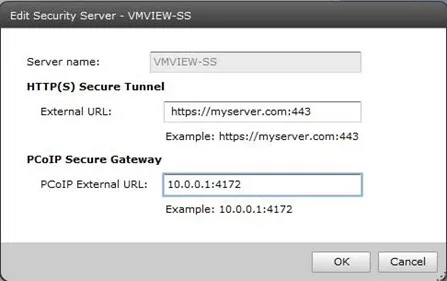
If you are planning to make use if non-default ports for PCoIP without network address translation (NAT) you will also be required to modify the PCoIP External URL for the security server to match.
2 comments from the original blog
Matt Leib
More great and completely useful information Andre. Always appreciated.
Matt
Andre Leibovici
@Matt Leib
Thank you for the feedback and Welcome.
Andre
Comments are preserved from the original site and are closed.